---
title: "Angular 6 Release: What’s New?"
description: "Fresh out the oven is Angular 6. It brings some new features and enhancement to one of the most popular JavaScript frameworks for crafting mobile, desktop and web applications. Learn what's new in Angular!"
authors:
- name: "Prosper Otemuyiwa"
url: "https://auth0.com/blog/authors/prosper-otemuyiwa/"
date: "May 7, 2018"
category: "Developers,Whats New,Angular"
tags: ["angular", "angular6", "javascript", "frontend", "authentication"]
url: "https://auth0.com/blog/whats-new-in-angular6/"
---
# Angular 6 Release: What’s New?
---
**TL;DR:** In this article, I'll cover the new features in Angular 6 and several other changes and deprecations.
---
Angular is a very popular framework that is actively [maintained by Google](https://developers.google.com/experts/all/technology/angular). Its popularity and wide adoption have been driven by how it keeps evolving and getting better by the day. Angular powers a lot of web platforms such as _Google Adwords_, _Google Fiber_, _Adsense_, and _Winc_.
The previous major Angular version was Angular 5. We covered the [major features and bug fixes that shipped with Angular 5 before](https://auth0.com/blog/whats-new-in-angular5/). Now, we are going to cover the latest major release, Angular 6, which focuses on making Angular smaller and faster to use.
Let's go through the major changes in Angular 6.
## 1. Improved Service Worker Support
Angular 6 now supports the configuration of navigation URLs in Service Workers. The service worker will redirect navigation requests that don't match any `asset` or `data` group to the specified index file.
By default, a navigation request can have any URL except for those containing `__` and URLs containing a file extension (i.e a `.`) in the last path segment. Sometimes it is great to be able to configure different rules for the URLs of navigation requests (e.g. ignore specific URLs and pass them through to the server).
Now, you can specify an optional `navigationUrls` list in `ngsw-config.json`. which contains URLs or simple globs. Only requests whose URLs match any of the positive URLs/patterns and
none of the negative ones (i.e. URLs/patterns starting with `!`) will be
considered navigation requests and handled the right way by the service worker.
Before now, the service worker would enter a degrade mode where only existing clients would be served if either the client or server was offline while trying to fetch `ngsw.json`. In Angular 6, the service worker remains in the current mode until connectivity to the server is restored.
Furthermore, a helper script, `safety-worker.js`, has been added to the service worker package to enable easy deactivation of an existing service worker in production.
_packages/service-worker/safety-worker.js_
```js
self.addEventListener('install', event => { self.skipWaiting(); });
self.addEventListener('activate', event => {
event.waitUntil(self.clients.claim());
self.registration.unregister().then(
() => { console.log('NGSW Safety Worker - unregistered old service worker'); });
});
```
## 2. Goodbye Template Element
The `` element was deprecated long ago, precisely in Angular 4. It has been removed completely in Angular 6.
The `` element should be used instead.
**Before:**
``` html
some template content
```
**Now:**
``` html
some template content
```
## 3. Better URL Serialization
Before now, there were issues around routes and URL serialization such as this below:
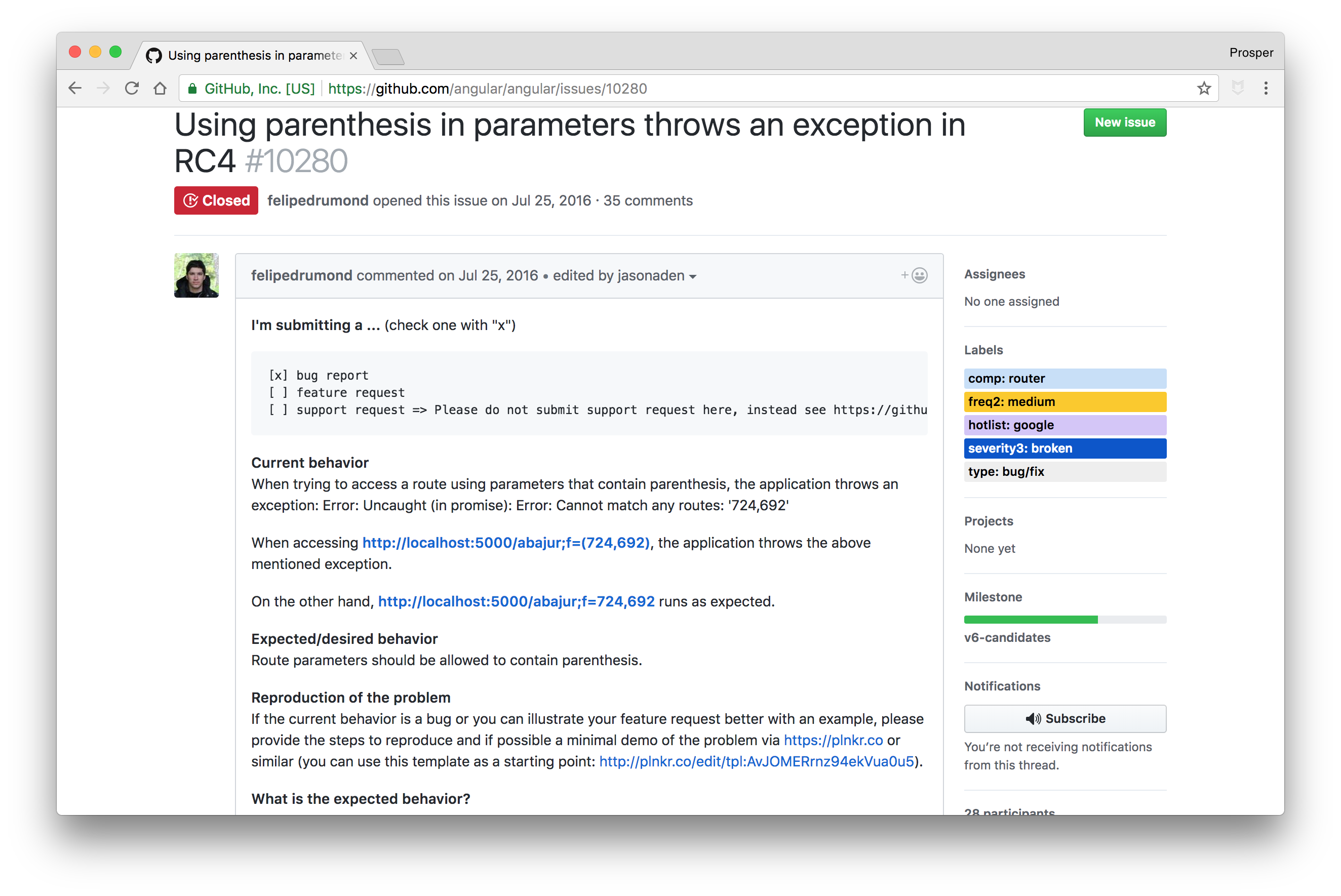
_What's new in Angular 6 - URL Serialization_
In Angular 6, issues like the one above have been fixed and:
* URI fragments will now serialize the same as query strings.
* In the URL path, (portion prior to the query string and/or fragment), the plus sign (`+`) and ampersand (`&`) will appear decoded.
* In the URL path, parentheses values (`(` and `)`) will now appear percent-encoded as `%28` and `%29` respectively.
* In the URL path, semicolons will be encoded in their percent encoding `%3B`.
It's also important to know that parentheses and semicolons denoting auxiliary routes will, in any case, show up in their decoded shape except for parentheses and semicolons used as values in a segment or key/value pair for matrix params which will show up encoded.
## 4. Support Added for Custom Elements
This is crazy. When I discovered this, I jumped! Let me explain before you get too excited.
The support is currently experimental and unstable. It's targeted to land and become stable in the Angular 6.x release cycle.
With this support, developers can simply register Angular Components as Custom Elements. Once registered, these components can be used just like built-in HTML elements. They are HTML Elements, so why not?
So, Angular developers can do something like this:
```js
//my-name.ts
import { Component, Input, NgModule } from '@angular/core';
import { createCustomElement } from '@angular/elements';
@Component({
selector: 'my-name',
template: `
Hello my name is {{name}}
`
})
export class MyName {
@Input() name: string = 'Prosper!';
}
@NgModule({
declarations: [ MyName ],
entryComponents: [ MyName ]
})
export class MyNameModule {}
```
```ts
//app.component.ts
import { Component, NgModuleRef } from '@angular/core';
import { createCustomElement } from '@angular/elements';
import { MyName } from './my-name.ngfactory';
@Component({
selector: 'app-root',
templateUrl: './app.component.html',
styleUrls: ['./app.component.css']
})
export class AppComponent {
constructor(private injector: Injector, ngModuleRef: NgModuleRef) {
const ngElementConfig = createCustomElement(MyName, injector);
customElements.define('my-name', NgElementConfig);
}
}
```
### 5. Forms Validation in Angular 6
Before now, `ngModelChange` was always emitted before the underlying form control was updated.
If you had a handler for the `ngModelChange` event that checked the value through the control, the old value would be logged instead of the updated value. This is not the case if you pass the value through the `$event` keyword directly.
Check out this example:
_Passing the value through the $event keyword directly_
``` html
```
```js
onChange(value) {
console.log(value); // logs updated value
}
```
_Using a Handler_
``` html
```
```js
onChange(ngModel: ngModel) {
console.log(ngModel.value); // logs old value
}
```
In Angular 6, `ngModelChange` is now emitted after the value is updated on its form control.
```js
onChange(ngModel: NgModel) {
console.log(ngModel.value); // logs updated value
}
```
## 6. Multiple Validators for Form Builder Array
In previous versions of Angular, you could set only one validator on a `FormArray` field with the `FormBuilder.array` method.
In Angular 6, you can set multiple validators with the `FormBuilder.array` method:
```js
...
ngOnInit() {
this.speakerForm = this.formBuilder.group({
text: ['', Validators.required],
options: this.formBuilder.array([], [MyValidators.correctProposalCount, MyValidators.totalProposals])
});
}
```
## 7. Token Marking for Runtime Animation Context
In Angular 6, it's now possible to determine which animation context is used for a component at runtime. A token is provided as a marker to determine whether the component is running a `BrowserAnimationsModule` or `NoopAnimationsModule` context at runtime.
## 8. Hello Schematics
**Schematics** is a new scaffolding library that's used by the Angular CLI to generate custom templates. The Angular team has always been keen on improving developer productivity, which explains the birth of **schematics**.
With Schematics, you can easily create Angular libraries like so:
First, install the necessary schematic tools:
```bash
npm i -g ng-lib-schematics @angular-devkit/core @angular-devkit/schematics-cli
```
Next, create a new `angular-cli` project:
```bash
ng new avengers --skip-install // avengers is the name of the new library I'm trying to create
```
Finally, you can just run `schematics` like so:
```bash
schematics ng-lib-schematics:lib-standalone --name avengers
```
A new `lib` directory will be generated for you inside the `src` folder. The `lib` directory ships with a sample demo and the build tools necessary for a typical Angular package.
Check out this [deep and excellent guide to Schematics](https://blog.angular.io/schematics-an-introduction-dc1dfbc2a2b2).
## Deprecations and Other Updates
* Angular 6 ships with [Rxjs 6.0.0.](https://github.com/ReactiveX/rxjs)
* `@Injectable` now supports tree-shakeable tokens.
* Service workers now properly handle invalid hashes in all scenarios.
* The router sometimes hits a race condition while a route is being instantiated and a new navigation request arrives. This issue has been solved in Angular 6.
* Avoid overriding `ngInjectableDef` in the decorator if present on the type.
Check out other [Angular 6 updates here](https://github.com/angular/angular/blob/master/CHANGELOG.md).
## Upgrading to Angular 6
The Angular team built an [awesome tool](https://angular-update-guide.firebaseapp.com/) to make upgrading as easy as possible.
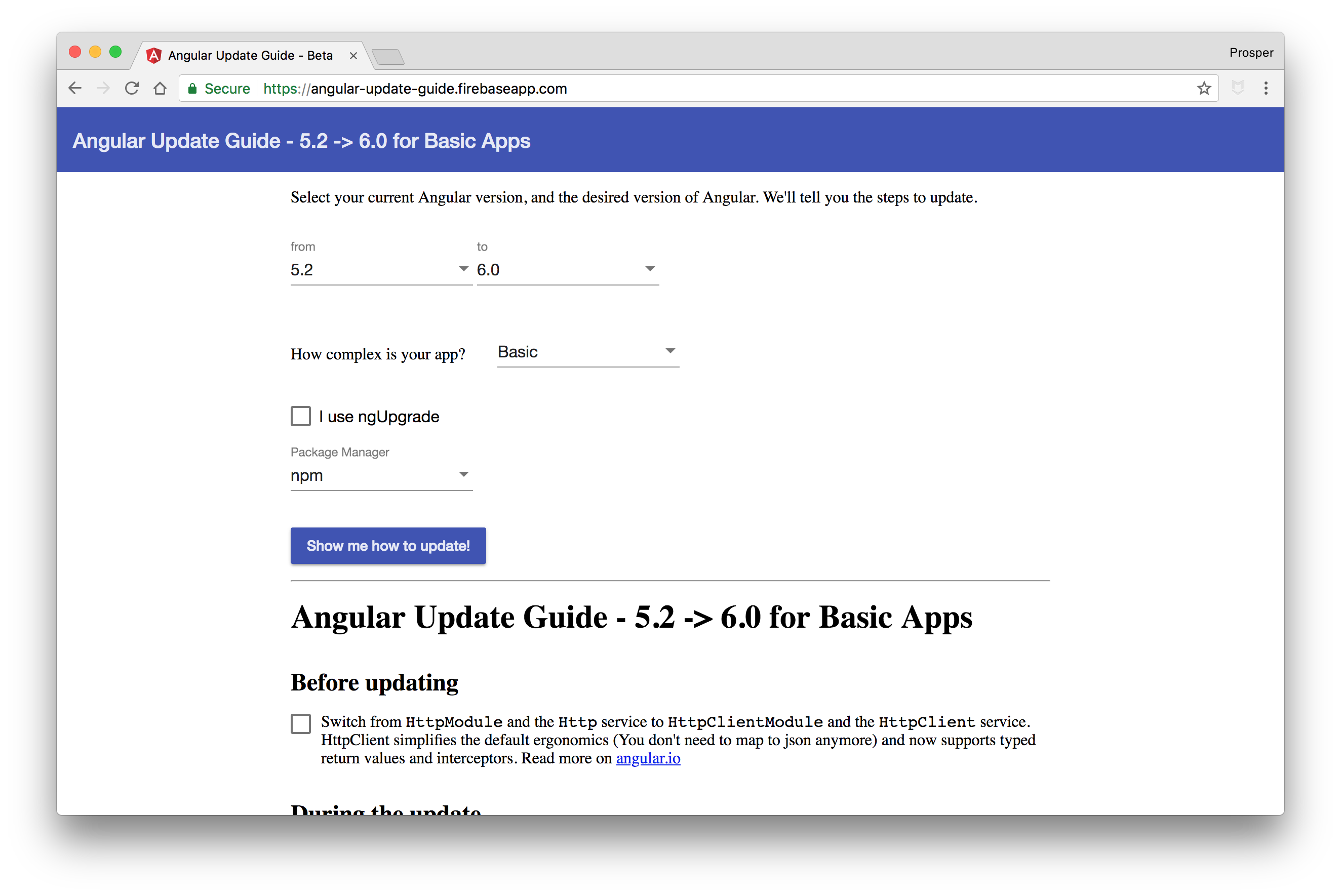
_Angular 6 upgrade tool_
## Conclusion
**Angular 6** came loaded with new features and significant improvements. Kudos to the Angular team on making Angular faster and better to use.
Have you upgraded to Angular 6 yet? What are your thoughts? Did you notice any significant improvement? Let me know in the comments section! 😊