---
title: "Another Round of JWT.io and JWT Debugger Extension Updates"
description: "We have released new versions of JWT.io and the JWT Debugger extension, learn what's new."
authors:
- name: "Sebastian Peyrott"
url: "https://auth0.com/blog/authors/sebastian-peyrott/"
date: "May 8, 2018"
category: "Announcements,Features,JWT.io"
tags: ["jwt", "jwt-io", "jwt-debugger", "debugger", "json-web-token", "json-web-tokens", "extension", "chrome", "firefox"]
url: "https://auth0.com/blog/more-jwt-io-and-jwt-debugger-extension-updates/"
---
# Another Round of JWT.io and JWT Debugger Extension Updates
We have released another round of updates for our [JWT.io](https://jwt.io/) website and the JWT Debugger extensions ([Chrome](https://chrome.google.com/webstore/detail/jwt-debugger/ppmmlchacdbknfphdeafcbmklcghghmd), [Firefox](https://addons.mozilla.org/en-US/firefox/addon/jwtio-debugger)). Among the new features are [HMAC](https://en.wikipedia.org/wiki/HMAC) secret length hints, common claim descriptions, simplified library updates for the website, a share button for the website, support for plain RSA public keys, and more token types can be passed in the URL! In this post, we will go over these new features.
---
## JWT.io and the JWT Debugger extension
[JSON Web Tokens (JWTs)](https://jwt.io/introduction/) are a convenient way to exchange claims between parties. The key features of JWTs are their simple format (Base64-encoded JSON) and the use of signatures and/or encryption. [JWT.io](https://jwt.io/) provides a convenient way to debug and inspect [JSON Web Tokens (JWTs)](https://auth0.com/e-books/jwt-handbook), along with an introduction to some of the key concepts behind them. It also provides a list of libraries and frameworks that can be used with them in many different programming languages.
The JWT Debugger extensions ([Chrome](https://chrome.google.com/webstore/detail/jwt-debugger/ppmmlchacdbknfphdeafcbmklcghghmd), [Firefox](https://addons.mozilla.org/en-US/firefox/addon/jwtio-debugger)) are the [Web Extension](https://browserext.github.io/browserext/) versions of JWT.io. The debugger has the same features as the website but can be used offline. It also provides additional features like automatic inspection of web storage and cookies to easily find and edit JWTs in websites!
Now, let's go over the new features of this release!
## New Features
### HMAC Secret Length Hints
As [we have seen on our blog before](https://auth0.com/blog/brute-forcing-hs256-is-possible-the-importance-of-using-strong-keys-to-sign-jwts/), the length of the HMAC secret is one of the fundamental properties to ensure it cannot be brute forced. For this reason, we have added two hints:
- The default secret for all HMAC token examples now hints at the minimum required length.
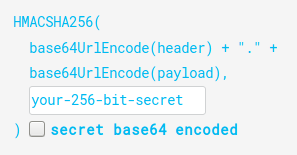
- When typing, a tooltip appears if the secret is too short to be considered safe.
Do note, however, that length is not the only thing that is important for secrets. They must also be hard to guess, or, in other words, completely random.
### Share Button
A `share button` to easily pass tokens in URL form has been requested many times, and indeed, it was already available in the extension. Now it is also available on the website!
### Easy Library Updates
Since its inception, adding a new library to the library list at JWT.io has been a cumbersome process. Several [Pug](https://pugjs.org/) and CSS files needed to be edited. Furthermore, editing an existing library had its problems too: to change features one had to remember class names, for example. We have finally modernized the process. Now libraries are located in the `views/website/libraries` folder. There, you will find a JSON file for each language or framework. Inside the JSON file you'll see something like this:
```json
{
"name": "Node.js",
"uniqueClass": "node",
"image": "/img/2.svg",
"bgColor": "rgb(138, 194, 68)",
"libs": [
{
"minimumVersion": "4.2.2",
"support": {
"sign": true,
"verify": true,
"iss": false,
"sub": false,
"aud": true,
"exp": true,
"nbf": false,
"iat": false,
"jti": false,
"hs256": true,
"hs384": true,
"hs512": true,
"rs256": true,
"rs384": true,
"rs512": true,
"es256": true,
"es384": true,
"es512": true
},
"authorUrl": "https://github.com/auth0",
"authorName": "Auth0",
"gitHubRepoPath": "auth0/node-jsonwebtoken",
"repoUrl": "https://github.com/auth0/node-jsonwebtoken",
"installCommandHtml": "npm install jsonwebtoken"
}
]
}
```
Multiple libraries go in the `libs` array. Most of the JSON file is self-explanatory, but some values are optional. For full details, check out the [README](https://github.com/jsonwebtoken/jsonwebtoken.github.io/blob/master/README.md) file.
To add a language or framework, a new JSON file must be created. The name of the file should start with a number, followed by a name, and end with `.json`. No further changes are required (other than editing the contents of the file).
It really is that simple!
### JWT.io as OpenID Connect Callback
One of the uses that JWT.io originally supported, was to be set as the callback for OpenID Connect operations (you can do this from the Auth0 Dashboard). That way, after a successful login, developers could be sent automatically to JWT.io with the returned token in the editor. This was disabled a long time ago during refactors. But now, that feature is back!
The following URL parameters are recognized: `access_token`, `id_token`, `token`, and `value`.
Sign up for a free Auth0 account to try this out!
### Common Claims Tooltips
In our previous update, we had enabled tooltips for dates in claims. This time, we have extended tooltips to also show a short description of what the claim means.
Of course, human-readable dates still work.
### Plain RSA Public Keys
Some RSA implementations work using the [old PEM-encoded RSA public key without the X.509 `SubjectPublicKeyInfo` header](https://stackoverflow.com/questions/18039401/how-can-i-transform-between-the-two-styles-of-public-key-format-one-begin-rsa) that is much more common nowadays. Unfortunately, old versions of JWT.io did not support these keys. But that's no longer the case! Plain RSA keys of yore are now supported, try it out!
## Other Changes
Of course, not every change in this release is related to new features. In this release, we have also:
- Merged **all PRs**.
- Added **6 new libraries** (thanks to external contributors!).
- Updates **12 libraries** (thanks again to external contributors!).
- Improved the [README file](https://github.com/jsonwebtoken/jsonwebtoken.github.io/blob/master/README.md).
- Implemented some **design changes**.
- Passed the **100 combined tests** mark!
- And fixed a good deal of bugs.
## What's Next
After all these changes, we will now let the codebase stabilize for a while. Of course, if you find any bugs, please report them in [the bug tracker](https://github.com/jsonwebtoken/jsonwebtoken.github.io/issues).
But that is not all! We are also thinking of more ways of improving JWT.io. Here are some of the ideas we are considering at the moment:
- Adding a button to clear the last saved token.
- Allowing the selection of different tokens passed in as URL parameters (`access_token` vs `id_token` for example).
- Support more algorithms, such as `ES512` or the [new EdDSA signatures](https://tools.ietf.org/html/rfc8037).
- Undock capability for the extensions (if possible).
What are your thoughts? Don't hesitate to tell us in the comments or by opening an enhancement request in the [bug-tracker](https://github.com/jsonwebtoken/jsonwebtoken.github.io/issues). Hack on!