---
title: "Managing the State of React Apps with MobX"
description: "Learn how to use MobX to manage the state of your React apps with ease."
authors:
- name: "Idorenyin Obong"
url: "https://auth0.com/blog/authors/idorenyin-obong/"
date: "Nov 6, 2018"
category: "Developers,Tutorial,React"
tags: ["mobx", "react", "state", "state-management", "redux", "web", "spa", "development", "javascript", "js", "context-api", "frontend"]
url: "https://auth0.com/blog/managing-the-state-of-react-apps-with-mobx/"
---
# Managing the State of React Apps with MobX
**TL;DR:** [MobX](https://mobx.js.org/) is one of the popular state management libraries out there frequently used with [React](https://reactjs.org/). In this article, you will learn how to manage the state of your React apps with MobX. If you need, you can find the code developed throughout the article in [this GitHub repository](https://github.com/auth0-blog/react-mobx-tutorial).
## Prerequisites
Before diving into this article, you are expected to have prior knowledge of React already. If you still need to learn about React, you can find [a good React article here](https://auth0.com/blog/react-tutorial-building-and-securing-your-first-app/).
Besides knowing React, you will need [Node.js](https://nodejs.org/en/) and [NPM](https://www.npmjs.com/) installed on your machine. If you don't have them, please, [follow the instructions here](https://nodejs.org/en/download/).
## State Management in React
Before understanding the concept of _state management_, you have to realize what a _state_ is. A _state_ in this context is the data layer of your application. When it comes to React and the libraries that help it manage state, you can say that state is an object that contains the data that your application is dealing with. For instance, if you want to display a list of items on your app, your state will contain the items you intend to display. State influences how React components behave and how they are rendered. Yes! It is as simple as that.
State management, therefore, means monitoring and managing the data (i.e., the state) of your app. Almost all apps have state in one way or the other and, as such, managing state has become one of the most important parts of building any modern app today.
When you think about state management in React apps, basically, there are three alternatives:
- [Redux](https://auth0.com/blog/redux-practical-tutorial/);
- [the new React Context API](https://auth0.com/blog/react-context-api-managing-state-with-ease/);
- and MobX.
### Redux
[Redux](https://redux.js.org/) is the most popular state management solution for React apps. Redux strictly abides by the _single source of truth_ principle. With this library, the state is kept in one location (the store) and made a read-only entity. Redux revolves around three concepts: the store, the reducer, and actions. The store holds the state, actions represent intents to change the state, and reducers specify how the application's state changes in response to actions. To alter the state of your application, reducers listen to actions emitted and returns a new state based on the action performed.
Reducers do not mutate the current state. They copy the current state, modify it based on actions emitted, and return a new state. This way, your state is not mutated in an irregular manner. Reducers are seen as the most important of the three concepts.
[To learn more about Redux, check out this article](https://auth0.com/blog/redux-practical-tutorial/).
### React Context API
The [React Context API](https://reactjs.org/docs/context.html#api) is another alternative for state management in your React app. This is not a library like the earlier mentioned alternatives. Rather, this is a framework in-built solution. Actually, this API is not something new, it had existed in React a long while ago. However, you will frequently listen people calling it as the _new_ React Context API because only recently (more specifically on React `v16.3`) this API has reached a mature stage.
In fact, Redux uses this API behind the scenes. The API provides a way to pass data down a React component tree without explicitly passing it through all the child components. This API revolves around two components, the `Provider` (used by a component located in a higher hierarchy of the component tree) to provide the data and the `Consumer` (used by a `Component` down the hierarchy) to consume data.
[To learn more about the new React Context API, check out this article](https://auth0.com/blog/react-context-api-managing-state-with-ease/).
In the next section, you will learn about the third alternative at your disposal, MobX.
## MobX Introduction
As mentioned, [MobX](https://mobx.js.org/) is another state management library available for React apps. This alternative uses a more reactive process, and it is slowly gaining popularity in the community. MobX is not just a library for React alone, it is also suitable for use with other JavaScript libraries and frameworks that power the frontend of web apps.
MobX is sponsored by reputable companies such as [Algolia](https://www.algolia.com/), [Coinbase](https://www.coinbase.com), etc. MobX hit 16,719 stars on [GitHub](https://github.com/mobxjs/mobx) at the time of writing. That obviously tells you it is becoming a solid choice for state management in React applications.
In the following subsections, you will learn about important concepts that you have to keep in mind while developing with MobX. Then, in the next section, you will see MobX in action while creating a sample app.
### Observable State on MobX
Observable state is one of the main concepts of MobX. The idea behind this concept is to make an object able to emit new changes on them to the observers. You can achieve this with the `@observable` decorator. For example, imagine you have a variable named `counter` that you expect to change with time. You can make it observable like so:
```javascript
@observable counter = 0
```
Or, you can declare it like so:
```javascript
decorate(ClassName, {
counter: observable
})
```
`ClassName`, in the second example, is the name of the class where the `counter` object resides. This decorator can be used in instance fields and property getters.
### Computed Values on MobX
Computed value is another important concept of MobX. These values are represented by the `@computed` decorator. Computed values work in hand with observable states. With computed values, you can automatically derive values. Say you have a snippet like this:
```javascript
class ClassName {
testTimes100 = 0;
@observable test = 0;
@computed get computedTest() {
return this.testTimes100 * 100;
}
}
```
In this snippet, if the value of `test` changes, the `computedTest` method is called and `testTimes100` is updated automatically. So, with computed values, MobX can automatically compute other values when needed by using `@computed`.
### Reactions on MobX
Reactions are very similar to computed values. The difference here is that, instead of computing and returning a value, a reaction simply triggers a side effect, more like it performs a side operation. Reactions occur as a result of changes on observables. Reactions could affect the UI, or they could be background actions. MobX provides three main types of reaction functions: `when`, `autorun`, and `reaction`.
The `when` reaction accepts two functions as parameters, the `predicate` and the `effect`. This reaction runs and observes the first function (the `predicate`) and, when this one is met, it runs the `effect` function.
Here you can see an example of how this function works:
```javascript
when(
// predicate
() => this.isEnabled,
// effect
() => this.exit()
);
```
Once the `isEnabled` class property is `true`, the `effect` executes the `exit` function. The function that returns `isEnabled` must be a function that reacts. That is, `isEnabled` must be marked with `@computed` so that the value is automatically computed or, better yet, marked with an `@observable` decorator.
The next reaction function is the `autorun` function. Unlike the `when` function, this function takes in one function and keeps running it until it is manually disposed. Here you can see how you can use an `autorun` function:
```javascript
@observable age = 10
const dispose = autorun(() => {
console.log("My age is: ", age.get())
})
```
With this in place, anytime the variable `age` changes, the anonymous function passed to `autorun` logs it out. This function is disposed once you call `dispose`.
The next one, the `reaction` function, mandatorily accepts two functions: the data function and side effect function. This function is similar to the `autorun` function but gives you more control on which observables to track. Here, the data function is tracked and returns data to be used inside effect function. Whereas an `autorun` function reacts to everything used in its function, the `reaction` function reacts to observables you specify.
Here you can see a simple use case:
```javascript
const todos = observable([
{
title: "Read Auth0 Blog",
done: false,
},
{
title: "Write MobX article",
done: true
}
]);
const reactionSample = reaction(
() => todos.map(todo => todo.title),
titles => console.log("Reaction: ", titles.join(", "))
);
```
In this case, the `reaction` function reacts to changes in the length and title of the list.
Another reaction function available for React developers is the `observer` function. This one is not provided by the main MobX package but, instead, provided by the `mobx-react` library. To use the `observer` function, you can simply add the `@observer` decorator in front of it like so:
```javascript
@observer class ClassName {
// [...]
}
```
With this `reaction` function, if an object tagged with the `@observable` decorator is used in the `render` method of the component and that property changes, the component is automatically re-rendered. The `observer` function uses `autorun` internally.
### Actions on MobX
Actions are anything that modifies the state. You can mark your actions using the `@action` decorator. As such, you are supposed to use the `@action` on any function that modifies observables or has side effects. A simple example is this:
```javascript
@observable variable = 0;
@action setVariable(newVariable){
this.variable = newVariable;
}
```
This function is updating the value of an observable, and so it is marked with `@action`.
## MobX and React in Practice
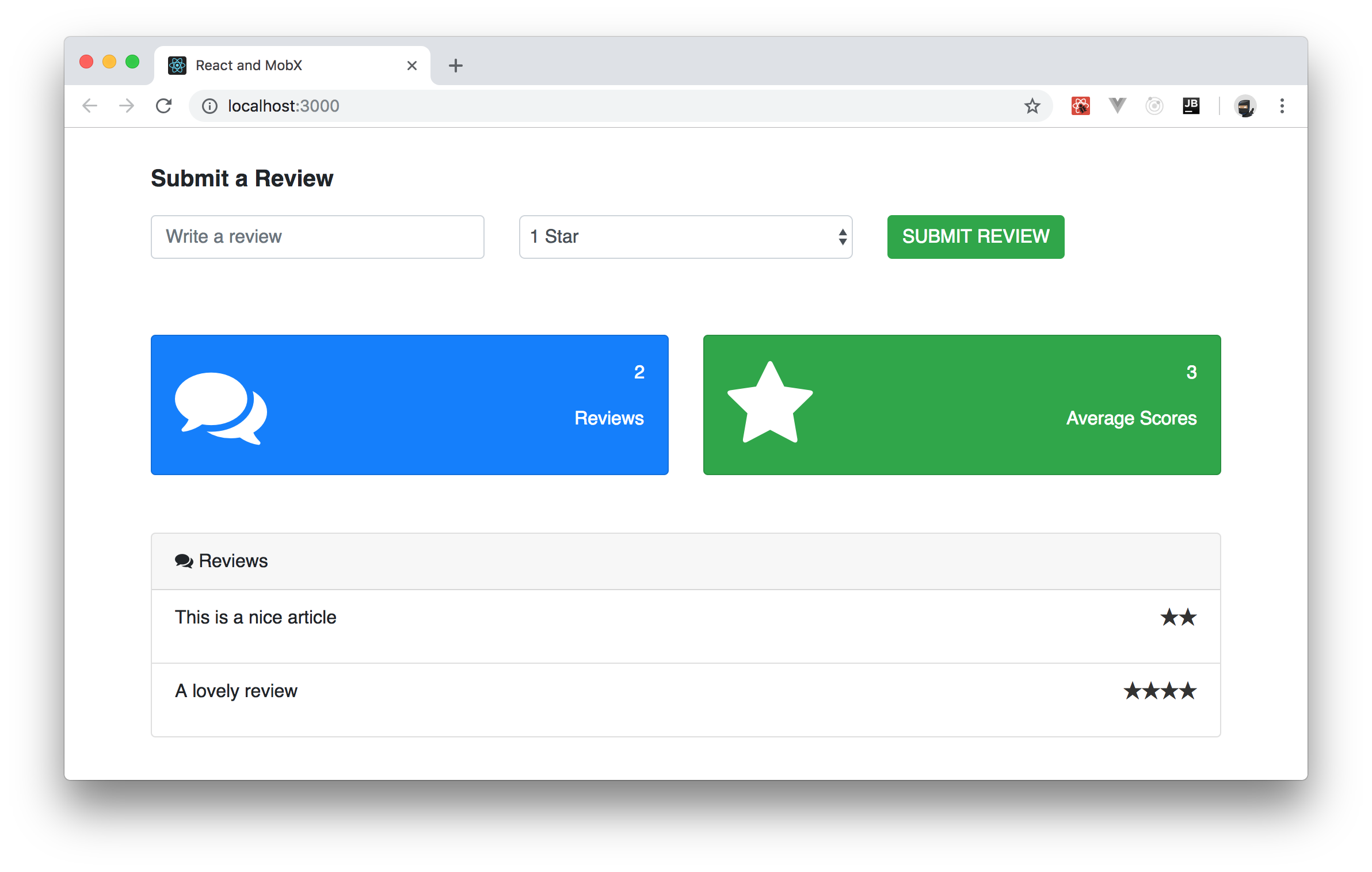
Now that you have gone through the main concepts in MobX, it is time to see it in action. In this section, you will build a simple user review dashboard. In the review dashboard, a user will enter a review using an input field, select a rating from a dropdown list, and finally submit the review.
The dashboard will show the total number of reviews, the average star rating, and a list of all the reviews. You will use MobX to manage certain operations like updating the reviews in realtime on the dashboard, calculating the total number of reviews submitted and lastly, obtaining the average star rating. Once you are done, your app will look similar to this:
### Scaffolding a new React app
To quickly scaffold a new React app, you will use [the `create-react-app` CLI](https://github.com/facebook/create-react-app) tool to bootstrap your React quickly. If you are on NPM `v5.2.0` or greater, you can open a terminal, move into the directory where you usually save your projects, and issue the following command:
```bash
npx create-react-app react-mobx-tutorial
```
If you have an older version of NPM, you will have to proceed as follows:
```bash
# install create-react-app globally
npm install -g create-react-app
# use it to create your project
create-react-app react-mobx-tutorial
```
This tool will need some seconds (or even a couple of minutes depending on your internet connection) to finish its process. After that, you can open your new project (`react-mobx-tutorial`) on your preferred IDE.
### Installing Dependencies
After creating your app, the next step is to install the required dependencies. For this article, you need only three dependencies: the main `mobx` library to add MobX to your app; the `mobx-react` library to add React specific functions available through MobX; and the `react-star-rating-component` dependency to easily implement a rating bar in the app.
To install them, move into your project and use NPM, as follows:
```bash
# move into app directory
cd react-mobx-tutorial
# install deps
npm install mobx mobx-react react-star-rating-component --save
```
### Creating a Store with MobX
You might wonder why haven't you heard about _stores_ on the last section (_MobX Introduction_). The thing is, MobX does not require you to use stores to hold your data. Actually, they explain [in this resource, stores are part of an opinionated approach that they discovered at Mendix while working with MobX](https://mobx.js.org/best/store.html).
> "The main responsibility of stores is to move logic and state out of your components into a standalone testable unit that can be used in both frontend and backend JavaScript." - [Best Practices for building large scale maintainable projects](https://mobx.js.org/best/store.html)
As such, the first thing you are going to do in your app is to add a store. This will ensure that the app reads from (and writes to) a global state object instead of its own components' state. To set this up, create a new file called `Store.js` inside the `src` directory and add the following code to it:
```javascript
class Store {
reviewList = [
{review: "This is a nice article", stars: 2},
{review: "A lovely review", stars: 4},
];
addReview(e) {
this.reviewList.push(e);
}
get reviewCount() {
return this.reviewList.length;
}
get averageScore() {
let avr = 0;
this.reviewList.map(e => avr += e.stars);
return Math.round(avr / this.reviewList.length * 100) / 100;
}
}
export default Store;
```
In this store, you defined a `reviewList` array containing some items already. This is the list your whole app will feed on. Besides defining this array, the store also defines three methods:
- `addReview()`: Through this method, your app will add new reviews to the `reviewList` array.
- `averageScore()`: This is the method that your app will use to get the average score inputted by users.
- `reviewCount()`: You will use this method to get the size of `reviewList`.
Next, you will expose these methods as observables so that other parts of your application can make use of it. MobX has a set of decorators that defines how observable properties will behave (as discussed earlier). To declare these observables, you will use the `decorate` function and add it to your `App.js` file as shown here:
```javascript
// ... leave other imports untouched ...
import Store from './Store';
import {decorate, observable, action, computed} from 'mobx';
decorate(Store, {
reviewList: observable,
addReview: action,
averageScore: computed,
reviewCount: computed
});
// ... leave class definition and export statement untouched ...
```
As you can see, you are using the `decorate` function to apply the `observable`, `action`, and `computed` decorators to the fields defined by `Store`. This makes them tightly integrated with MobX, and you can now make your app react to changes in them.
### Updating the Store on MobX
Next, you will create a component with the form that will collect users' review and update the store accordingly. To keep things organized, you will create a directory called `components` inside the `src` directory. For the rest of the article, you will use this directory for all your React components.
After creating the `components` directory, add a file called `Form.js` inside it and add the following code to this file:
```html
import React, {Component} from 'react';
export default class Form extends Component {
submitReview = (e) => {
e.preventDefault();
const review = this.review.value;
const stars = Number(this.stars.value);
this.props.store.addReview({review, stars})
};
render() {
return (
Submit a Review
)
}
}
```
The new component that you just defined contains only two functions: `submitReview` and `render`. The `submitReview` function, which React will call when users submit the form, get the `review` inputted by users and the number of `stars` and then call the `addReview` function from the store. Note that this component is calling the `addReview` function through `props`. As such, while using the `Form` component, you will have to pass this function to it.
Now, regarding the `render` function, although lengthy, you can see that all it does is to use some HTML elements and some Bootstrap classes to define a beautiful form with:
1. a title: "Submit a Review";
2. an `input` text where users will write their review;
3. a drop-down box (`select`) where users will choose how many stars they give to the review (between 1 and 5);
4. and a `submit` that will trigger the `submitReview` function when clicked (through the `onSubmit={this.submitReview}` property of the `form` element).
### Reacting to Changes with MobX
Once users submit the form and the store receives the new review, you need to display the updated data to your users immediately. For this purpose, you will create a component that will display the average number of stars from reviews given and the total number of reviews.
To create this component, create a new file called `Dashboard.js` inside the `components` directory and insert the following code into it:
```javascript
import React from 'react';
import {observer} from 'mobx-react'
function Dashboard({store}) {
return (
{store.reviewCount}
Reviews
{store.averageScore}
Average Scores
)
}
export default observer(Dashboard);
```
As you can see, this component contains two `card` elements (or Bootstrap components). The first one uses `store.reviewCount` to show how many reviews were inputted so far. The second one uses `store.averageScore` to show the average score given by reviewers.
One thing that you must note is that, instead of exporting the `Dashboard` component directly, you are encapsulating the component inside the `observer()` function. This turns your `Dashboard` into a reactive and smart component. With this in place, any changes made to any content in store within the component above will make React re-render it. That is, when `averageScore` and `reviewCount` get updated in your store, React will update the user interface with new contents instantaneously.
Besides this dashboard, you will also create a component that will show all reviews inputted by users. As such, create a file called `Reviews.js` inside the `components` directory and paste the following code into it:
```javascript
import React from 'react';
import {observer} from 'mobx-react';
import StarRatingComponent from 'react-star-rating-component';
function List({data}) {
return (
{data.review}
)
}
function Reviews({store}) {
return (
Reviews
{store.reviewList.map((e, i) =>
)}
)
}
export default observer(Reviews);
```
In the snippet above, you are importing the `StarRatingComponent` installed earlier to display the number of stars selected by the user during the review. Also, you are creating a component called `Review` that is used only inside this file. This component is what will render the details of a single review, like the comment inputted (`review`) and the amount of `stars`.
Then, in the end, you are defining the `Reviews` component, which is also wrapped by the `observer()` function to make the component receive and display changes in the MobX store as they come. This component is quite simple. It uses the `card` Bootstrap component to display an unordered (`ul`) list of reviews (`reviewList`) and a title ("Reviews").
### Wrapping Up your MobX App
With these components in place, your app is almost ready for the prime time. To wrap up things, you will just make some adjustments to the UI, make your `App` component use the components you defined in the previous sections, and import Bootstrap (which you have been using but you haven't imported).
So, for starters, open the `App.css` file in your project and replace its contents like this:
```css
.formSection {
margin-top: 30px;
}
.formSection p {
font-weight: bold;
font-size: 20px;
}
.dashboardSection {
margin-top: 50px;
}
.reviewsWrapper {
margin-top: 50px;
}
```
These are just small adjustments so you can have a beautiful user interface.
Next, open the `App.js` file and update this as follows:
```javascript
// ... leave the other import statements untouched ...
import Form from './components/Form';
import Dashboard from './components/Dashboard';
import Reviews from './components/Reviews';
import Store from './Store';
// ... leave decorate(Store, {...}) untouched ...
const reviewStore = new Store();
class App extends Component {
render() {
return (
);
}
}
export default App;
```
There are three new things happening in the new version of your `App` component:
1. You are importing and using all the components you defined before (`Form`, `Dashboard`, and `Reviews`).
2. You are creating an instance of your `Store` class and calling it `reviewStore`.
3. You are passing the `reviewStore` as a prop called `store` to all components.
With that in place, the last thing you will have to do is to open the `index.html` file and update it as follows:
```html
React and MobX
```
In this case, you are simply changing the title of your app to "React and MobX" and making it import [Bootstrap](https://getbootstrap.com) and [Font Awesome (a library of icons that you are using to enhance your UI)](https://fontawesome.com/).
After refactoring the `index.html` file, go back to your terminal and make your app run by issuing the following command:
```bash
# from the react-mobx-tutorial
npm start
```
Now, if you open [`http://localhost:3000/`](http://localhost:3000/) in your preferred browser, you will be able to interact with your app and see React and MobX in action. How cool is that?
## Conclusion
In this post, you learned about state management in React apps. You also had the opportunity to take a quick look at the various alternatives for managing state in React apps, more specifically, MobX.
After that, you were able to build an app to show the most important concepts in MobX. MobX might not as popular as Redux when it comes to state management on React, but it is very mature, easy to start with, and provides a seamless way to integrate into a new or an existing application.
I do hope that you enjoyed this tutorial. Happy hacking!