---
title: "Auth0 for AI Agentsが一般公開(GA)されました"
description: "認証および認可ソリューションであるAuth0を使用して、安全なAIエージェントを構築しましょう。"
authors:
- name: "Gareth Davies"
url: "https://auth0.com/blog/authors/gareth-davies/"
date: "Nov 19, 2025"
category: "Announcements"
tags: ["ai", "ai agents"]
url: "https://auth0.com/blog/jp-auth0-for-ai-agents-generally-available/"
---
# Auth0 for AI Agentsが一般公開(GA)されました
>本記事は2025年11月19日に更新された「Auth0 for AI Agents is Now Generally Available (GA)」を翻訳した記事です。
要約:[Auth0 for AI Agents](https://auth0.com/jp/ai)が一般公開(GA)されました。AIエージェントをアプリケーションやデータに対して、より安全に接続し、AIエージェントが実行できるアクションやアクセスできるデータをユーザーが制御でます。また、重要なエージェントアクションに対して人間による確認を有効化できます。[今すぐ開発を開始してください](https://auth0.com/signup?onboard_app=auth_for_aa&ocid=701KZ000000cXXxYAM-aPA4z0000008OZeGAM)。
## 課題:セキュリティを犠牲にすることなく強力なAIエージェントを構築する
チームがAIエージェントの構築を迅速に進める中、スピードと精度のバランスを取ることは不可欠です。現在、最も簡単に運用を開始する方法は、AIエージェントフレームワークを使用し、ハードコードされた認証情報やAPIキーをAIエージェントに使用させることです。しかし、この方法は開発やテストには適していますが、AIエージェントを本番環境に導入するには適していません。このアプローチには欠陥があり、AIエージェントに必要以上のアクセスを許可するだけでなく、堅牢なセキュリティに必要な不可欠な認証ソリューションが欠けています。これにより、フレームワークの範囲外で対処されていない大きなギャップが残ります。
* AIエージェントはどのようにユーザーを識別し、アプリケーションやAPIに安全に接続するのか。
* エージェントの監視をどのように維持し、重要なアクションに人間による承認をどのように組み込むのか。
これらの課題に適切に対処せず、ユーザーデータを能動的に保護するための特定のエージェントアクセスパラメータを設定しないと、AIエージェントはすぐに大きなリスクとなる可能性があります。
## 解決策:Auth0 for AI Agents — AIエージェントのための完全な認証ソリューション
[Auth0 for AI Agents](https://auth0.com/jp/ai)は、セキュリティやイノベーションを損なうことなくAIエージェントを構築するための安全な基盤を開発者に提供します。この包括的なソリューションは、AIエージェントをアプリやデータに安全に接続し、あらゆるシナリオで正しいユーザー権限を適用します。AIエージェントを構築する場合、以下のことが可能になります。
* エージェントとやり取りするユーザーを識別する。
* AIエージェントに保持しているユーザーデータへのアクセスを許可する。
* 例:チャット履歴、設定、または過去の注文。
* ユーザーに代わってアプリケーションにより安全に接続する。
* 例:カレンダーを確認して予定をスケジュールする、メールを送信する、またはチケットを予約する。
* ドキュメントの送信や購入の許可など、エージェントワークフローの適切なタイミングで、重要なアクションを承認する制御権をユーザーに与える。
* ユーザー権限に基づいたきめ細かなデータアクセスを強制し、AIエージェントに特定のアクセスパラメータを設定してユーザーデータをより適切に保護する。
 ## Auth0 for AI Agentsがユースケースをサポートする方法
Auth0 for AI Agentsは、B2B、B2C、および社内アプリで使用できる4つの機能で構成されています。ユーザー認証、Token Vault、非同期認可、およびRAGのためのきめ細かな認可(FGA for RAG)です。
## ユーザー認証:AIエージェント向けのより安全なログイン体験を有効化する
## Auth0 for AI Agentsがユースケースをサポートする方法
Auth0 for AI Agentsは、B2B、B2C、および社内アプリで使用できる4つの機能で構成されています。ユーザー認証、Token Vault、非同期認可、およびRAGのためのきめ細かな認可(FGA for RAG)です。
## ユーザー認証:AIエージェント向けのより安全なログイン体験を有効化する
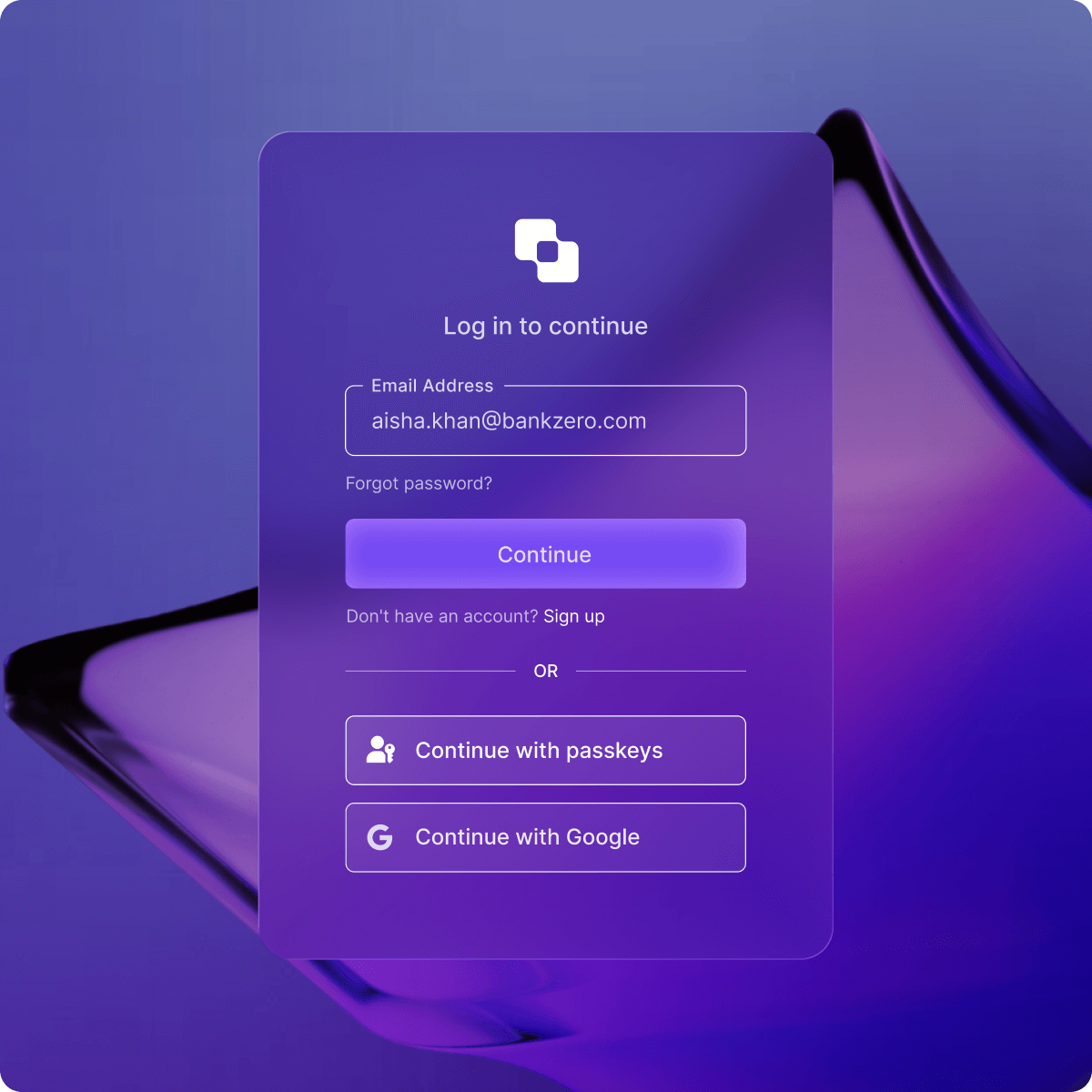 より安全でスケーラブルな[ユーザー認証](https://auth0.com/ai/docs/intro/user-authentication)は、セキュリティを強化し、データを保護し、機能へのアクセスを制御しながら、エージェントにファーストパーティAPIへの安全なアクセスを許可します。ユースケースの例として、顧客とやり取りするカスタマーサポートAIエージェントがあります。ユーザーがログインすると、ユーザー認証によりエージェントはユーザーとその注文履歴を識別できます。
```python
@router.get("/protected")
def protected_route(auth_session=Depends(auth0_client.require_session)):
user = auth_session.get("user")
if not user:
return {"error": "User not authenticated"}
return {
"message": f"Hello {user.get('email')}!",
"user_id": user.get("sub")
}
```
```javascript
export default async function Home() {
const session = await auth0.getSession();
if (!session) {
return (
Sign up
Log in
);
}
return (
Welcome, {session.user.name}!
);
}
```
## Token Vault:サードパーティAPIにより安全に接続する
より安全でスケーラブルな[ユーザー認証](https://auth0.com/ai/docs/intro/user-authentication)は、セキュリティを強化し、データを保護し、機能へのアクセスを制御しながら、エージェントにファーストパーティAPIへの安全なアクセスを許可します。ユースケースの例として、顧客とやり取りするカスタマーサポートAIエージェントがあります。ユーザーがログインすると、ユーザー認証によりエージェントはユーザーとその注文履歴を識別できます。
```python
@router.get("/protected")
def protected_route(auth_session=Depends(auth0_client.require_session)):
user = auth_session.get("user")
if not user:
return {"error": "User not authenticated"}
return {
"message": f"Hello {user.get('email')}!",
"user_id": user.get("sub")
}
```
```javascript
export default async function Home() {
const session = await auth0.getSession();
if (!session) {
return (
Sign up
Log in
);
}
return (
Welcome, {session.user.name}!
);
}
```
## Token Vault:サードパーティAPIにより安全に接続する
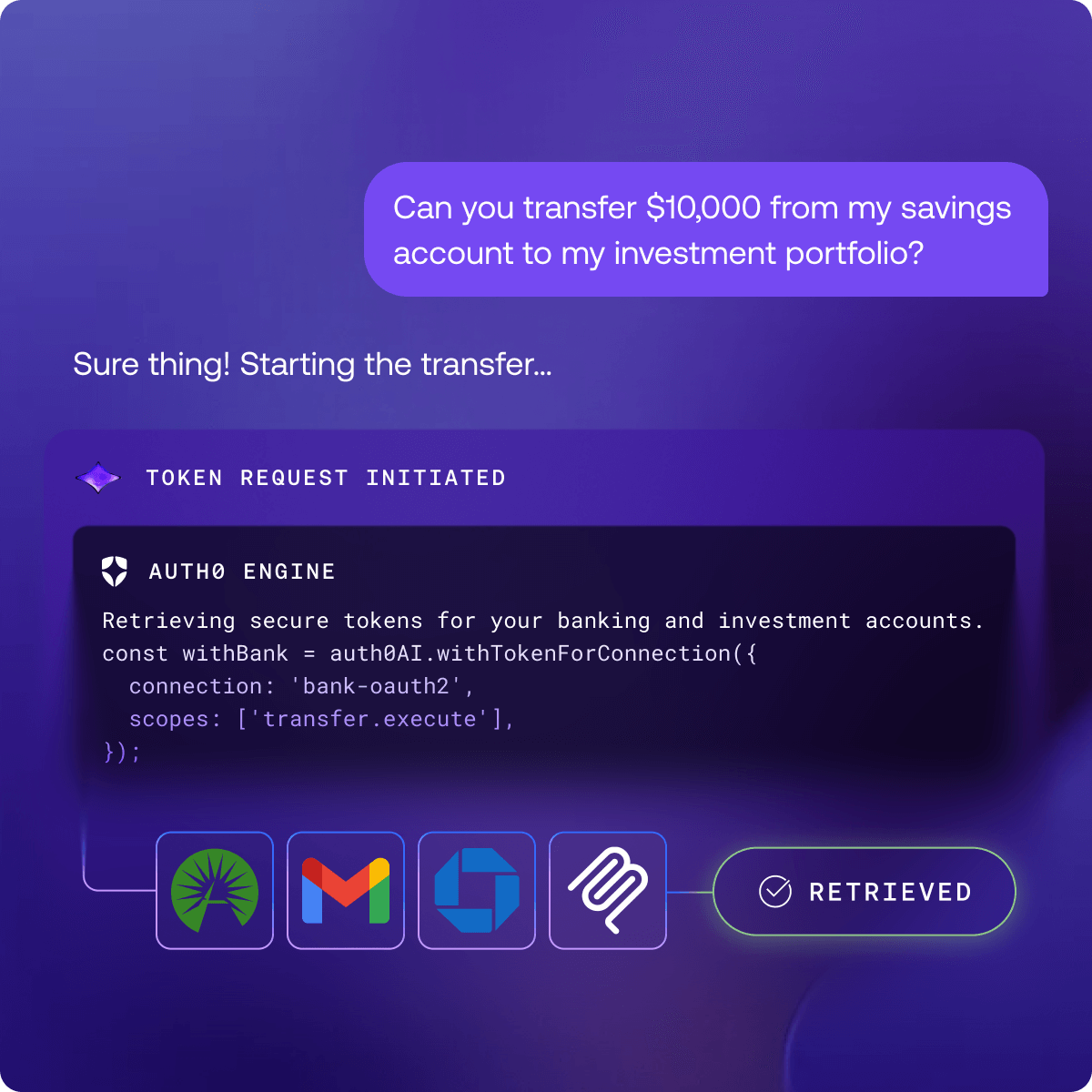 [Token Vault](https://auth0.com/jp/features/token-vault)は、AIエージェントをGoogle Drive、Jira、SlackなどのサードパーティAPIや外部システムと統合する、安全で一元化された認可レイヤーです。Auth0は、OAuthトークンを自動的に保存、管理、更新することで、これらの外部システムへの認証情報を保護し、機密データや認証情報がエージェントのロジック内で危険にさらされたり保存されたりしないようにします。同時に、どのエージェントがどのサードパーティシステムにアクセスできるかを制御できます。Token Vaultを使用すると、同意を提供したエンドユーザーに代わってAIエージェントがシームレスに動作するため、統合されたアプリやOAuthサービスを接続するための安全でシンプルなソリューションとなります。
社内ユースケースの例として、GitHubやSlackへのアクセスを必要とする生産性AIエージェントの構築があります。[35以上のサポートされているアプリ統合](https://auth0.com/ai/docs/integrations/overview)を使用してAIエージェントがアクションを実行できるようにし、標準的なOAuthの仕組みを利用して他のアプリに接続します。
[Token Vault](https://auth0.com/jp/features/token-vault)は、AIエージェントをGoogle Drive、Jira、SlackなどのサードパーティAPIや外部システムと統合する、安全で一元化された認可レイヤーです。Auth0は、OAuthトークンを自動的に保存、管理、更新することで、これらの外部システムへの認証情報を保護し、機密データや認証情報がエージェントのロジック内で危険にさらされたり保存されたりしないようにします。同時に、どのエージェントがどのサードパーティシステムにアクセスできるかを制御できます。Token Vaultを使用すると、同意を提供したエンドユーザーに代わってAIエージェントがシームレスに動作するため、統合されたアプリやOAuthサービスを接続するための安全でシンプルなソリューションとなります。
社内ユースケースの例として、GitHubやSlackへのアクセスを必要とする生産性AIエージェントの構築があります。[35以上のサポートされているアプリ統合](https://auth0.com/ai/docs/integrations/overview)を使用してAIエージェントがアクションを実行できるようにし、標準的なOAuthの仕組みを利用して他のアプリに接続します。
 ```python
with_slack_connection = auth0_ai.with_token_vault(
connection="sign-in-with-slack",
scopes=["channels:read"],
)
@tool
def list_channels_tool_function(date: datetime):
# Get the access token from Auth0 AI
access_token = get_access_token_from_token_vault()
# Call Slack SDK
client = WebClient(token=access_token)
response = client.conversations_list(
exclude_archived=True,
types="public_channel,private_channel",
limit=10
)
channels = response['channels']
channel_names = [channel['name'] for channel in channels]
return channel_names
list_slack_channels_tool = with_slack_connection(StructuredTool(
name="list_slack_channels",
description="List channels for the current user on Slack",
args_schema=EmptySchema,
func=list_channels_tool_function,
))
```
```javascript
export const withSlackConnection = auth0AI.withTokenVault({
connection: 'sign-in-with-slack',
scopes: ['channels:read'],
});
export const listChannels = withSlackConnection(
tool({
description: "List channels for the current user on Slack",
parameters: z.object({}),
execute: async () => {
// Get the access token from Auth0 AI
const accessToken = getAccessTokenFromTokenVault();
// Call Slack SDK
const web = new WebClient(accessToken);
const result = await web.conversations.list({
exclude_archived: true,
types: "public_channel,private_channel",
limit: 10,
});
return result.channels?.map((channel) => channel.name);
},
})
);
```
## 非同期認可:重要なアクションに対する人間による承認を有効化する
```python
with_slack_connection = auth0_ai.with_token_vault(
connection="sign-in-with-slack",
scopes=["channels:read"],
)
@tool
def list_channels_tool_function(date: datetime):
# Get the access token from Auth0 AI
access_token = get_access_token_from_token_vault()
# Call Slack SDK
client = WebClient(token=access_token)
response = client.conversations_list(
exclude_archived=True,
types="public_channel,private_channel",
limit=10
)
channels = response['channels']
channel_names = [channel['name'] for channel in channels]
return channel_names
list_slack_channels_tool = with_slack_connection(StructuredTool(
name="list_slack_channels",
description="List channels for the current user on Slack",
args_schema=EmptySchema,
func=list_channels_tool_function,
))
```
```javascript
export const withSlackConnection = auth0AI.withTokenVault({
connection: 'sign-in-with-slack',
scopes: ['channels:read'],
});
export const listChannels = withSlackConnection(
tool({
description: "List channels for the current user on Slack",
parameters: z.object({}),
execute: async () => {
// Get the access token from Auth0 AI
const accessToken = getAccessTokenFromTokenVault();
// Call Slack SDK
const web = new WebClient(accessToken);
const result = await web.conversations.list({
exclude_archived: true,
types: "public_channel,private_channel",
limit: 10,
});
return result.channels?.map((channel) => channel.name);
},
})
);
```
## 非同期認可:重要なアクションに対する人間による承認を有効化する
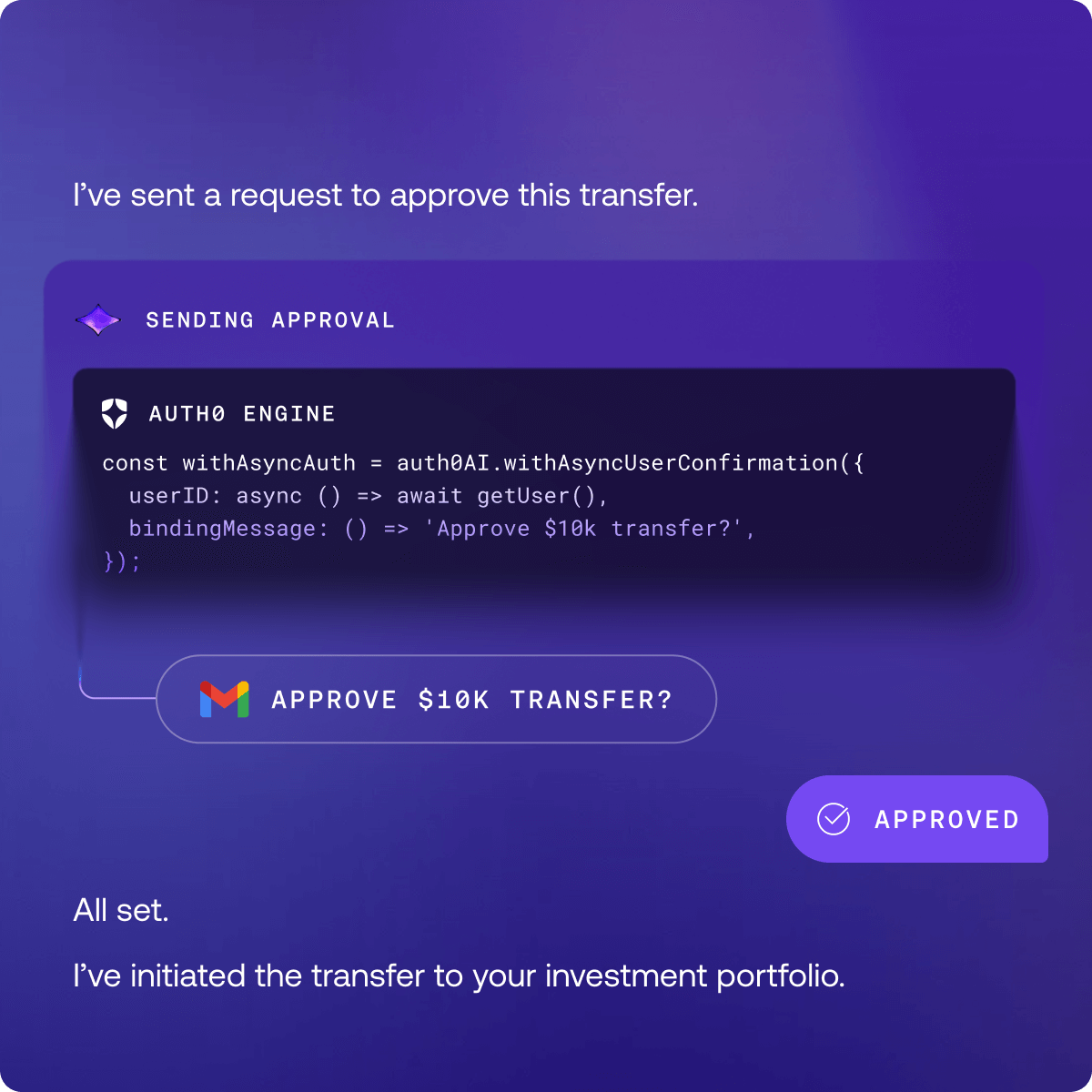
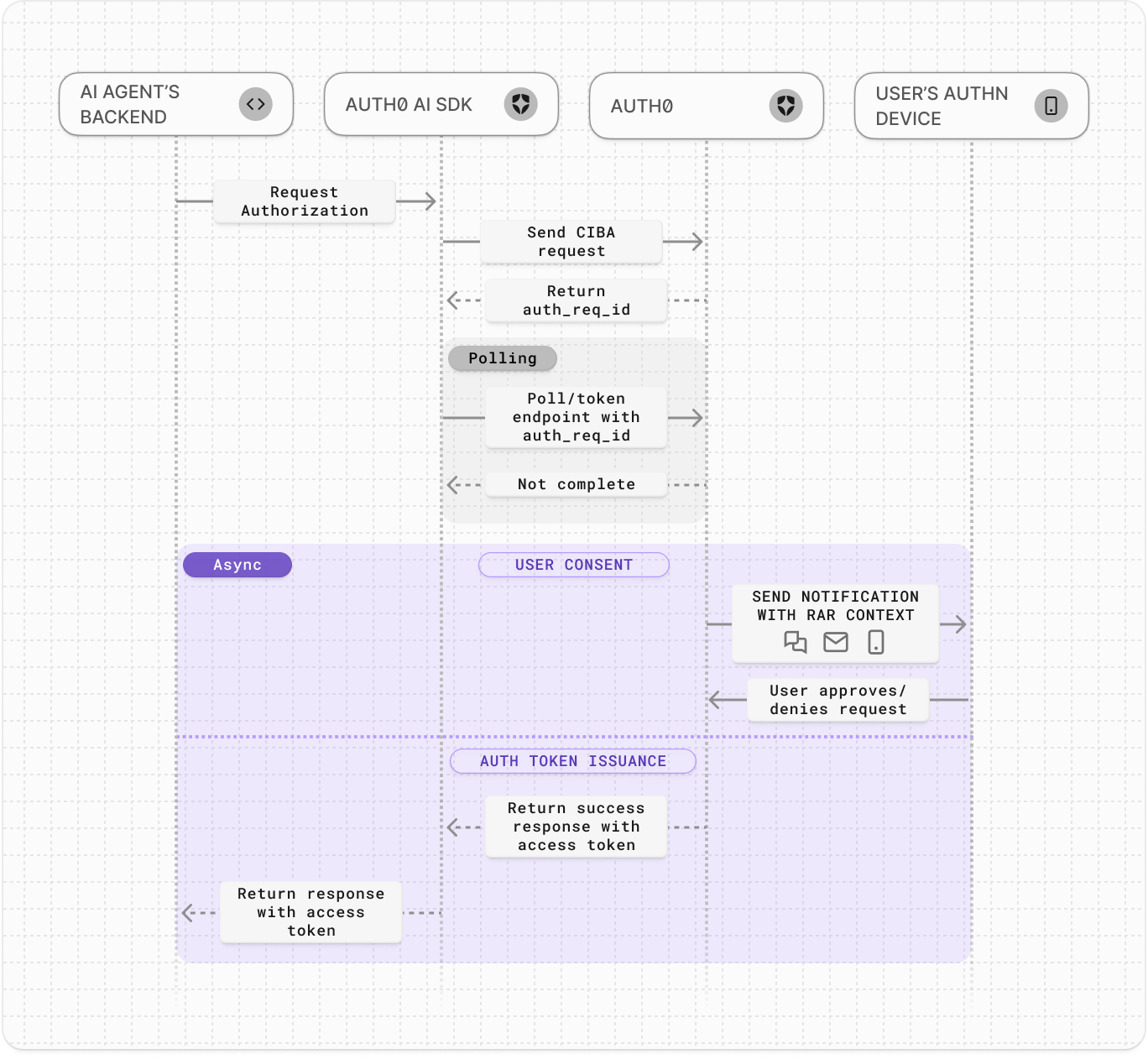 Auth0 for AI Agentsを使用すると、AIエージェントは[Client-Initiated Backchannel Authentication Flow (CIBA)](https://auth0.com/docs/ja-jp/get-started/authentication-and-authorization-flow/client-initiated-backchannel-authentication-flow)を使用してユーザーを[非同期に認可](https://auth0.com/ai/docs/get-started/asynchronous-authorization)できます。AIエージェントはバックグラウンドで動作し、重要なアクションに必要な場合にのみユーザーに通知します。
より安全な[人間による承認(human-in-the-loop approvals)](https://auth0.com/blog/secure-human-in-the-loop-interactions-for-ai-agents/)をAIエージェントのワークフローに追加する場合、Auth0を使用して認可リクエストを完了するためのユーザー権限をリクエストできます。AIエージェントは同意プロンプトに[豊富な認可データ](https://auth0.com/docs/ja-jp/get-started/authentication-and-authorization-flow/client-initiated-backchannel-authentication-flow/user-authorization-with-ciba)をレンダリングできるため、ユーザーは何を認可しているかを正確に把握できます。
ユースケースの例として、ユーザーがAIエージェントにオンラインでの購入をリクエストしたが、エージェントが取引を完了するために確認を必要とする場合があります。たとえAIエージェントが製品を購入したくても、ユーザーの認可がないため、エージェント単独で実行する権限はありません。ユーザーが取引を承認したときにのみ、ユーザーに代わってアクションを実行するためのトークンをエージェントに発行します。これにより、ユーザーが完全に制御を維持できます。
```python
with_async_user_confirmation = auth0_ai.with_async_authorization(
audience=settings.SHOP_API_AUDIENCE,
binding_message=lambda product: f"Do you want to buy {product}",
user_id=get_user_id(config),
)
@tool
async def shop_online_fn(product: str):
"""Tool to buy products online."""
credentials = get_async_authorization_credentials()
async with httpx.AsyncClient() as client:
response = await client.post(
API_URL,
headers={
"Authorization": f"Bearer {credentials['access_token']}",
},
json={ "product": product },
)
return response.json()
```
```javascript
export const withAsyncAuthorization = auth0AI.withAsyncAuthorization({
userID: async () => await getUser(),
bindingMessage: async ({ product }) => `Do you want to buy ${product}`,
audience: process.env['API_AUDIENCE']!,
});
export const shopOnlineTool = withAsyncAuthorization(tool({
description: 'Tool to buy products online',
parameters: z.object({ product: z.string() }),
execute: async (params) => {
const credentials = getAsyncAuthorizationCredentials();
const response = await fetch(API_URL, {
headers: {
Authorization: `Bearer ${credentials?.accessToken}`,
},
body: JSON.stringify(params),
});
const result = await response.json();
return result;
},
}));
```
*現在、Guardianによるプッシュ通知が利用可能です。メールおよびSMSチャネルは近日公開予定です。*
## RAGのためのきめ細かな認可(FGA for RAG):ユーザーデータを保護し漏洩を防止する
Auth0 for AI Agentsを使用すると、AIエージェントは[Client-Initiated Backchannel Authentication Flow (CIBA)](https://auth0.com/docs/ja-jp/get-started/authentication-and-authorization-flow/client-initiated-backchannel-authentication-flow)を使用してユーザーを[非同期に認可](https://auth0.com/ai/docs/get-started/asynchronous-authorization)できます。AIエージェントはバックグラウンドで動作し、重要なアクションに必要な場合にのみユーザーに通知します。
より安全な[人間による承認(human-in-the-loop approvals)](https://auth0.com/blog/secure-human-in-the-loop-interactions-for-ai-agents/)をAIエージェントのワークフローに追加する場合、Auth0を使用して認可リクエストを完了するためのユーザー権限をリクエストできます。AIエージェントは同意プロンプトに[豊富な認可データ](https://auth0.com/docs/ja-jp/get-started/authentication-and-authorization-flow/client-initiated-backchannel-authentication-flow/user-authorization-with-ciba)をレンダリングできるため、ユーザーは何を認可しているかを正確に把握できます。
ユースケースの例として、ユーザーがAIエージェントにオンラインでの購入をリクエストしたが、エージェントが取引を完了するために確認を必要とする場合があります。たとえAIエージェントが製品を購入したくても、ユーザーの認可がないため、エージェント単独で実行する権限はありません。ユーザーが取引を承認したときにのみ、ユーザーに代わってアクションを実行するためのトークンをエージェントに発行します。これにより、ユーザーが完全に制御を維持できます。
```python
with_async_user_confirmation = auth0_ai.with_async_authorization(
audience=settings.SHOP_API_AUDIENCE,
binding_message=lambda product: f"Do you want to buy {product}",
user_id=get_user_id(config),
)
@tool
async def shop_online_fn(product: str):
"""Tool to buy products online."""
credentials = get_async_authorization_credentials()
async with httpx.AsyncClient() as client:
response = await client.post(
API_URL,
headers={
"Authorization": f"Bearer {credentials['access_token']}",
},
json={ "product": product },
)
return response.json()
```
```javascript
export const withAsyncAuthorization = auth0AI.withAsyncAuthorization({
userID: async () => await getUser(),
bindingMessage: async ({ product }) => `Do you want to buy ${product}`,
audience: process.env['API_AUDIENCE']!,
});
export const shopOnlineTool = withAsyncAuthorization(tool({
description: 'Tool to buy products online',
parameters: z.object({ product: z.string() }),
execute: async (params) => {
const credentials = getAsyncAuthorizationCredentials();
const response = await fetch(API_URL, {
headers: {
Authorization: `Bearer ${credentials?.accessToken}`,
},
body: JSON.stringify(params),
});
const result = await response.json();
return result;
},
}));
```
*現在、Guardianによるプッシュ通知が利用可能です。メールおよびSMSチャネルは近日公開予定です。*
## RAGのためのきめ細かな認可(FGA for RAG):ユーザーデータを保護し漏洩を防止する
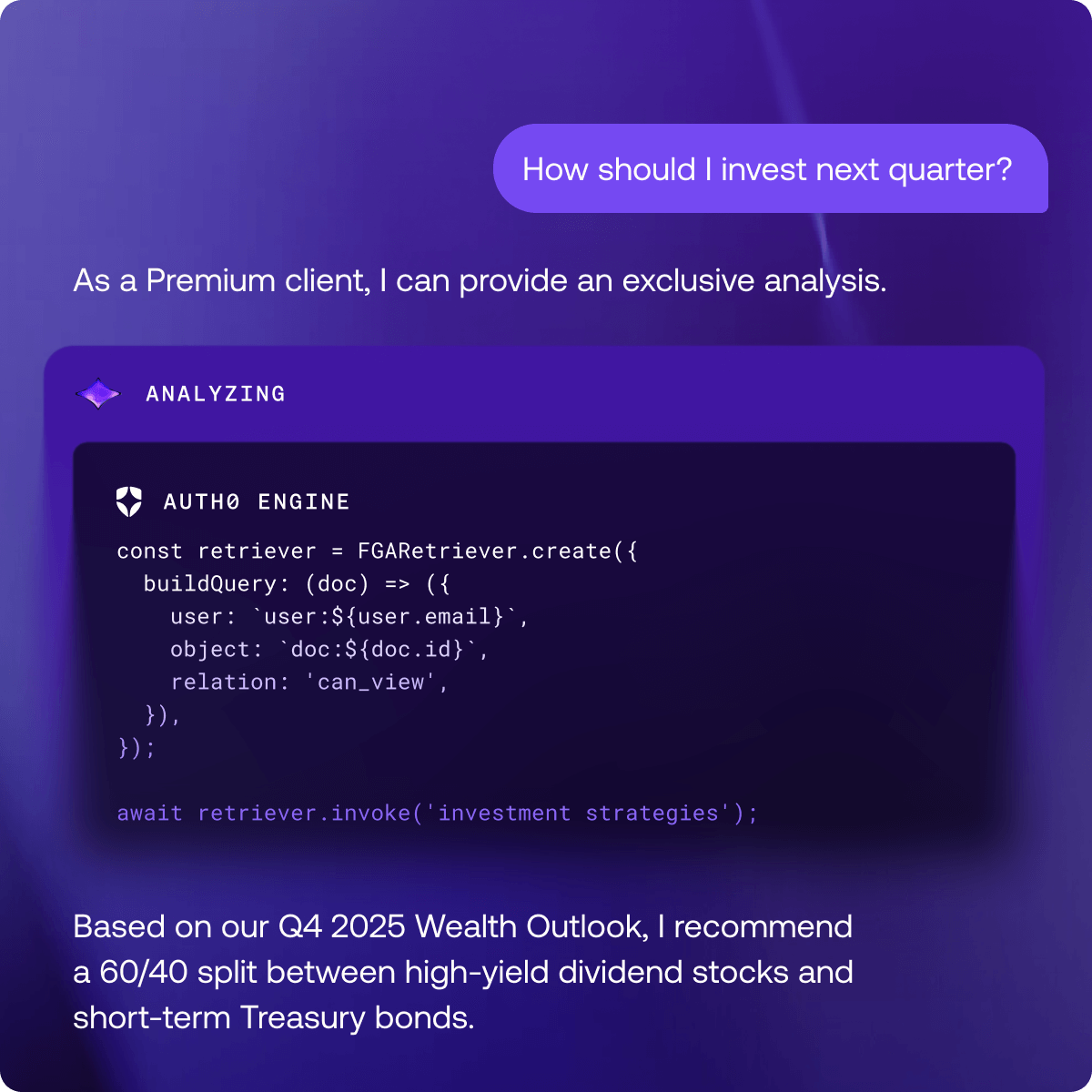 Auth0 for AI Agentsを使用すると、AIエージェントは[検索拡張生成(RAG)のためのきめ細かな認可](https://auth0.com/ai/docs/get-started/authorization-for-rag)(FGA for RAG)を実装できます。AIエージェントがRAGを使用してユーザーのクエリに対して高度で関連性の高い回答を提供する場合、認可されたデータにのみアクセスします。
例として、競合他社の情報や売り込み方法の分析のために社内ドキュメントを検索するGTMセールスAIエージェントがあります。AIエージェントはすべてのドキュメントを迅速に検索し、セールスチームに直接かつ即座に回答を提供します。これは優れた機能ですが、ユーザーがすべての社内ドキュメントではなく、アクセス権を持つドキュメントからのみ回答を受け取るようにする必要があります。コードの内部動作は以下の通りです。
1. Vector DBを照会して、質問に最も意味的に関連するドキュメントの埋め込みを見つける。ソースドキュメントはすでにインデックス化され、Vector DBに保存されている。
1. きめ細かな認可(FGA)を使用して結果をフィルタリングする。Vector DBからの生の結果がFGAデータベースに対して権限を確認され、ユーザーに対して許可されているドキュメントのみがエージェントに返される。
Auth0 for AI Agentsを使用すると、AIエージェントは[検索拡張生成(RAG)のためのきめ細かな認可](https://auth0.com/ai/docs/get-started/authorization-for-rag)(FGA for RAG)を実装できます。AIエージェントがRAGを使用してユーザーのクエリに対して高度で関連性の高い回答を提供する場合、認可されたデータにのみアクセスします。
例として、競合他社の情報や売り込み方法の分析のために社内ドキュメントを検索するGTMセールスAIエージェントがあります。AIエージェントはすべてのドキュメントを迅速に検索し、セールスチームに直接かつ即座に回答を提供します。これは優れた機能ですが、ユーザーがすべての社内ドキュメントではなく、アクセス権を持つドキュメントからのみ回答を受け取るようにする必要があります。コードの内部動作は以下の通りです。
1. Vector DBを照会して、質問に最も意味的に関連するドキュメントの埋め込みを見つける。ソースドキュメントはすでにインデックス化され、Vector DBに保存されている。
1. きめ細かな認可(FGA)を使用して結果をフィルタリングする。Vector DBからの生の結果がFGAデータベースに対して権限を確認され、ユーザーに対して許可されているドキュメントのみがエージェントに返される。
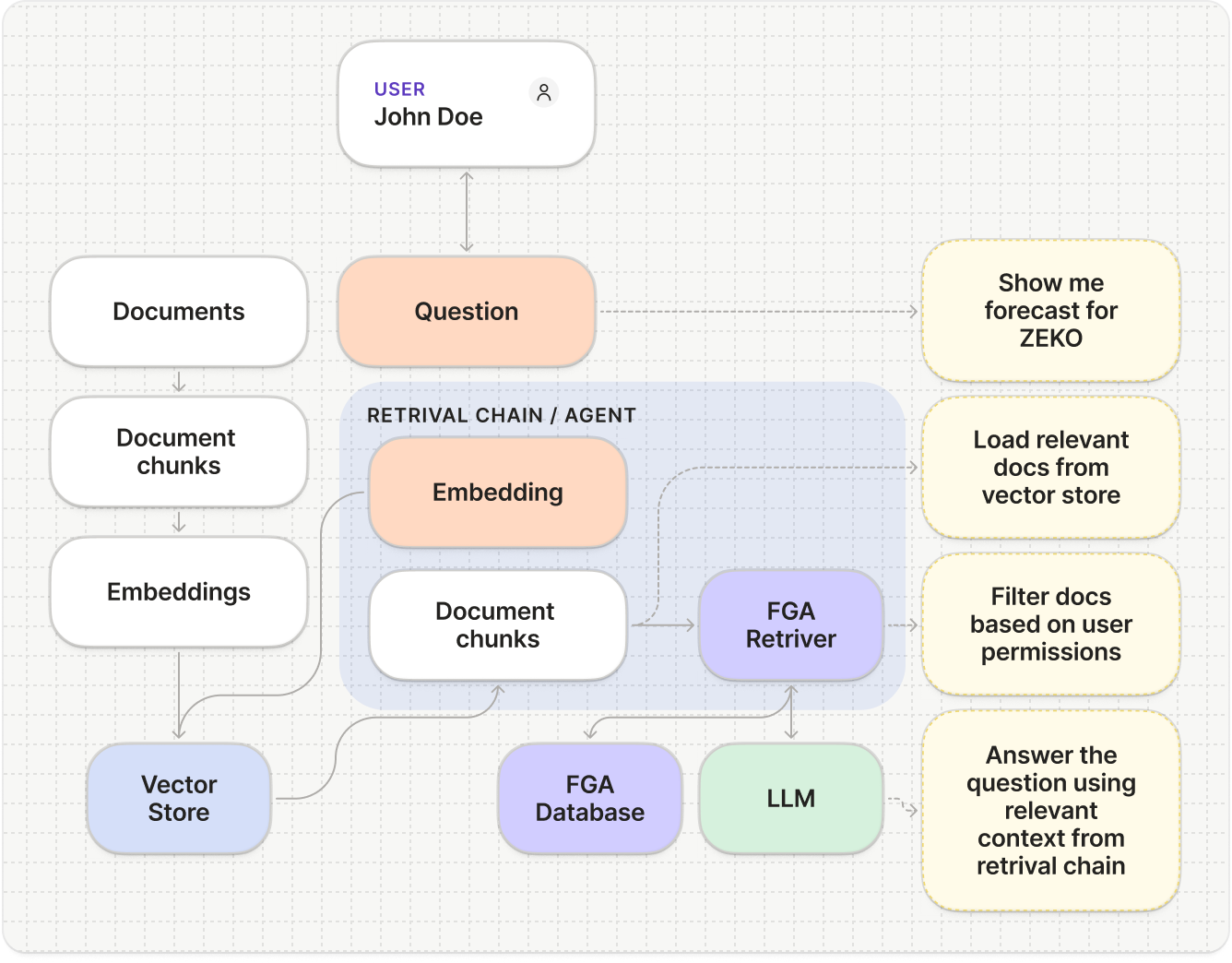 [FGA](https://docs.fga.dev/)を使用すると、ユーザーがさまざまな権限レベル(閲覧、コメント、編集、または共有)を持つドキュメントアクセスなど、複雑な権限構造をモデル化できます。さらに、ユーザーは複数のグループに所属し、そこから権限を継承できます。FGAは、大量のドキュメントが含まれる複雑な権限状況においてスケーラブルでパフォーマンスに優れています。ナレッジアシスタント型AIエージェントのセキュリティレイヤーとして[FGA for RAG](https://auth0.com/blog/rag-and-access-control-where-do-you-start/)を使用し、検索中のドキュメント権限を強制してください。
```python
@tool
def get_context_documents_tool(query: str):
"""Use the tool when user asks for documents"""
retriever = FGARetriever(
retriever=vector_store.as_retriever(),
build_query=lambda doc: ClientBatchCheckItem(
user=f"user:{user_email}",
object=f"doc:{doc.metadata.get('documentId')}",
relation="can_view",
),
)
documents = retriever.invoke(query)
return "\n\n".join([document.page_content for document in documents])
```
```javascript
export const getContextDocumentsTool = tool(
async ({ question }) => {
const user = await auth0.getUser();
const retriever = FGARetriever.create({
retriever: vectorStore.asRetriever(),
buildQuery: (doc) => ({
user: `user:${user?.email}`,
object: `doc:${doc.metadata.documentId}`,
relation: 'can_view',
}),
});
const documents = await retriever.invoke(question);
return documents.map((doc) => doc.pageContent).join('\n\n');
},
{
name: 'get_context_documents',
description: 'Use the tool when user asks for documents',
schema: z.object({ question: z.string() }),
},
);
```
## お気に入りのフレームワークで構築を開始する
[FGA](https://docs.fga.dev/)を使用すると、ユーザーがさまざまな権限レベル(閲覧、コメント、編集、または共有)を持つドキュメントアクセスなど、複雑な権限構造をモデル化できます。さらに、ユーザーは複数のグループに所属し、そこから権限を継承できます。FGAは、大量のドキュメントが含まれる複雑な権限状況においてスケーラブルでパフォーマンスに優れています。ナレッジアシスタント型AIエージェントのセキュリティレイヤーとして[FGA for RAG](https://auth0.com/blog/rag-and-access-control-where-do-you-start/)を使用し、検索中のドキュメント権限を強制してください。
```python
@tool
def get_context_documents_tool(query: str):
"""Use the tool when user asks for documents"""
retriever = FGARetriever(
retriever=vector_store.as_retriever(),
build_query=lambda doc: ClientBatchCheckItem(
user=f"user:{user_email}",
object=f"doc:{doc.metadata.get('documentId')}",
relation="can_view",
),
)
documents = retriever.invoke(query)
return "\n\n".join([document.page_content for document in documents])
```
```javascript
export const getContextDocumentsTool = tool(
async ({ question }) => {
const user = await auth0.getUser();
const retriever = FGARetriever.create({
retriever: vectorStore.asRetriever(),
buildQuery: (doc) => ({
user: `user:${user?.email}`,
object: `doc:${doc.metadata.documentId}`,
relation: 'can_view',
}),
});
const documents = await retriever.invoke(question);
return documents.map((doc) => doc.pageContent).join('\n\n');
},
{
name: 'get_context_documents',
description: 'Use the tool when user asks for documents',
schema: z.object({ question: z.string() }),
},
);
```
## お気に入りのフレームワークで構築を開始する
 これらのSDKを使用すると、[LangChain](https://www.langchain.com/)、[LlamaIndex](https://www.llamaindex.ai/)、[Cloudflare Agents](https://agents.cloudflare.com/)などのフレームワークを使用して、Auth0をAIエージェントに迅速かつ簡単に統合できます。
SDKは、ツール呼び出しがユーザーの認証を必要とするタイミングを検出し、ツール呼び出しフローを中断して、認証が必要であることを示すメッセージをユーザーに表示します。ユーザーが認証されると、ツール呼び出しが自動的に再開されます。SDKはAuth0の[Token Vault](https://auth0.com/jp/features/token-vault)を使用し、外部APIへのユーザーのアクセストークンを保存します。これにより、以降のツール呼び出しではToken Vaultがアクセストークンを自動的に提供するため、ユーザーは再度認証する必要がありません。
[Assistant0: Auth0で保護されたAIパーソナルアシスタント](https://github.com/auth0-samples/auth0-assistant0/tree/main)を確認してください。このアプリケーションは、整理された状態を維持し効率を高めるために、複数のツールに動的にアクセスしてデジタルライフを統合するAIパーソナルアシスタントです。
* [LangChain + JavaScript](https://github.com/auth0-samples/auth0-assistant0/tree/main/ts-langchain)
* [LangChain + Python](https://github.com/auth0-samples/auth0-assistant0/tree/main/py-langchain)
* [LlamaIndex + JavaScript](https://github.com/auth0-samples/auth0-assistant0/tree/main/ts-llamaindex)
* [Vercel AI + JavaScript](https://github.com/auth0-samples/auth0-assistant0/tree/main/ts-vercel-ai)
[LangChain](https://www.langchain.com/)向けAuth0 AI:Auth0 for AI Agents、LangChain、およびLangGraph SDKを使用すると、LangChainとLangGraphを使用してAIエージェントワークフローを簡単に統合し、保護できます。
[開始する >>](https://github.com/auth0/auth0-ai-js/tree/main/packages/ai-langchain)
```javascript
npm install @auth0/ai-langchain
```
```python
pip install auth0-ai-langchain
```
[LlamaIndex](https://www.llamaindex.ai/llamaindex)向けAuth0 AI:Auth0 for AI AgentsおよびLlamaIndex SDKを使用すると、LlamaIndexを使用してAIエージェントワークフローを簡単に統合し、保護できます。
[開始する >>](https://github.com/auth0/auth0-ai-python/tree/main/packages/auth0-ai-llamaindex)
```javascript
npm install @auth0/ai-llamaindex
```
```python
pip install auth0-ai-llamaindex
```
[Vercel](https://vercel.com/solutions/ai-apps) AI SDK向けAuth0 AI:Auth0 for AI AgentsおよびVercel AI SDKを使用すると、Vercel AIを使用してAIエージェントワークフローを簡単に統合し、保護できます。
[開始する >>](https://github.com/auth0/auth0-ai-js/tree/main/packages/ai-vercel)
```javascript
npm install @auth0/ai-vercel
```
## Auth0で近日公開予定の機能
* [Auth for MCP](https://auth0.com/ai/docs/mcp/auth-for-mcp)は現在、早期アクセスで利用可能です。[こちらからプログラムへの参加をリクエストしてください >>](https://docs.google.com/forms/d/e/1FAIpQLSferoMH9K1ZasfOqXVByCwwKoL4qOidCIdOtpHXMzUcUibGOQ/viewform)。Auth for MCPを使用すると、MCPを利用したワークフロー内でAuth0の機能を活用できます。ユーザーまたはAIエージェントがMCPサーバーに接続する前にユーザーを認証し、AIエージェントがOAuth 2.0を使用してリソースに安全に接続できるようにMCPクライアントとサーバーを登録し、Custom Token Exchangeを使用して社内APIに安全に接続します。
* [Cross App Access (XAA)](https://auth0.com/docs/ja-jp/get-started/authentication-and-authorization-flow/cross-app-access)は、同意とポリシーの適用をアイデンティティプロバイダー(IdP)に移すことで、安全なエージェント対アプリおよびアプリ対アプリの通信をサポートするようにOAuthを拡張するオープンプロトコルです。Auth0は間もなくこれをネイティブに実装し、アプリケーションが**リクエストアプリ**(アクセス用ID-JAGトークンの交換)または**リソースアプリ**(スコープ付きトークンの検証と発行)として動作できるようにします。顧客がプロトコルをサポートする参加IdP(Oktaなど)を使用すると、すべてのアプリとエージェントの接続を一元的に制御、可視化、およびガバナンスできるようになります。[ベータ版に登録してください](https://docs.google.com/forms/d/e/1FAIpQLSfmhg0hi3qaJ7BZy92eTQ1zk6FWcP89hFwOk0hPJEoERZms5A/viewform)。
## Auth0で強力なAIエージェントを構築
今すぐ構築を開始してください。
* [クイックスタート](http://auth0.com/ai/docs/get-started)
* [ドキュメント](http://auth0.com/ai/docs)
* [How To](https://auth0.com/ai/docs/how-tos)
* [サンプルアプリ](https://auth0.com/ai/docs/sample-apps)
* 無料プランでは、Token Vaultを用いて2つのアプリケーションに接続できます。スケールに合わせて、アップグレードが追加されたセルフサービスプランを提供しています。[構築を開始する >>](https://auth0.com/signup?onboard_app=auth_for_aa&ocid=701KZ000000cXXxYAM-aPA4z0000008OZeGAM)
* 既存のAuth0ユーザーは、現在のAuth0プランに関係なく、無料で開始できます。[開始する >>](https://manage.auth0.com/#/ai-agents)
* 対象となるスタートアップには、Auth0を1年間無料で提供します。[今日申し込む >>](https://auth0.com/jp/startups)
* 対象となる非営利団体には、セルフサービスおよびエンタープライズプランを50%オフで提供します。[今日申し込む >>](https://auth0.com/jp/nonprofits)
質問がありますか。1月14日のコミュニティAMAに参加して、[こちら](https://community.auth0.com/t/ask-me-anything-coming-soon/193183)に質問を投稿してください。または、12月11日の[Reddit AMA](https://www.reddit.com/user/auth0dev/comments/1pikqc4/hi_reddit_were_sandrino_di_mattia_chief_product/)に参加してください。
Auth0 for AI Agentsを使用すると、**迅速に行動し、責任を持って構築し、制御を維持できます。**
これらのSDKを使用すると、[LangChain](https://www.langchain.com/)、[LlamaIndex](https://www.llamaindex.ai/)、[Cloudflare Agents](https://agents.cloudflare.com/)などのフレームワークを使用して、Auth0をAIエージェントに迅速かつ簡単に統合できます。
SDKは、ツール呼び出しがユーザーの認証を必要とするタイミングを検出し、ツール呼び出しフローを中断して、認証が必要であることを示すメッセージをユーザーに表示します。ユーザーが認証されると、ツール呼び出しが自動的に再開されます。SDKはAuth0の[Token Vault](https://auth0.com/jp/features/token-vault)を使用し、外部APIへのユーザーのアクセストークンを保存します。これにより、以降のツール呼び出しではToken Vaultがアクセストークンを自動的に提供するため、ユーザーは再度認証する必要がありません。
[Assistant0: Auth0で保護されたAIパーソナルアシスタント](https://github.com/auth0-samples/auth0-assistant0/tree/main)を確認してください。このアプリケーションは、整理された状態を維持し効率を高めるために、複数のツールに動的にアクセスしてデジタルライフを統合するAIパーソナルアシスタントです。
* [LangChain + JavaScript](https://github.com/auth0-samples/auth0-assistant0/tree/main/ts-langchain)
* [LangChain + Python](https://github.com/auth0-samples/auth0-assistant0/tree/main/py-langchain)
* [LlamaIndex + JavaScript](https://github.com/auth0-samples/auth0-assistant0/tree/main/ts-llamaindex)
* [Vercel AI + JavaScript](https://github.com/auth0-samples/auth0-assistant0/tree/main/ts-vercel-ai)
[LangChain](https://www.langchain.com/)向けAuth0 AI:Auth0 for AI Agents、LangChain、およびLangGraph SDKを使用すると、LangChainとLangGraphを使用してAIエージェントワークフローを簡単に統合し、保護できます。
[開始する >>](https://github.com/auth0/auth0-ai-js/tree/main/packages/ai-langchain)
```javascript
npm install @auth0/ai-langchain
```
```python
pip install auth0-ai-langchain
```
[LlamaIndex](https://www.llamaindex.ai/llamaindex)向けAuth0 AI:Auth0 for AI AgentsおよびLlamaIndex SDKを使用すると、LlamaIndexを使用してAIエージェントワークフローを簡単に統合し、保護できます。
[開始する >>](https://github.com/auth0/auth0-ai-python/tree/main/packages/auth0-ai-llamaindex)
```javascript
npm install @auth0/ai-llamaindex
```
```python
pip install auth0-ai-llamaindex
```
[Vercel](https://vercel.com/solutions/ai-apps) AI SDK向けAuth0 AI:Auth0 for AI AgentsおよびVercel AI SDKを使用すると、Vercel AIを使用してAIエージェントワークフローを簡単に統合し、保護できます。
[開始する >>](https://github.com/auth0/auth0-ai-js/tree/main/packages/ai-vercel)
```javascript
npm install @auth0/ai-vercel
```
## Auth0で近日公開予定の機能
* [Auth for MCP](https://auth0.com/ai/docs/mcp/auth-for-mcp)は現在、早期アクセスで利用可能です。[こちらからプログラムへの参加をリクエストしてください >>](https://docs.google.com/forms/d/e/1FAIpQLSferoMH9K1ZasfOqXVByCwwKoL4qOidCIdOtpHXMzUcUibGOQ/viewform)。Auth for MCPを使用すると、MCPを利用したワークフロー内でAuth0の機能を活用できます。ユーザーまたはAIエージェントがMCPサーバーに接続する前にユーザーを認証し、AIエージェントがOAuth 2.0を使用してリソースに安全に接続できるようにMCPクライアントとサーバーを登録し、Custom Token Exchangeを使用して社内APIに安全に接続します。
* [Cross App Access (XAA)](https://auth0.com/docs/ja-jp/get-started/authentication-and-authorization-flow/cross-app-access)は、同意とポリシーの適用をアイデンティティプロバイダー(IdP)に移すことで、安全なエージェント対アプリおよびアプリ対アプリの通信をサポートするようにOAuthを拡張するオープンプロトコルです。Auth0は間もなくこれをネイティブに実装し、アプリケーションが**リクエストアプリ**(アクセス用ID-JAGトークンの交換)または**リソースアプリ**(スコープ付きトークンの検証と発行)として動作できるようにします。顧客がプロトコルをサポートする参加IdP(Oktaなど)を使用すると、すべてのアプリとエージェントの接続を一元的に制御、可視化、およびガバナンスできるようになります。[ベータ版に登録してください](https://docs.google.com/forms/d/e/1FAIpQLSfmhg0hi3qaJ7BZy92eTQ1zk6FWcP89hFwOk0hPJEoERZms5A/viewform)。
## Auth0で強力なAIエージェントを構築
今すぐ構築を開始してください。
* [クイックスタート](http://auth0.com/ai/docs/get-started)
* [ドキュメント](http://auth0.com/ai/docs)
* [How To](https://auth0.com/ai/docs/how-tos)
* [サンプルアプリ](https://auth0.com/ai/docs/sample-apps)
* 無料プランでは、Token Vaultを用いて2つのアプリケーションに接続できます。スケールに合わせて、アップグレードが追加されたセルフサービスプランを提供しています。[構築を開始する >>](https://auth0.com/signup?onboard_app=auth_for_aa&ocid=701KZ000000cXXxYAM-aPA4z0000008OZeGAM)
* 既存のAuth0ユーザーは、現在のAuth0プランに関係なく、無料で開始できます。[開始する >>](https://manage.auth0.com/#/ai-agents)
* 対象となるスタートアップには、Auth0を1年間無料で提供します。[今日申し込む >>](https://auth0.com/jp/startups)
* 対象となる非営利団体には、セルフサービスおよびエンタープライズプランを50%オフで提供します。[今日申し込む >>](https://auth0.com/jp/nonprofits)
質問がありますか。1月14日のコミュニティAMAに参加して、[こちら](https://community.auth0.com/t/ask-me-anything-coming-soon/193183)に質問を投稿してください。または、12月11日の[Reddit AMA](https://www.reddit.com/user/auth0dev/comments/1pikqc4/hi_reddit_were_sandrino_di_mattia_chief_product/)に参加してください。
Auth0 for AI Agentsを使用すると、**迅速に行動し、責任を持って構築し、制御を維持できます。**