---
title: "JavaScript Promises vs. RxJS Observables"
description: "Compare JavaScript Promises and RxJS Observables to find the one that meets your needs."
authors:
- name: "Kapehe Jorgenson"
url: "https://auth0.com/blog/authors/kapehe-jorgenson/"
date: "Jan 23, 2020"
category: "Developers,Tips,Promises and Observables"
tags: ["javascript", "rxjs", "promises", "observables"]
url: "https://auth0.com/blog/javascript-promises-vs-rxjs-observables/"
---
# JavaScript Promises vs. RxJS Observables
**TL;DR:** Have you ever thought to yourself, which should I use, JavaScript Promises or RxJS Observables? In this article, we are going to go over some pros and cons of each one. We'll see which one might be better for a project. Remember, this is a constant debate, and there are so many different points to cover. I will be covering only five points in this article.
## The On-Going Debate
There has been an on-going debate in the world of developers, and that is which is better: JavaScript Promises or RxJS Observables? Each one can bring so much value to different projects. It's a good idea to have a good understanding of each and how it could benefit a project. But before we start looking at some comparisons, let's do a quick overview of what each one is.
### What is a Promise?
A [JavaScript Promise](https://developer.mozilla.org/en-US/docs/Web/JavaScript/Reference/Global_Objects/Promise) is an object that produces a single value, asynchronously. Data goes in, and a single value is emitted and used. Easy, straightforward way to handle incoming data.
Promises are very eager. If we had a callback function provided to a Promise, once the Promise is resolved, the `.then` gets executed. If we were to demonstrate that in an API call, it would look something like this:
```javascript
fetch('my-api-goes-here')
.then(resp => resp.json());
```
That raises a question: are we wasting resources with that eagerness?
### What is an Observable?
An Observable takes in a stream of data and emits multiple bits of data over time.
Observables are very lazy. They don't do much until called upon. Or how we like to say in the Observable world, are "subscribed" to. To create an Observable, we create a function, and this function will return the data.
If we were to demonstrate an Observable, it would look something like this:
```javascript
const data$ = new Observable("stuff here")
data$.subscribe(data => {
// do some stuff here
})
```
We create the Observable, and then it will wait to be subscribed to. Once that happens, it handles the data and emits whatever values get returned. So the subscribe is essential because that is what wakes the Observables up.
Is that more efficient? We'll see.
## The Great Comparison
Let's look at a handful of comparables between the two. Again, remember there are many different ways we could look at this, but I will be covering only five in this article.
## Simplicity
The best thing about Promises is that they come built-in with JavaScript. That means we don't have to add anything to our package size. There's no third-party library, it's just there, waiting, making it pretty easy to get started with using Promises in a project.
Now Observables, on the other hand, are inside of the RxJS library. We are going to have to add that third party library now. No biggie, right? Now the [minified bundle size of RxJS is 45.6kB](https://bundlephobia.com/result?p=rxjs@6.5.3). That doesn't seem like a lot, but every byte counts when we talk about performance.
> Note: There is talk of adding Observables in the ECMAScript standard. That GitHub proposal can be found [here](https://github.com/tc39/proposal-observable).
So that poses the question, is adding in the entire RxJS library worth it? It all depends on how much data we are handling, how much use we are going to get out of the Observables, and if we can make that 45.6kB worth it.
If our project is small or we only need a Promise or two, maybe sticking with Promises would be worth it. It'll keep our project light and quick, and that is a goal in all web development.
## Unicast and Multicast
Before we show how Promises and Observables use Unicast and Multicast, let's first discuss what they do.
### Unicast
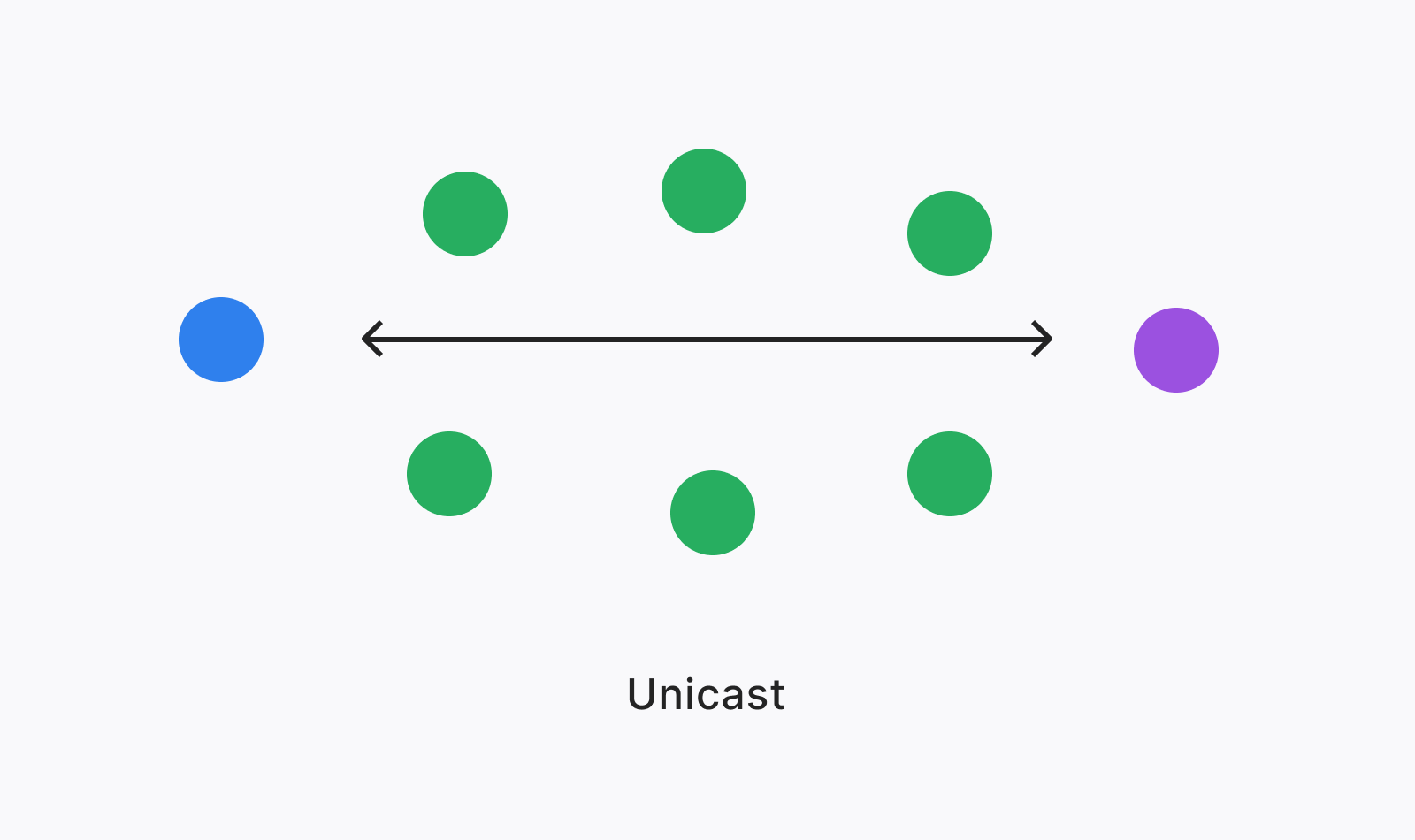
Unicast is a one-to-one communication process. That means there is one sender and one receiver for each bit of data, that's it. So if multiple receivers are there, each one will get a different line of communication, and it's own unique data sent to it even if it's the same data that gets sent out. A cool way to remember it is that unicast is "unique-cast"; every single receiver will get a "unique" bit of data.
### Multicast
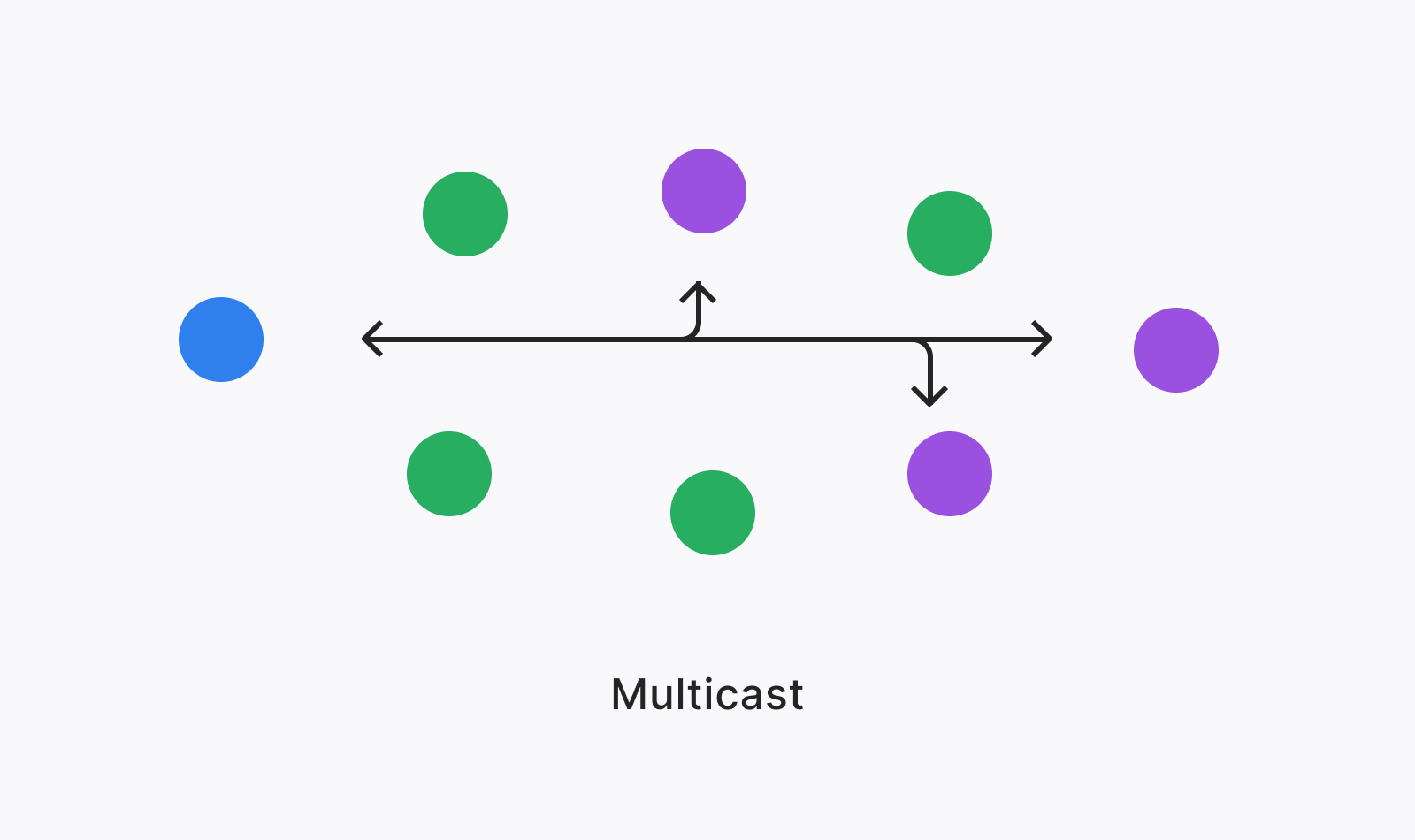
Multicast is a one-to-many communication process. Multicast has one sender and many receivers. If we had one bit of data we needed to send out, then it's as if all the receivers are on the same line and sharing that information that gets sent out.
### Unicast and Multicast in the world of Promises vs. Observables
Promises are multicast, only. Like we talked above, Promises are very eager; they get super excited to send their information to anyone who wants it. They have that line of communication open, and anyone who jumps onto the call will hear the data.
Observables are also multicast but unicast as well. By default, Observables are unicast, making every result get passed to a single, unique subscriber. But Observables allow for the developer to utilize both unicast and multicast benefits. Observables don't care; they just want to get that information out when it's subscribed to.
## Functionality
So far, with this information, there are some clear benefits to using both. Another relevant comparison is the functionality of each one. They both take in data, and they both produce an output. Let's look at how Promises and Observables would each handle an API call.
### The Promises way
Both Promises and Observables will "fetch" the data from the API. Let's see how Promises would handle that data.
To fetch that data, we should see something like this:
```javascript
function fetchTheData(){
return fetch('my-api-call-here');
}
```
Once we have that data, let's unwrap that data in a `.then` so we can use it:
```javascript
function fetchTheData() {
return fetch('my-api-call-here');
.then(resp => resp.json()); // added line
}
```
If we wanted to, we could use an outside function to help handle the data. That would look like this:
```javascript
function fetchTheData() {
return fetch('my-api-call-here');
.then(resp => resp.json());
.then(outsideFunction); // added line
}
// our outside function
function outsideFunction(){
// stuff here
}
```
Sometimes there can be a lot of data coming in, and we want to filter through it all. Let's add on the `filter` method and see how that would change things:
```javascript
function fetchTheData() {
return fetch('my-api-call-here');
.then(resp => resp.json())
.then(data => data.filter('callback here')) // added line
.then(outsideFunction);
}
function outsideFunction() {
// stuff here
}
```
> Something we do not want to forget is that we have `async/await` that we could use. We can learn more about [async here](https://developer.mozilla.org/en-US/docs/Web/JavaScript/Reference/Statements/async_function) and [await here](https://developer.mozilla.org/en-US/docs/Web/JavaScript/Reference/Operators/await).
Now with this example, we have done three things.
1. Grabbed data
2. Unwrapped the data
3. Filtered through said data
Next, let's look at how the code would be with Observables!
### The Observables way
We want to try and accomplish the same thing that we just did with the Promises. Let's fetch some data! Only this time we'll be using [`fromFetch`](https://rxjs-dev.firebaseapp.com/api/fetch/fromFetch) that uses the [Fetch API](https://developer.mozilla.org/en-US/docs/Web/API/Fetch_API):
```javascript
fromFetch('my-api-call-here');
```
There are many ways to unpack data from an API call, and in today's example, we'll use [`switchMap`](https://rxjs-dev.firebaseapp.com/api/operators/switchMap). The benefit of using `switchMap` is that it can cancel any redundant HTTP requests. There are others like [`map`](https://rxjs-dev.firebaseapp.com/api/operators/map), [`flatMap`](https://rxjs-dev.firebaseapp.com/api/operators/flatMap), and [`concatMap`](https://rxjs-dev.firebaseapp.com/api/operators/concatMap) but we are not going to go over those. Also, what are all these methods that we are using? We'll chat about that in a moment.
```javascript
fromFetch('my-api-call-here')
.pipe(
switchMap(resp => resp.json());
)
```
Like we did with Promises, let's look at how we could filter through that data:
```javascript
fromFetch('my-api-call-here');
.pipe(
switchMap(resp => resp.json());
filter('filterstuffhere')
)
```
> Note: These must be "subscribed" to as well.
## Operators
Okay, let's talk about Operators for a second. When we used `switchMap`, that was an RxJS Operator. Operators are what make RxJS super convenient. Adding an Operator can give a lot of complex code with just a few lines or a few words even. Operators can promote a functional way to process data and this is important from a unit testing perspective. There are many Operators, and learning or understanding them can be a steep learning curve. But once we can wrap our heads around them or at least understand a good chunk of them, we'll be shocked at how much they can do.
Want to learn more about Operators? Visit [this link](https://rxjs-dev.firebaseapp.com/guide/operators)!
### Functionality overview
We have now demonstrated how to fetch data, unwrap that data, and filter through it using both Promises and Observables. Both can get the job done, but let's note that once things get more complicated, Promises need a lot of the logic written out, whereas Observables have the power of Operators. Is that a benefit? Maybe. Maybe not. With that steep learning curve and so many Operators to "filter" (😂) through, it could slow the project down.
I'll leave you to decide which one you think adds the most value here.
## Ability to Cancel
When a Promise or Observable is running, how do we make it stop? How do we cancel that function from continuing to run?
Both can be canceled but in such different ways. Let's check them out.
A Promise is not cancellable, naturally. Can it be? Yes. There is a nifty third-party library that we can add to our project that can help in canceling a Promise. If we were to look at the [bluebird.js docs](http://bluebirdjs.com/docs/api/cancellation.html), it would show us exactly how to use it to cancel a Promise. We won't go over it in this article, but we can visit that link if we want to learn more.
It's pretty straightforward, although it does add a lot of extra stuff to the project.
With Observables, those are cancellable. Let's see how:
```javascript
Observable$.unsubscribe()
```
And that's it! To wake up an Observable, we would `.subscribe()` to it, and to cancel the process, we would `.unsubscribe()` from it. That makes for quick and even more straightforward cancellation.
## Promise.race() vs race
In our final comparison, we will look at `Promise.race()` and the `race` Operator. We'll demonstrate this with the game: Which `console.log()` Would Get Logged First!
> Note: To learn more about these, please visit [this link for `Promise.race()`](https://developer.mozilla.org/en-US/docs/Web/JavaScript/Reference/Global_Objects/Promise/race) and [this link for `race`](https://www.learnrxjs.io/operators/combination/race.html).
### A look at the Promises way
Let's say we have two Promises that need to run. We'll put them both within a `Promise.race()` and see what happens.
What we are trying to accomplish here is what returns (or consoles in our example) first.
```javascript
Promise.race([
fastPromise.then(() => console.log('This is a race.'))
.then(() => 'Who will win?'),
slowPromise.then(() => console.log('Am I the winner?'))
])
.then(x => console.log(x))
```
The output for this would be as follows:
* "This is a race."
* "Who will win?"
* "Am I the winner?"
Although this is only a little bit of data that consoles, this could be a problem in larger-scale apps. Like we talked about before, Promises are not cancellable by default, so the entire thing has to run. What if we only wanted the fastest, first response to be recorded and returned? We could be wasting time and the user's time because we are trying to load everything at once.
### A look at the Observables way
If Observables wanted to race, we would want to use the `race` operator. Whichever Observable wins the "race" is what gets emitted.
```javascript
race(
fast$.pipe(tap(() => console.log('This is a race.')),
map(() => 'Who will win?')),
slow$.pipe(tap(() => console.log('Am I the winner?'))
)
.subscribe(x => console.log(x))
```
This output would be:
* "This is a race."
* "Who will win?"
The moment we have a winner, the race is over, and we get our desired information. Observables are cancellable, so they cancel the slower Observable because we only want the quickest data.
Is our project needing only the winning data? If so, Observables might be a better way because of how it cancels once that winner is declared.
## So Which to Use?
Eh, this is still tough. Honestly, it all depends on the project.
RxJS has a steep learning curve, and Promises come built into JavaScript. But then we get Operators with RxJS, and those are so convenient! It's a toss-up!
Some reasons why we would want to use a Promise:
* We need to handle the event, no matter what. We want that response.
* We want only one event handling to occur.
Some reasons why we would want to use an Observable:
* We want to be able to "unsubscribe" from a stream of data.
* The ability to accept multiple events from the same source.
## Conclusion
So which to use, Promises or Observables? The world may never know the answer. But we sure can keep up on the knowledge of how one could benefit our project. It's good to understand both and know when one would be more beneficial than the other.
Let me know your thoughts in the comments below. What are some other comparisons you've seen that must be brought to the table?
---