---
title: "Improving the Way You Configure Security Settings in the Auth0 Dashboard"
description: "A simpler user experience for the teams in charge of protecting your end-user identities."
authors:
- name: "Gino Cingolani Trucco"
url: "https://auth0.com/blog/authors/gino-cingolani-trucco/"
date: "Dec 9, 2020"
category: "Developers,Product,Auth0 Dashboard"
tags: ["dashboard", "security", "settings"]
url: "https://auth0.com/blog/improving-the-way-you-configure-security-settings-in-the-dashboard/"
---
# Improving the Way You Configure Security Settings in the Auth0 Dashboard
Security is one of the [main concerns for any software company](https://auth0.com/resources/whitepapers/broken-authentication), and nowadays, every company is a software one. One [security incident or data breach](https://auth0.com/blog/reducing-the-impact-of-credential-stuffing-attacks/) can make customers lose trust in an organization or even put the entire business at risk. At Auth0, we know that, and that's why we've been laser-focused on [improving the security capabilities](https://auth0.com/resources/whitepapers/real-time-credential-stuffing-attack) of our product over the last months.
From the moment we started engaging heavily with our customers' security teams, we heard feedback that the experience of configuring security features could be much better. Today we're introducing a new and improved way to configure all the security-related features in your Auth0 dashboard. Our aim is to provide a simpler and clear experience for developers, operators, and administrators in your tenant.
Here's a quick demo of the changes:
## A Single Destination
[Multi-factor authentication](https://auth0.com/docs/mfa) and Anomaly Detection are the key-feature sets our customers use to protect their users' accounts. Used separately or in combination, these features have the ability to identify and stop malicious access attempts before they occur. We grouped them into a unified section in our Management dashboard called Security. By doing this, we're creating a centralized place that will be the main destination for security teams and where the current and the upcoming functionalities will live in our dashboard.
## Better Feature Names, Aligned With Industry
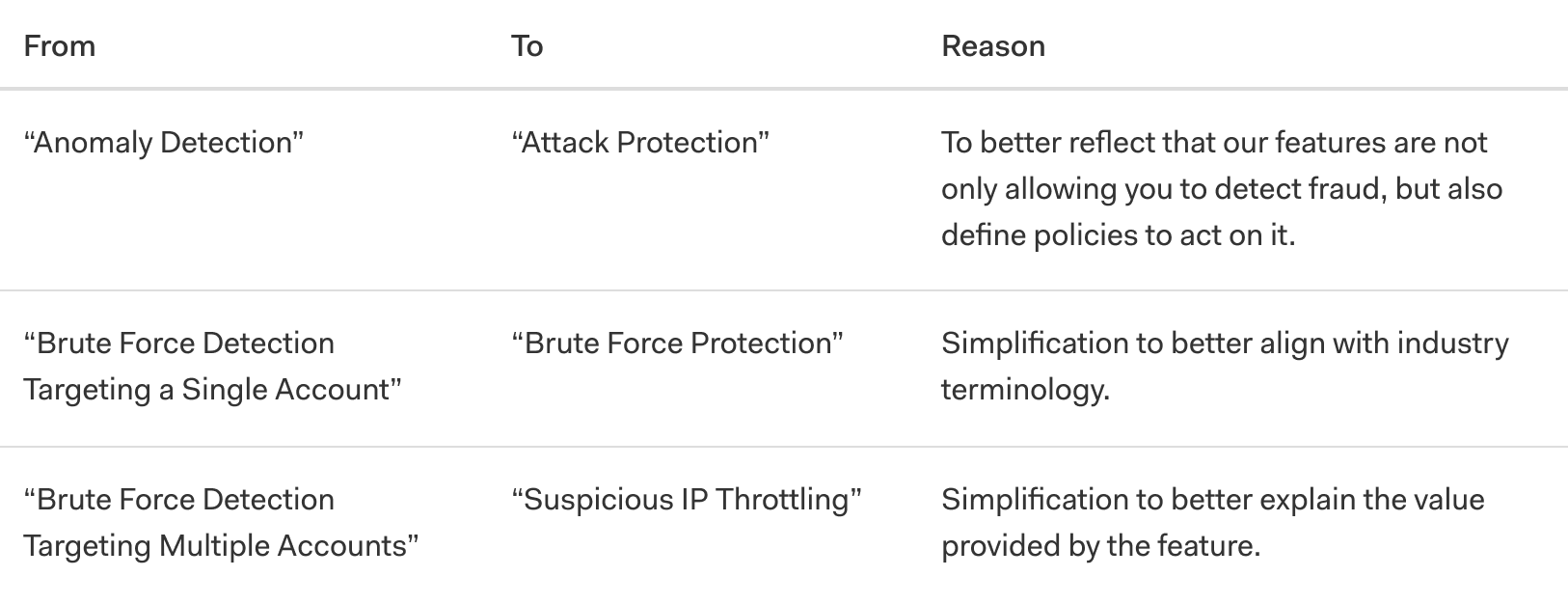
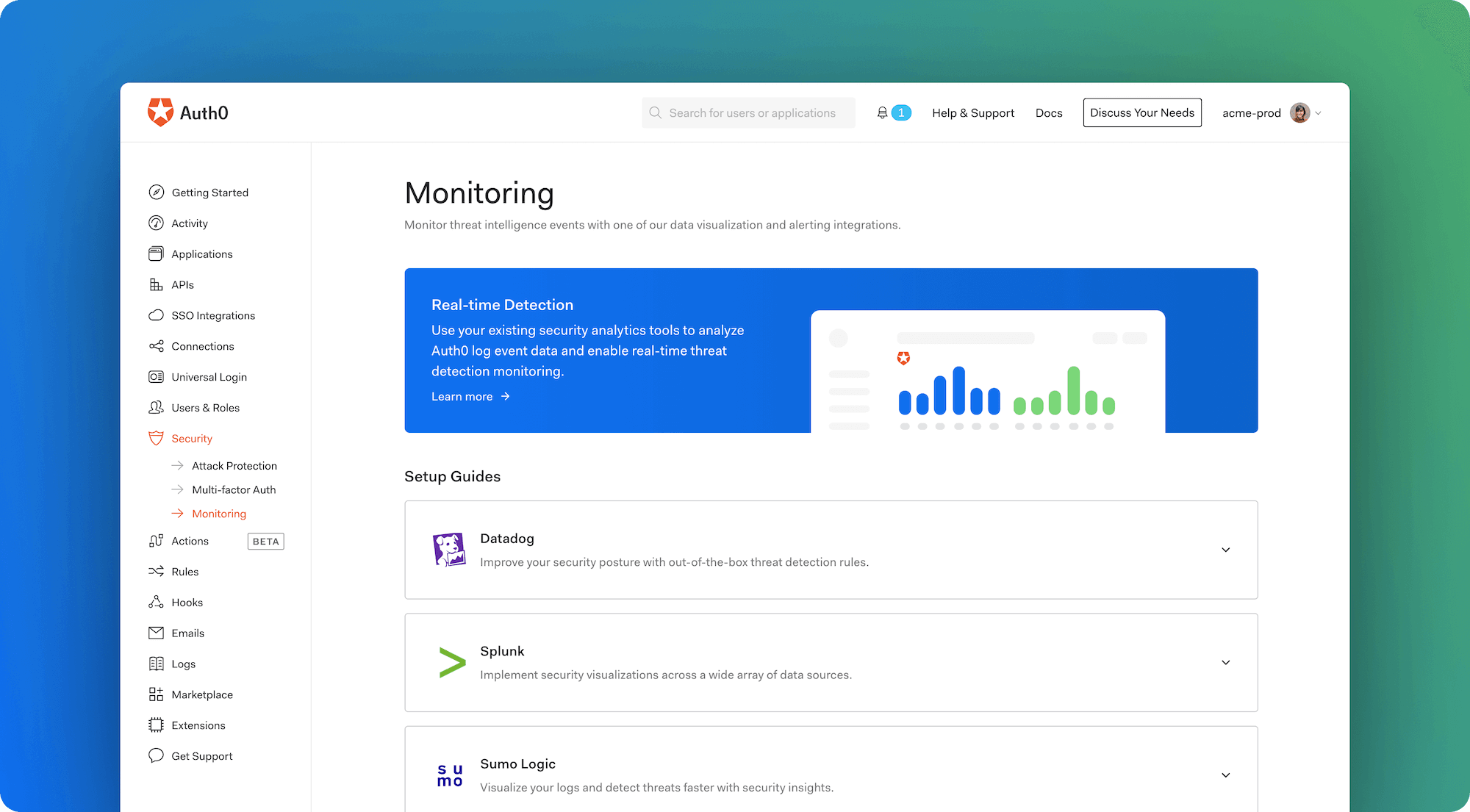
We listened to feedback from many customers, and one of the most common comments is that some of Auth0's feature names could use more clarity. For example, while any security engineer could understand what a brute force attack is, few could guess what our feature "Brute Force Protection Targeting Multiple Accounts" did. In this case, the feature actually throttles traffic from IPs that are sending a suspicious number of requests, attempting to login to a large number of accounts. In this particular example, we renamed the feature "Suspicious IP Throttling," which clearly reflects what the feature does.
## Status Overview
On the new Attack Protection view, teams [can quickly understand if a feature is disabled, in monitoring mode, or enabled](https://auth0.com/docs/attack-protection). Monitoring mode means that the events triggered by the functionality are being logged in the Auth0 Tenant Logs. Enabled means that in addition to the events being logged, a response is triggered. That response can be a CAPTCHA displayed when a suspicious login is detected with Bot Protection, an IP being throttled when an automated attack is detected with Suspicious IP Throttling, a user block for multiple failed attempts to one account from a single IP with Brute Force Protection, or blocking a user with compromised credentials with Breached Password Detection.
## Monitoring Guides to Empower Security Teams
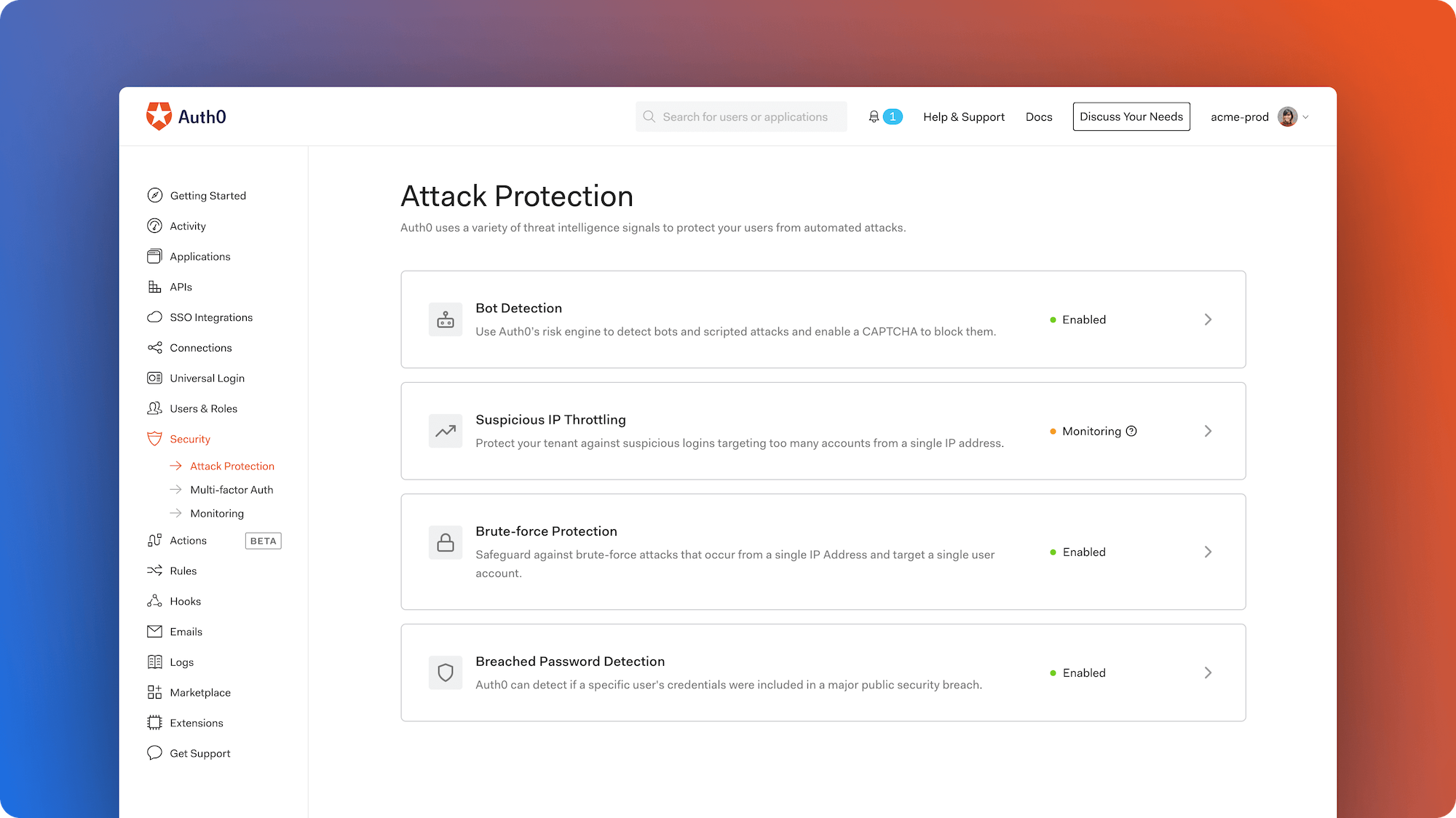
At Auth0, we know that security teams want to access the information they need with the tools they already use and love. That's why we crafted guides to empower and enable teams to build security-oriented dashboards on third-party analytics tools. By [leveraging the power of our Log Streaming feature](https://marketplace.auth0.com/features/log-streaming), customers can stream events to [Datadog](https://auth0.com/blog/auth0-partners-with-datadog-to-deliver-mission-critical-identity-data-in-near-real-time/), [Splunk](https://auth0.com/blog/auth0-and-splunk-provide-enhanced-security-and-operational-monitoring-and-insights/), and [Sumo Logic](https://auth0.com/blog/auth0-partners-with-sumo-logic-for-continuous-intelligence/) and build powerful dashboards to enable real-time threat detection monitoring.
## Learn More and Give Us Feedback
* Let us know what you think using [Auth0 Community](https://community.auth0.com/t/improving-the-way-you-configure-security-settings-in-the-auth0-dashboard/54556).
* Read the updated [Attack Protection](https://auth0.com/docs/attack-protection) documentation.
* Understand [how you can use Multi-factor Authentication](https://auth0.com/blog/multifactor-authentication-mfa/) to protect your users.
* Learn more about [our recently launched beta for WebAuthN](https://auth0.com/blog/fido-security-key-support-comes-to-auth0/) with security keys.