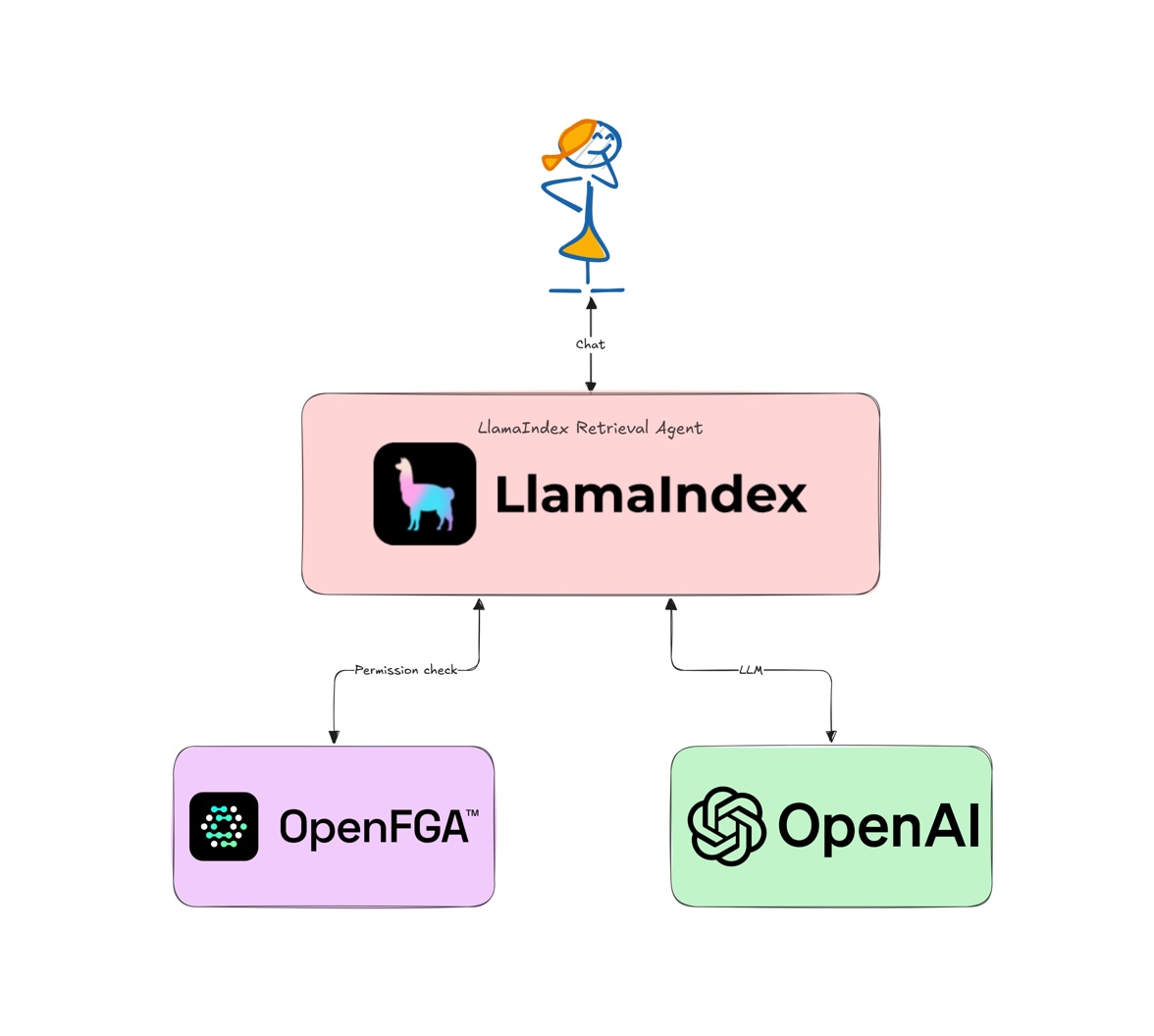
TL;DR: Sensitive Information Disclosure is a common issue for RAG-based systems. Traditional RBAC is not enough to secure RAG applications and agents — this is where Fine-Grained Authorization (FGA) comes in. This tutorial builds a simple RAG agent using LlamaIndex.TS and secures it using Auth0 FGA.
Generative Artificial Intelligence (GenAI) has massively changed the software landscape and AI agents are all the rage now. AI agents can also be used for complex Retrieval-Augmented Generation (RAG) systems where additional context can be provided to the Large Language Model (LLM) by retrieving updated or domain-specific data from a database or a search engine. This technique can reduce hallucinations and improve accuracy of the LLM. AI agents can also use RAG as a tool to perform complex workflows.
Sensitive Information Disclosure is a common issue that plagues RAG-based systems. We don't want the LLM to accidentally access or expose sensitive data from a database. Traditional Role-Based Access Control (RBAC) systems are not enough to secure RAG applications and agents. This is where Fine-Grained Authorization (FGA) shines as a solution.
If you would like to learn the basics of using FGA for RAG, check out this blog post on RAG and Access Control: Where Do You Start?.

Learn how to get started with Auth0 FGA for a RAG application.
In this tutorial, we will build a simple RAG agent using the LlamaIndex.TS, which is the JavaScript version of the popular LlamaIndex framework, and secure it using Auth0 FGA.
Prerequisites
This tutorial was created with the following tools and services:
- NodeJS v20
- An Auth0 FGA account. Create one.
- An OpenAI account and API key. Create one.
Why LlamaIndex for RAG?
LlamaIndex is a flexible framework for building AI agents and RAG applications. It provides Python and JavaScript SDKs to interact with a variety of LLMs and databases. LlamaIndex can be used to build AI agents and workflows that can interact with the user, retrieve data from a database, and generate responses using an LLM. It also provides tools like LlamaParse to transform unstructured data into LLM-optimized formats and LlamaCloud to store and retrieve LLM-ready data from the cloud.
Set Up a LlamaIndex RAG Application
To get started, clone the auth0-ai-samples repository from GitHub:
git clone https://github.com/auth0-samples/auth0-ai-samples.git
cd auth0-ai-samples/authorization-for-rag/llamaindex-agentic-js
# install dependencies
npm install
The application is written in TypeScript for the Node.js platform and is structured as follows:
index.ts: The main entry point of the application that defines the RAG pipeline.assets/docs/*.md: Sample markdown documents that will be used as context for the LLM. We have public and private documents for demonstration purposes.scripts/fga-init.ts: Utility to initialize the Auth0 FGA authorization model.
Let us look at the important bits and pieces before we run the application.
Building the RAG Pipeline
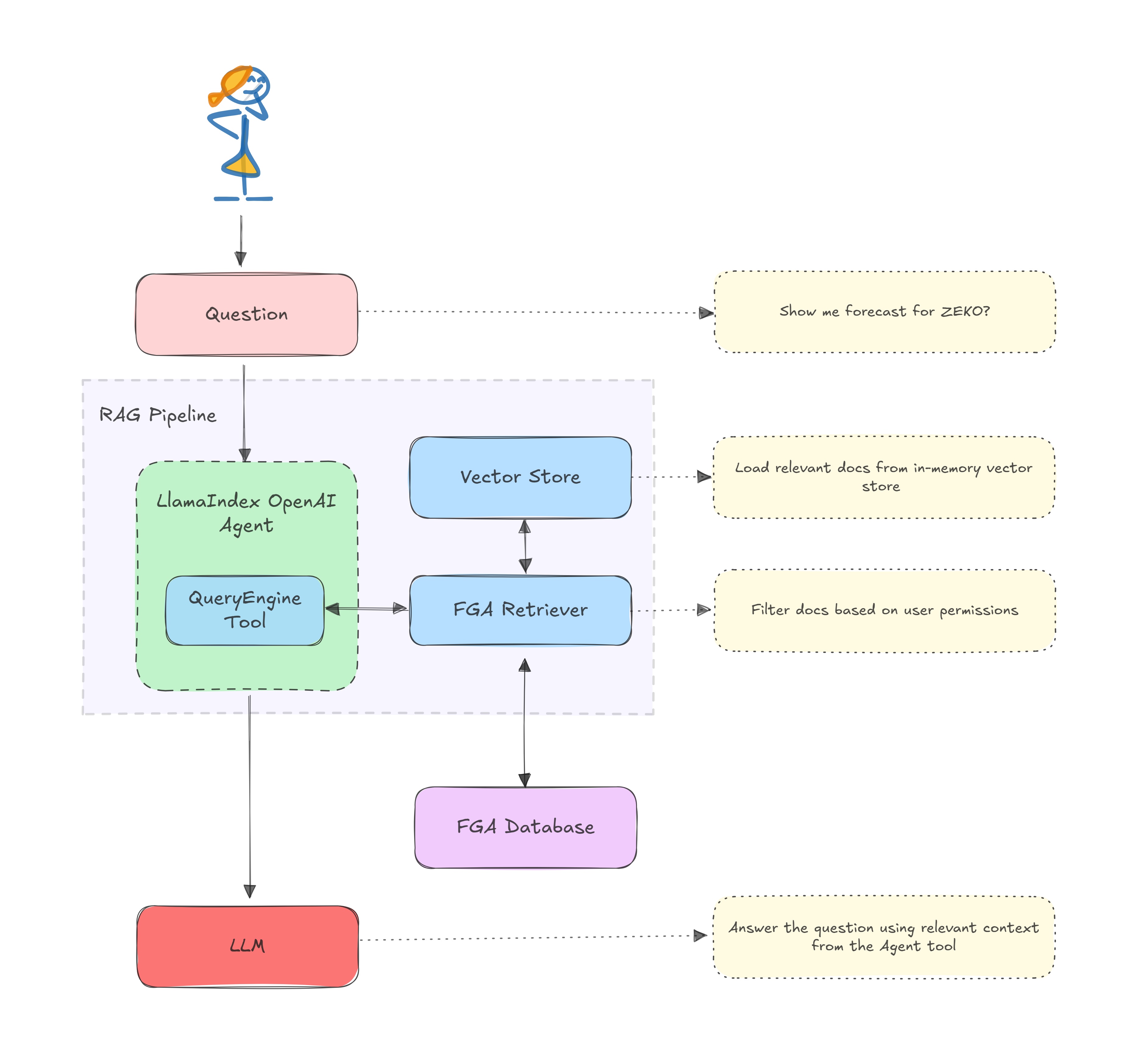
The RAG pipeline is defined in index.ts. It uses LlamaIndex Agents to interact with the underlying LLM and retrieve data from the database. The pipeline is defined as follows:
/** index.ts **/
const user = 'user1';
// 1. Read and load documents from the assets folder
const documents = await readDocuments();
// 2. Create an in-memory vector store from the documents using the default OpenAI embeddings
const vectorStoreIndex = await VectorStoreIndex.fromDocuments(documents);

// 3. Create query engine using the default OpenAI's LLM
const queryEngine = vectorStoreIndex.asQueryEngine({
    // 4. Decorate the retriever with the FGARetriever to check the permissions.
    retriever: FGARetriever.create({
      retriever: vectorStoreIndex.asRetriever(),
      // FGA tuple to query for the user's permissions
      buildQuery: (document) => ({
        user: `user:${user}`,
        object: `doc:${document.node.metadata.id}`,
        relation: "viewer",
      }),
    }),
  });

// 5. Create a query engine and convert it into a tool

const tools = [
  new QueryEngineTool({
    queryEngine,
    metadata: {
      name: 'zeko-internal-tool',
      description: `This tool can answer detailed questions about ZEKO.`,
    },
  }),
];

// 6. Create an agent using the tools
arrayconst agent = new OpenAIAgent({ tools });

// 7. Query the agent
let response = await agent.chat({ message: 'Show me forecast for ZEKO?' });
Here is a visual representation of the RAG architecture
Filtering Documents with FGA
The FGARetriever class filters documents based on the authorization model defined in Auth0 FGA and will be available as part of the auth0-ai-js SDK. This retriever is a post-search filter ideal for scenarios where you already have documents in a vector store and want to filter the vector store results based on the user's permissions. Assuming the vector store already narrows down the documents to a few, the FGA retriever will further narrow down the documents to only the ones to which the user has access.
The retriever can be installed using the following command:
npm install @auth0/ai @auth0/ai-llamaindex
The build query function is used to construct the query to the FGA store. The query is constructed using the user, object, and relation. The user is the user ID, the object is the document ID or the document name, and the relation is the permission that the user must have on the document.
buildQuery: (document) => ({
  user: `user:${user}`,
  object: `doc:${document.node.metadata.id}`,
  relation: "viewer",
}),
Building the Retrieval Agent
The
queryEngineis created from the vector store index and configured to use our custom FGA retriever. The query engine handles searching through documents and retrieving relevant information based on user queries.The
toolsarray contains aQueryEngineToolthat wraps our query engine. The tool provides a structured interface for the agent to access the query engine's capabilities.The
agentis created using OpenAI's GPT-4 model and the tools array. The agent acts as an intelligent interface between the user and the tools - it understands natural language queries, determines when to use the query engine tool, and formulates responses based on the retrieved information.
/** index.ts **/
const queryEngine = vectorStoreIndex.asQueryEngine({ retriever });
const tools = [
  new QueryEngineTool({
    queryEngine,
    metadata: {
      name: 'zeko-internal-tool',
      description: `This tool can answer detailed questions about ZEKO.`,
    },
  }),
];

// 5. Create an agent using the tools array and OpenAI GPT-4 LLM
const agent = new OpenAIAgent({ tools });
Setting Up the Auth0 FGA Authorization Model
In the Auth0 FGA dashboard, navigate to Settings, and in the Authorized Clients section, click + Create Client. Give your client a name, mark all three client permissions, and then click Create.
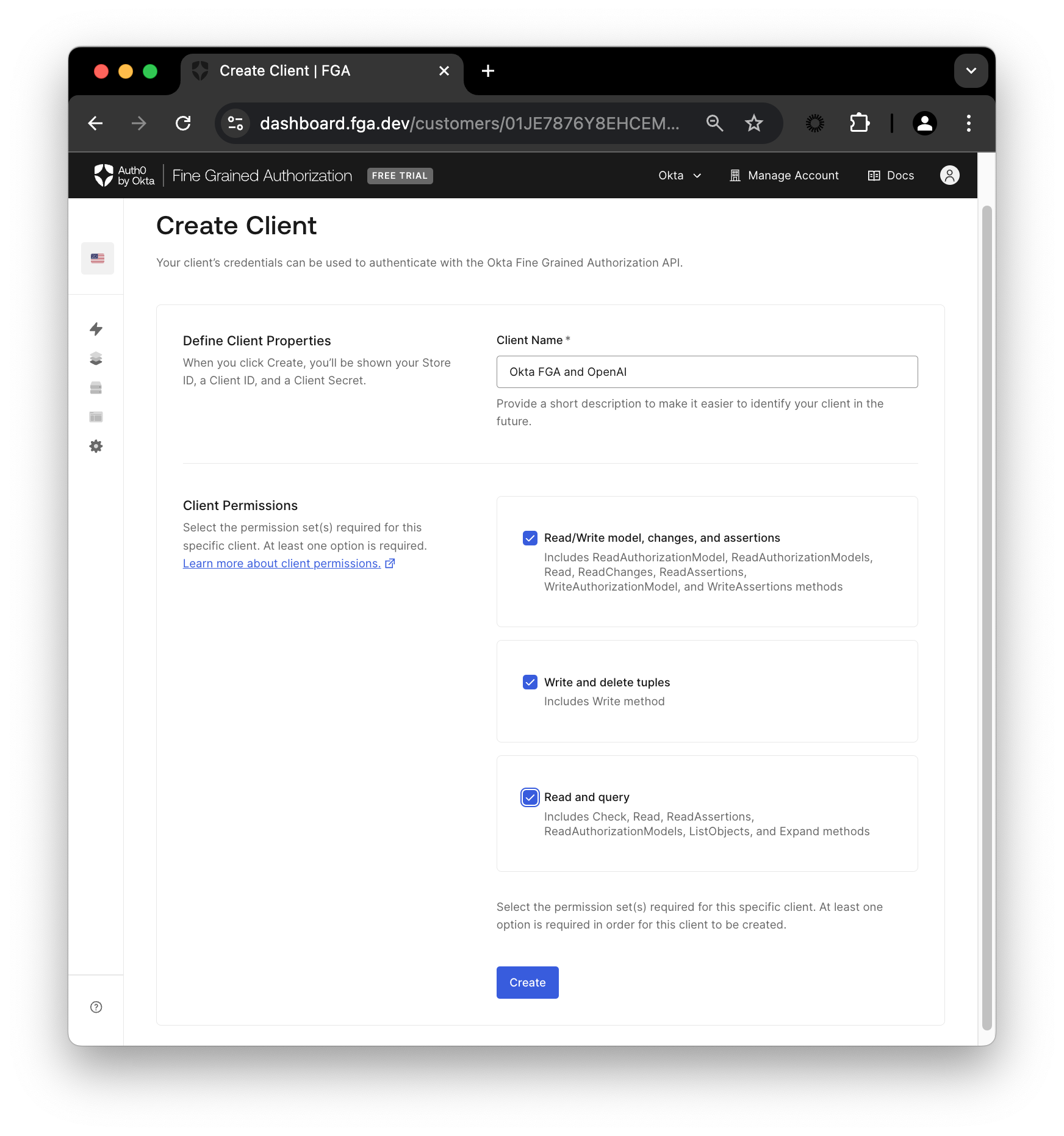
Once your client is created, you’ll see a modal containing Store ID, Client ID, and Client Secret.
Add a .env file with the following content to the root of the project. Click Continue to see the FGA_API_URL and FGA_API_AUDIENCE.
# OpenAI
OPENAI_API_KEY=<your-openai-api-key>

# Auth0 FGA
FGA_STORE_ID=<your-fga-store-id>
FGA_CLIENT_ID=<your-fga-store-client-id>
FGA_CLIENT_SECRET=<your-fga-store-client-secret>
# Required only for non-US regions
FGA_API_URL=https://api.xxx.fga.dev
FGA_API_AUDIENCE=https://api.xxx.fga.dev/
Check the instructions here to find your OpenAI API key.
Next, navigate to Model Explorer. You’ll need to update the model information with this:
model
  schema 1.1

type user

type doc
  relations
    define owner: [user]
    define viewer: [user, user:*]
Remember to click Save.
Check out this documentation to learn more about creating an authorization model in FGA.
Now, to have access to the public information, you’ll need to add a tuple on FGA. Navigate to the Tuple Management section and click + Add Tuple, fill in the following information:
- User :
user:* - Object : select doc and add
public-docin the ID field - Relation :
viewer
A tuple signifies a user’s relation to a given object. For example, the above tuple implies that all users can view the public-doc object.
Alternatively, you can use the
scripts/fga-init.tsscript to initialize the FGA store with the model and tuple. Run thenpm run fga:initcommand after setting up the.envfile.
Testing Permission Enforcement in Real Time
Now that you have set up the application and the FGA store, you can run the application using the following command:
npm start
The application will start with the query, Show me forecast for ZEKO? Since this information is in a private document, and we haven't defined a tuple with access to this document, the application will not be able to retrieve it. The FGA retriever will filter out the private document from the vector store results and, hence, print a similar output.
The provided context does not include specific forecasts or projections for Zeko Advanced Systems Inc. ...
If you change the query to something that is available in the public document, the application will be able to retrieve the information.
Now, to have access to the private information, you’ll need to update your tuple list. Go back to the Auth0 FGA dashboard in the Tuple Management section and click + Add Tuple, fill in the following information:
- User :
user:user1 - Object : select doc and add
private-docin the ID field - Relation :
viewer
Now click Add Tuple and then run the script again:
npm start
This time, you should see a response containing the forecast information since we added a tuple that defines the viewer relation for user1 to the private-doc object.
Congratulations! You have run a simple RAG application using LlamaIndex and secured it using Auth0 FGA.
Learn More about Auth0 for AI Agents, Auth0 FGA and GenAI
In this post, you learned how to secure a LlamaIndex-based RAG application using Auth0's Auth0 for AI Agents and Auth0 FGA. Auth0 FGA is built on top of OpenFGA, which is open-source. We invite you to check out the OpenFGA code on GitHub.
Before you go, we have some great news to share: we are working on more content and sample apps in collaboration with amazing GenAI frameworks like LlamaIndex, LangChain, CrewAI, Vercel AI SDK, and GenKit. Auth0 for AI Agents is our upcoming product to help you protect your user's information in GenAI-powered applications. Make sure to join the Auth0 Lab Discord server to hear more and ask questions.
Frequently Asked Questions
About the author

Deepu K Sasidharan
Principal Developer Advocate