---
title: "Exploring .NET Core 3.0. What's New?"
description: "Learn about the new features introduced by the .NET Core 3.0 release."
authors:
- name: "Andrea Chiarelli"
url: "https://auth0.com/blog/authors/andrea-chiarelli/"
date: "Oct 15, 2021"
category: "Developers,Whats New,.NET"
tags: ["dotnet", "dotnet-core", ".net", ".net-core", "web", "web-development", "whats-new", "c#", "csharp", "aspnet", "asp-net"]
url: "https://auth0.com/blog/exploring-dotnet-core-3-whats-new/"
---
# Exploring .NET Core 3.0. What's New?
**TL;DR:** Take a look at the new features available in NET Core 3.0. This post will provide you with an overview of the latest release of the well-known Microsoft development platform.
## .NET Core 3.0 and the .NET Unification
After more than 12 years from its first release, .NET has reached a crucial point in the ecosystem transformation announced last May: [the .NET platform unification into .NET 5](https://devblogs.microsoft.com/dotnet/introducing-net-5/). This crucial point is represented by the release of [.NET Core 3.0](https://dotnet.microsoft.com/download/dotnet-core/3.0) launched these days at [.NET Conf](https://www.dotnetconf.net/).
In recent years, continuous innovation and the desire to bring .NET to platforms other than Windows has created fragmentation in the ecosystem. Developers had to deal with different targets, such as .NET Framework, .NET Core, Mono and so on. The [.NET Standard](https://github.com/dotnet/standard) should have put the house in order, but maybe it risked complicating things. The .NET unification aims to simplify the .NET development independently from the target system.
The preliminary efforts for this unification converge in the .NET Core 3.0 release bringing interesting new features and improvements. The new release also implements the latest [.NET Standard 2.1](https://github.com/dotnet/standard/blob/master/docs/versions/netstandard2.1.md) specifications. Far from covering all the new stuff, in this article, you will take a look at the most relevant of them.
> **Note**: In order to leverage the latest features of .NET Core 3.0 while developing your applications, you should use the [.NET Core 3.0 SDK](https://dotnet.microsoft.com/download) or [Visual Studio 2019 16.3](https://visualstudio.microsoft.com) or [Visual Studio 2019 for Mac 8.3](https://docs.microsoft.com/en-us/visualstudio/mac/?view=vsmac-2019).
## Executables and Performance Improvements
A few features of the new release aim to simplify application packaging and delivery.
For example, you can build a *single-file executable* containing all the dependencies required to run your application in a specific platform. This can be accomplished by using the `PublishSingleFile` flag with the `dotnet publish` command, as shown in the following example:
```shell
dotnet publish -r win10-x64 /p:PublishSingleFile=true
```
This command will create a single file package for your Windows 10 application.
Alternatively, you can edit your project file by adding the `PublishSingleFile` element, as follows:
```xml
win10-x64true
```
In addition, .NET Core now creates smaller executables by building [framework-dependent executables](https://docs.microsoft.com/en-us/dotnet/core/deploying/index#framework-dependent-executables-fde) by default. This means that `dotnet build` and `dotnet publish` commands create an executable that matches the platform of the .NET Core SDK you are using, avoiding to include .NET Core itself.
Some improvements relate to performance. In addition to some internal code optimization, now the [tiered compilation](https://devblogs.microsoft.com/dotnet/tiered-compilation-preview-in-net-core-2-1/) is active by default. This feature helps the *Just-In-Time* (JIT) compiler get better performance by adapting the generation of optimized code to the various stages of the execution of an application. For example, at startup, you can tolerate the generation of a non-optimized code since you are giving priority to the application responsiveness.
By the way, you can also improve the startup time of your application by compiling it in the **ReadyToRun** (R2R) format. Binaries built in this format reduce the amount of work of the JIT compiler, but they are larger. If you want to take advantage of it, you need to add the `PublishReadyToRun` key to your project configuration:
```xml
true
```
Then, you need to publish your application as a self-contained app. You can do this by running the `dotnet publish` command with the `--self-contained` flag, as shown in the following example:
```shell
dotnet publish -c Release -r win-x64 --self-contained true
```
## C# 8 Enhancements
One of the most awaited features of .NET Core 3.0 is the latest version of C#. In addition to some internal improvements to the compiler, C# 8 brings a few interesting new features to the language.
### Switch Expressions
*Switch expressions* are a very convenient way to map information in a compact fashion. Take a look at the following code:
```c#
public int Calculate(string operation, int operand1, int operand2) {
int result;
switch (operation) {
case "+":
result = operand1 + operand2;
break;
case "-":
result = operand1 - operand2;
break;
case "*":
result = operand1 * operand2;
break;
case "/":
result = operand1 / operand2;
break;
default:
throw new ArgumentException($ "The operation {operation} is invalid!");
}
return result;
}
```
It defines the `Calculate()` method that performs the four arithmetic operations based on the given arguments. In particular, the `operation` string is analyzed through a `switch` statement in order to detect the operation to perform.
You can rewrite this method in a more compact way as shown in the following code:
```c#
public int Calculate(string operation, int operand1, int operand2) {
var result = operation switch
{
"+" => operand1 + operand2,
"-" => operand1 - operand2,
"*" => operand1 * operand2,
"/" => operand1 / operand2,
_ =>
throw new ArgumentException($ "The operation {operation} is invalid!"),
};
return result;
}
```
As you can see, the `switch` keyword acts as an operator between the variable to check (`operation` in the example) and the map of expressions to evaluate. The resulting code is much more readable since you are now able to catch at a glance which expression matches the operation.
### Nullable Reference Types
One of the most common causes of bug is the *null reference exception*, due to the attempt to access a `null` value while you expect a *non-null* value. This type of exception comes out from the lack of a clear declaration of the developer intent. In other words, if you declare a variable without initializing it, like in the following example, its default value in C# before version 8 is `null`:
```c#
string myString;
```
This changes in C# 8. Any variable of a reference type is now considered a *non-nullable* reference type. That means that the compiler will emit a warning if the variable is not assigned a *non-null* value.
If you want your variable have `null` values, you must explicitly declare it as a *nullable reference type* by appending the well-known `?` at the type name, as shown below:
```c#
string? myString;
```
This change will have an impact on your existing code, even if just in helping you to easily find potential bugs. You can read [this tutorial](https://docs.microsoft.com/en-us/dotnet/csharp/tutorials/upgrade-to-nullable-references) in order to migrate your application to the *nullable reference type* system.
### Default Interface Members
This feature allows you to define a default implementation for a member of an interface. To understand how it works, consider the following example of an interface definition:
```c#
enum LogLevel
{
Information,
Warning,
Error
}
interface ILogger
{
void Log(LogLevel level, string message);
}
```
This code defines a very simple interface for a typical logger. You can define your own implementation with the following code:
```c#
class ConsoleLogger : ILogger
{
public void Log(LogLevel level, string message)
{
Console.Write($"{level}: {message}");
}
}
```
What happens if you add a new member to the interface? Of course, you are breaking the current implementations of that interface. With C# 8 you can define a default implementation for a member so that your existing implementations are preserved. The following is an example of an interface declaration that defines the `LogError()` method with a default implementation:
```c#
interface ILogger
{
void Log(LogLevel level, string message);
void LogError(string message)
{
Log(LogLevel.Error, message);
};
}
```
Your `ConsoleLogger` class will inherit the default implementation for the `LogError()` method.
### Asynchronous Streams
*Asynchronous streams*, also called *async streams*, allow you to create and consume data streams that may be retrieved or generated asynchronously. .NET Core 3.0 implements some new interfaces introduced in .NET Standard 2.1 in order to support this type of stream. C# 8 allows you to leverage them by using the new `IAsyncEnumerable` type in combination with the `async` modifier, the `await` keyword, and the `yield return` statement.
To take a very quick look at the *async streams* feature, consider the following snippet of code:
```c#
public async IAsyncEnumerable GetRelevantDataAsync()
{
Random random = new Random();
for (int i = 0; i < 1000; i++)
{
await Task.Delay(100);
int randomInteger = random.Next(0, 100);
if (randomInteger > 75) {
yield return randomInteger;
}
}
}
```
The `GetRelevantDataAsync()` method defines an asynchronous stream. It generates a random integer every 100 milliseconds but returns only numbers greater than 75.
The following code consumes the asynchronous stream generated by the `GetRelevantDataAsync()` method:
```c#
await foreach (var relevantInteger in GetRelevantDataAsync())
{
Console.WriteLine(relevantInteger);
}
```
Note the `await foreach` statement. It allows you to enumerate the asynchronous sequence of integers.
Other interesting features also come with C# 8. See [this document](https://docs.microsoft.com/en-us/dotnet/csharp/whats-new/csharp-8) to learn more.
## Improving ASP.NET Core
Along with some clean-up and updates of various templates, ASP.NET Core comes with a few new features that developers should be aware of. Here are some of them.
### New Options for MVC Service Registration
Three new extension methods for MVC service registration are now supported:
- `AddControllers`. This method is used when you are building a web API and don't need any server-side views
- `AddControllersWithViews`. You use this method when you are building an application that needs a web API and server-side views
- `AddRazorPages`. You need this method when your application uses Razor Pages — that is, pages using the [Razor template markup syntax](https://docs.microsoft.com/en-us/aspnet/core/mvc/views/razor?view=aspnetcore-3.0).
These extension methods should be used inside the `ConfigureService()` method of the `Startup` class of a ASP.NET application, as shown in the following example:
```c#
public void ConfigureServices(IServiceCollection services)
{
services.AddControllers();
}
```
They replace the `AddMvc()` method allowing more granular support based on the type of application you are building. However, the `AddMvc()` method has not been removed and it still works as usual.
### Endpoint Routing
In order to improve the endpoint routing process, it has been decoupled from the MVC middleware. Now you should use the `UseEndpoints()` method of the application instance instead of the `UseMvc()` method. The following is an example that uses it in the body of the `Configure()` method of the `Startup` class:
```c#
public void Configure(IApplicationBuilder app, IWebHostEnvironment env)
{
app.UseRouting();
app.UseEndpoints(endpoints =>
{
endpoints.MapControllers();
});
}
```
In this case, you assume that your application is just implementing a Web API and you map its controllers by using the `MapControllers()` method. If you are using Razor Pages, then you should use the `MapRazorPages()` method.
### Blazor Improvements
*[Blazor](https://dotnet.microsoft.com/apps/aspnet/web-apps/blazor)*, the Web UI framework you can use to create Web pages with ASP.NET, has some new features:
- *Authentication and authorization support*. You now have built-in support for [handling authentication and authorization](https://docs.microsoft.com/en-us/aspnet/core/security/blazor/?view=aspnetcore-3.0&tabs=visual-studio) in ASP.NET applications using Blazor.
- *Case-sensitive component binding*. Components defined in `.razor` files are now case-sensitive. This helps the Razor compiler to provide better diagnostic data and allows you to overcome some [tricky development scenarios](https://github.com/aspnet/AspNetCore/issues/9860).
- *Culture aware data binding*. Now, data-binding for `` elements takes into account the current culture as specified by the `System.Globalization.CultureInfo.CurrentCulture` property. This means that values will be formatted for display and parsed by using the current culture.
- *Razor Pages support for `@attribute`*. You can now use the `@attribute` directive in Razor Pages in order to specify attributes the same way you are doing with C# classes and members. For example, you can now specify that a page requires authorization in the following way:
```html
@page
@attribute [Microsoft.AspNetCore.Authorization.Authorize]
Protected page
```
Of course, these are just a few of the new features that have been added to Blazor.
### Other features
Many other features regarding ASP.NET Core are available with the new release. It would be impossible to talk about all them here, but the following should be at least mentioned:
- `BodyReader` *and* `BodyWriter`. These new members of the `HttpRequest` and `HttpResponse` classes respectively allow you to leverage the high performance of `System.IO.Pipelines`. This actually exposes to all developers the technology originally introduced for internal use in the Kestrel Web server.
- *Worker Service template*. This is a new project template for long-running tasks such as *Windows Services* or *Linux daemons*.
- *[gRPC](https://grpc.io) support*. Thanks to this new feature, you can build lightweight microservices or point-to-point real-time services with ASP.NET Core.
## Supporting Windows Desktop Applications
Maybe the most evident effort towards the .NET unification is the support for Windows desktop applications. With this addition, .NET Core 3.0 allows you to run new and existing Windows desktop applications using the UI framework of your choice.
In fact, the new release brings [Windows Forms](https://docs.microsoft.com/en-us/dotnet/framework/winforms/) (WinForms) and [Windows Presentation Foundation](https://docs.microsoft.com/en-us/dotnet/framework/wpf/) (WPF) to .NET Core. In addition, you will be able to include [Universal Windows Platform](https://docs.microsoft.com/en-us/windows/uwp/) (UWP) controls to your WPF and WinForms applications by using the so-called [XAML Islands](https://docs.microsoft.com/en-us/windows/apps/desktop/modernize/xaml-islands).
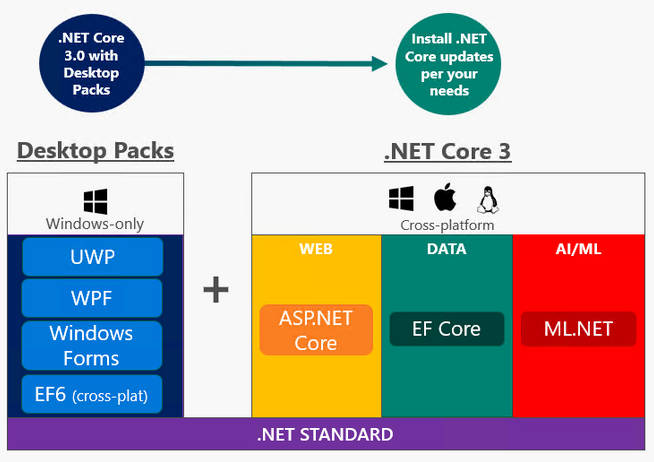
[[*Source: Microsoft*](https://devblogs.microsoft.com/dotnet/net-core-3-and-support-for-windows-desktop-applications/)]
You will have new .NET Core project templates in Visual Studio and will be able to create a new Windows Forms and WPF project via the `dotnet` command as shown in the following example:
```shell
dotnet new winforms
dotnet new wpf
```
Microsoft provides instructions to [port your Windows Forms](https://docs.microsoft.com/en-us/dotnet/core/porting/winforms) and [WPF](https://docs.microsoft.com/en-us/dotnet/core/porting/wpf) desktop applications from .NET Framework to .NET Core 3.0.
## The New Built-in JSON Engine
This new release of .NET Core no longer relies on [Json.NET](https://www.newtonsoft.com/json) to serialize and deserialize JSON data. A new JSON serialization library has been introduced in the `System.Text.Json` namespace. The built-in library offers high performance and low memory footprint and is the default library for the project templates involving JSON manipulation, such as the ASP.NET Core templates.
The library provides four types:
- `Utf8JsonReader`. It is a high-performance, forward-only reader for UTF-8 encoded JSON text. It should be considered a low-level reader useful to build custom JSON parsers.
- `Utf8JsonWriter`. This is the writing counterpart of `Utf8JsonReader`.
- `JsonDocument`. Based on the `Utf8JsonReader` class, this class allows you to parse JSON data and get a read-only DOM that you can navigate and query.
- `JsonSerializer`. This static class provides generic methods to serialize and deserialize JSON data.
By way of example, the following code serializes an anonymous object by using the `Serialize()` method of `JsonSerializer` class:
```c#
var book = new
{
Author = "John Smith",
Title = "Discovering .NET Core 3.0",
Price = 48.00
};
var serializedBook = System.Text.Json.JsonSerializer.Serialize(book);
```
## HTTP/2 Support
Support for HTTP/2 has been added to the [`HttpClient`](https://docs.microsoft.com/en-us/dotnet/api/system.net.http.httpclient?view=netcore-3.0) class. The default protocol remains HTTP/1.1, but you can enable HTTP/2 in two ways: at the `HttpClient` instance level or at the HTTP request level.
For example, the following code creates an `HttpClient` instance using HTTP/2 as its default protocol:
```c#
var client = new HttpClient()
{
BaseAddress = new Uri("https://localhost:5001"),
DefaultRequestVersion = new Version(2, 0)
};
```
On the other hand, the following example shows how to make a single request using the HTTP/2 protocol:
```c#
var client = new HttpClient() { BaseAddress = new Uri("https://localhost:5001") };
using (var request = new HttpRequestMessage(HttpMethod.Get, "/") { Version = new Version(2, 0) })
using (var response = await client.SendAsync(request))
Console.WriteLine(response.Content);
```
Remember that HTTP/2 needs to be supported by both the server and the client. If either party doesn't support HTTP/2, both will use HTTP/1.1.
## Aside: Securing ASP.NET Core 3.0 with Auth0
Securing ASP.NET Core 3.0 applications with Auth0 is easy and brings a lot of great features to the table. With [Auth0](https://auth0.com/), you only have to write a few lines of code to get solid [identity management solution](https://auth0.com/user-management), [single sign-on](https://auth0.com/docs/sso/single-sign-on), support for [social identity providers (like Facebook, GitHub, Twitter, etc.)](https://auth0.com/docs/identityproviders), and support for [enterprise identity providers (like Active Directory, LDAP, SAML, custom, etc.)](https://auth0.com/enterprise).
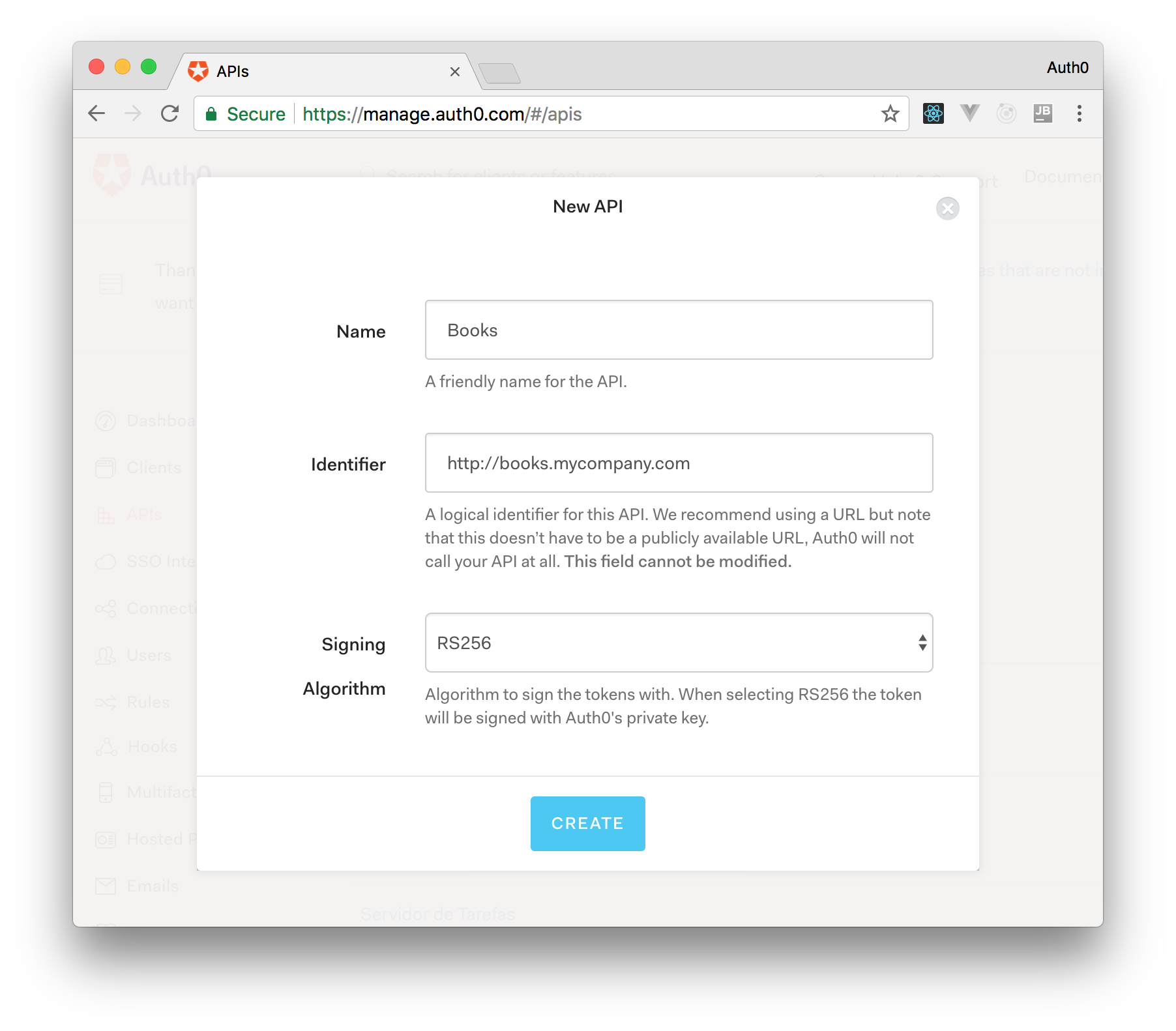
On ASP.NET Core 3.0, you need [to create an API in your Auth0 Management Dashboard](https://auth0.com/docs/apis) and change two things on your code. To create an API, you need to sign up for a free Auth0 account. After that, you need to go to [the API section of the dashboard](https://manage.auth0.com/#/apis) and click on "Create API". On the dialog shown, you can set the _Name_ of our API as "Books", the _Identifier_ as "http://books.mycompany.com", and leave the _Signing Algorithm_ as "RS256".
After that, you have to add the call to `services.AddAuthentication` in the `ConfigureServices` method of `Startup`:
```csharp
string domain = $"https://{Configuration["Auth0:Domain"]}/";
services.AddAuthentication(options =>
{
options.DefaultAuthenticateScheme = JwtBearerDefaults.AuthenticationScheme;
options.DefaultChallengeScheme = JwtBearerDefaults.AuthenticationScheme;
}).AddJwtBearer(options =>
{
options.Authority = domain;
options.Audience = Configuration["Auth0:Audience"];
});
```
You also need to add an invocation to `app.UseAuthentication()` in the body of `Configure()` method of `Startup`.
And add the following element to `appsettings.json`:
```json
{
"Logging": {
// ...
},
"Auth0": {
"Domain": "bk-samples.auth0.com",
"Audience": "http://books.mycompany.com"
}
}
```
> **Note** that the domain, in this case, **has to be changed** to the domain that you specified when creating your Auth0 account.
## Recap
In this article, you explored some of the new features of .NET Core 3.0. You read about application packaging and performance improvements provided by the platform and discovered switch expressions, asynchronous streams, and some other new features brought by C# 8.
You also learned how ASP.NET Core is going to replace some of the functionalities of ASP.NET MVC and which improvements are available in Blazor. You read about the new support of Windows Forms and WPF to port Windows desktop applications and peeked into other interesting new features.
Of course, it was impossible to cover all the new features of .NET Core 3.0 in one article, but the ones you discovered here give you an idea of what is going on in the .NET Core evolution.