---
title: "Developing and Securing GraphQL APIs with Laravel"
description: "Learn how to develop GraphQL APIs with Laravel and how to secure them with Auth0."
authors:
- name: "Andrea Chiarelli"
url: "https://auth0.com/blog/authors/andrea-chiarelli/"
date: "Mar 13, 2019"
category: "Developers,Tutorial,Laravel"
tags: ["laravel", "graphql", "api", "auth0", "php"]
url: "https://auth0.com/blog/developing-and-securing-graphql-apis-with-laravel/"
---
# Developing and Securing GraphQL APIs with Laravel
**TL;DR:** This article will show you how to use Laravel to implement a basic GraphQL API and how to secure it with Auth0. Throughout the article, you will learn how to implement the API step by step up to the final result. You can find the final code on this [GitHub repository](https://github.com/auth0-blog/laravel-graphql).
## The API You Will Build
The project you are going to build is an API providing a list of wines from all over the world. As mentioned before, you will build the API following the [GraphQL](https://graphql.org/) model. This model allows a client to request the exact data it needs, nothing more, nothing less. You will implement the GraphQL API by using [Laravel](https://laravel.com/), one of the most popular PHP frameworks that allows you to set up an application in minutes by exploiting its powerful infrastructure. Finally, you will learn how easy it is to secure your GraphQL API with Auth0.
Before starting the project, ensure you have [PHP](http://www.php.net/) and [MySQL](https://www.mysql.com/) installed on your machine. You will also need [Composer](https://getcomposer.org/), a dependency manager for PHP.
Once you have these tools installed on your machine, you are ready to build the *Wine Store* API.
## Setting up the Laravel PHP Project
The first step to create a Laravel project is to run the following command in a terminal:
```bash
composer create-project --prefer-dist laravel/laravel winestore
```
This command asks Composer to create a Laravel project named `winestore`. The result is a new directory called `winestore` right where you ran the command. This directory will have a few files and subdirectories as shown in the following picture:
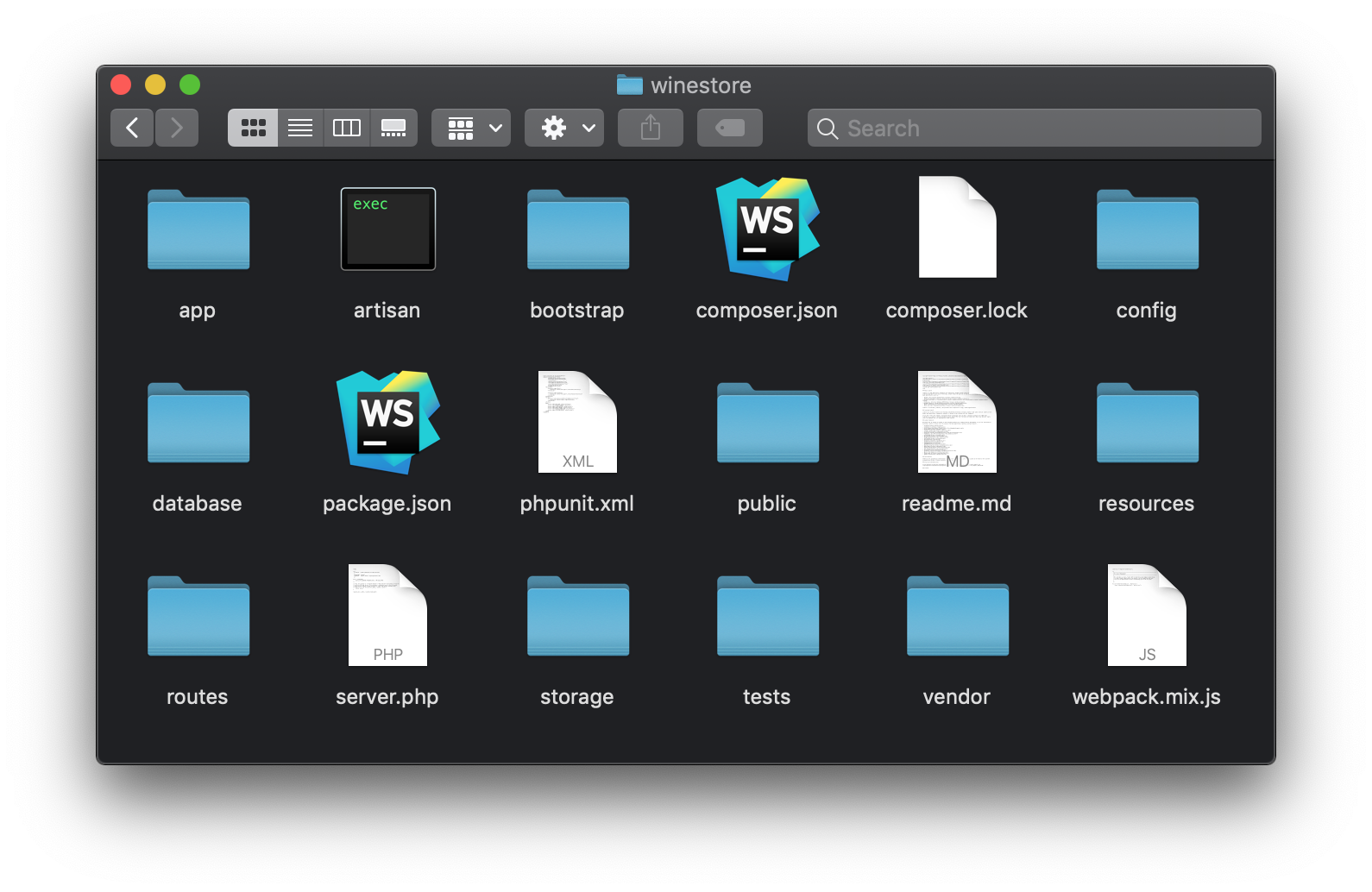
Don't worry if you are not acquainted with Laravel's structure. While you will build the application, you will learn the role of the most important directories and files.
## Creating the Wine Store Model
Now you can start to modify the scaffolded project to implement the *Wine Store* data model.
### Creating the Model and the Migration Script
For starters, you will need to use your terminal to move into the `winestore` project. After that you will run the following command:
```bash
# make sure you run it from the winestore directory
php artisan make:model Wine -m
```
This command will create the `Wine` model and, thanks to the `-m` flag, a migration script for database persistence.
The `Wine` model is implemented in the `Wine.php` file that you will find inside the `app` directory. In fact, the `app` directory contains the code representing the application's domain. The content of the `Wine.php` file will be as follows:
```php
// ./app/Wine.php
increments('id');
$table->string('name', 50);
$table->text('description');
$table->string('color', 10);
$table->string('grape_variety', 50);
$table->string('country', 50);
$table->timestamps();
});
}
/**
* Reverse the migrations.
*
* @return void
*/
public function down()
{
Schema::dropIfExists('wines');
}
}
```
> **Note:** The `up()` is executed when an _upgrade_ is applied to the database and the `down()` method is executed when a downgrade is applied.
As you can see, the code you inserted in this file is defining a few columns in your database (like `name`, `description`, and `country`). These columns will help you persist, in the database, the details of the wines.
### Add Seeders to the Database
To test the API you are about to create, you need to feed some initial data to your database. To do this, you can create a *seeder*. Seeders are classes that populate database tables. To create a seeder, type the following command:
```bash
# from the winestore directory
php artisan make:seeder WinesTableSeeder
```
This command will generate a new file called `WineTableSeeder.php` file in the `database/seeds` directory. Open this file and change its content with the following one:
```php
// ./database/seeds/WinesTableSeeder.php
'Classic Chianti',
'description' => 'A medium-bodied wine characterized by a marvelous freshness with a lingering, fruity finish',
'color' => 'red',
'grape_variety' => 'Sangiovese',
'country' => 'Italy'
]);
Wine::create([
'name' => 'Bordeaux',
'description' => 'A wine with fruit scents and flavors of blackberry, dark cherry, vanilla, coffee bean, and licorice. The wines are often concentrated, powerful, firm and tannic',
'color' => 'red',
'grape_variety' => 'Merlot',
'country' => 'France'
]);
Wine::create([
'name' => 'White Zinfandel',
'description' => 'Often abbreviated as White Zin, it is a dry to sweet wine, pink-colored rosé',
'color' => 'rosé',
'grape_variety' => 'Zinfandel',
'country' => 'USA'
]);
Wine::create([
'name' => 'Port',
'description' => 'A fortified sweet red wine, often served as a dessert wine',
'color' => 'red',
'grape_variety' => 'Touriga Nacional',
'country' => 'Portugal'
]);
Wine::create([
'name' => 'Prosecco',
'description' => 'It is a dry white wine (brut) sometimes with a sweet flavor of green apple, honeydew melon, pear, and honeysuckle',
'color' => 'white',
'grape_variety' => 'Glera',
'country' => 'Italy'
]);
}
}
```
The `run()` method of the `WinesTableSeeder` class creates instances of the `Wine` model based on the specified values. Now, edit the `DatabaseSeeder.php` file you find in the same folder and invoke the `WinesTableSeeder` class inside the `run()` method. The following is the resulting code:
```php
//database/seeds/DatabaseSeeder.php
call(WinesTableSeeder::class);
}
}
```
Now, open the `.env` file (which resides in the project's root) and configure the database parameters shown below accordingly to your development environment:
```text
DB_CONNECTION=mysql
DB_HOST=127.0.0.1
DB_PORT=3306
DB_DATABASE=homestead
DB_USERNAME=homestead
DB_PASSWORD=secret
```
> **Note:** If you don't have a MySQL database available and you have Docker, you can run the following code to start one:
>
> ```bash
> docker run --name mysql \
> -p 3306:3306 \
> -e MYSQL_ROOT_PASSWORD=myextremellysecretpassword \
> -e MYSQL_DATABASE=homestead \
> -e MYSQL_USER=homestead \
> -e MYSQL_PASSWORD=secret \
> -d mysql:5.7
> ````
After this preparation, you are ready to create the table schema and to populate it. Type the following in a console window:
```bash
php artisan migrate:fresh --seed
```
This command will clear the database, execute the migration scripts, and run the database seeder.
> **Note**: You may ask how the `Wine` model defined in the `Wine` class can be mapped to the `wines` table. This happens because, by convention, Eloquent maps a model to a table having the same lowercase name in the plural.
## Introducing GraphQL
So far, you defined the model and its database persistence. Now you can build the GraphQL API upon that.
### Why GraphQL
The API you are going to implement is based on [GraphQL](https://graphql.org/), a specification from Facebook defining a query language for APIs. With respect to classic REST APIs, GraphQL allows you to define a single endpoint providing multiple resources to the clients. This contributes to reduce network traffic and to potentially speed up client applications. In addition, GraphQL allows a client to request just the data it needs, avoiding to receive a resource with all possible information. Again, this reduces the network traffic and optimizes the data processing on the client side.
GraphQL achieves this result by defining an abstract language to describe queries, schemas, and types, in a similar way as in a database. As said before, GraphQL is a [specification](https://facebook.github.io/graphql/). This means that GraphQL is independent of any programming language. If you want to use it in your application, you need to choose among the [several available implementations](https://graphql.org/code/) available in almost any language.
### Installing the GraphQL Library
To support GraphQL in the application you're going to build you need to install a library that allows you to define schemas and queries in a simple way. The [Laravel GraphQL](https://github.com/rebing/graphql-laravel) library is one of the best for this purpose. To install it, issue the following command from the project root:
```bash
# issue this from the winestore directory:
composer require rebing/graphql-laravel
```
After the installation, you need to run the following command:
```bash
php artisan vendor:publish --provider="Rebing\GraphQL\GraphQLServiceProvider"
```
This command extracts the `graphql.php` configuration file from the `vendor` folder and put it into the `config` folder. This is a common approach that allows you to get one or more configuration files from a third party package so that you can change it for the needs of your application. You will use the `graphql.php` file later.
## Creating the GraphQL API Schema
Since GraphQL is a query language, you need to know how you can build your query, what type of object you can receive as a response, and what fields you can request from the server. A GraphQL API endpoint provides a complete description of what your client can query. This description is called *schema*, a collection of data defining the queries that a client can request, the type of the returned resources, the allowed change requests to the resources, also known as *mutations*, and others.
To keep things simple, your API will allow you to retrieve the list of wines in the *Wine Store* and a specific wine. So its schema will consist of queries and types.
### Creating the Wine Type
You will start by creating the API's schema by defining the resource returned. To do this, create the `GraphQL` directory inside the `app` directory. This directory will contain all the definitions you need for the GraphQL schema of the API. In the `app/GraphQL` directory, create the `Types` directory and put in it a file called `WineType.php` with the following content:
```php
// ./app/GraphQL/Types/WineType.php
'Wine',
'description' => 'Details about a wine',
'model' => Wine::class
];
public function fields()
{
return [
'id' => [
'type' => Type::nonNull(Type::int()),
'description' => 'Id of the wine',
],
'name' => [
'type' => Type::nonNull(Type::string()),
'description' => 'The name of the wine',
],
'description' => [
'type' => Type::nonNull(Type::string()),
'description' => 'Short description of the wine',
],
'color' => [
'type' => Type::nonNull(Type::string()),
'description' => 'The color of the wine',
],
'grape_variety' => [
'type' => Type::nonNull(Type::string()),
'description' => 'The grape variety of the wine',
],
'country' => [
'type' => Type::nonNull(Type::string()),
'description' => 'The country of origin of the wine',
]
];
}
}
```
This file defines the `WineType` class by extending `GraphQLType`. Notice the definition of three protected attributes that assign the name of the type (`Wine`), a description ("Details about a wine"), and the model the type is associated with (the `Wine` class you defined before). The `fields()` method returns an array with the property definitions of the resources your API will expose.
### Creating the GraphQL Queries
Now, create a `Queries` directory inside the `./app/GraphQL` directory and put there a file called `WinesQuery.php` with the following content:
```php
// ./app/GraphQL/Queries/WinesQuery.php
'wines',
];
public function type()
{
return Type::listOf(GraphQL::type('Wine'));
}
public function resolve($root, $args)
{
return Wine::all();
}
}
```
The `WinesQuery` class defined in this file represents a query that returns the list of wines from the *Wine Store*. You see that the query's name is `wines`. The `type()` method returns the type of the resource returned by the query, expressed as a list of `Wine` type items. The `resolve()` method actually returns the list of wines by using the `all()` method of the `Wine` model.
In the same way, create a second file in the `./app/GraphQL/Queries` directory called `WineQuery.php` (note that, this time, wine is singular). In this file, add the following code:
```php
// ./app/GraphQL/Queries/WineQuery.php
'wine',
];
public function type()
{
return GraphQL::type('Wine');
}
public function args()
{
return [
'id' => [
'name' => 'id',
'type' => Type::int(),
'rules' => ['required']
],
];
}
public function resolve($root, $args)
{
return Wine::findOrFail($args['id']);
}
}
```
In this case, the `WineQuery.php` file contains the definition of the query returning a _single_ wine identified by the `id` field. Notice that the definition of the `id` argument specifies that the argument must be an integer and that it is mandatory (`required`). You should be able to read the meaning of the other members of the `WineQuery` class: the query's name is `wine`, the returned type is `Wine`, and the returned resource is the wine identified by the `id` field.
### Registering the Schema
After creating these types and queries, you need to register these items as the GraphQL schema in your API. So, open the `graphql.php` file (you will find it inside the `config` directory) and replace the current definition of `'schemas'` with the following:
```php
// ./config/graphql.php
// ...
'schemas' => [
'default' => [
'query' => [
'wine' => App\GraphQL\Queries\WineQuery::class,
'wines' => App\GraphQL\Queries\WinesQuery::class,
]
],
],
// ...
```
Here you are saying that the schema of your GraphQL API consists of two queries named `wine` and `wines`, mapped to `WineQuery` and `WinesQuery` classes respectively.
Then, in the same file, replace the current definition of `'types'` with the following:
```php
// ./config/graphql.php
// ...
'types' => [
'Wine' => App\GraphQL\Types\WineType::class,
],
// ...
```
This definition maps the type GraphQL `Wine` to the `WineType` class.
## Testing the API with GraphiQL
At this point, you are ready to use your GraphQL API. You could test the API by using [`curl`](https://curl.haxx.se/), [Postman](https://www.getpostman.com/), or any other HTTP client. But a specialized client can help you to better appreciate the power and the flexibility of GraphQL. One client that you can use is Electron GraphiQL, which is available for Windows, Linux, and Mac.
To use it, head to [the GraphiQL homepage](https://electronjs.org/apps/graphiql) and download the version available for your operating system. After downloading and installing it, open the tool and change the GraphQL endpoint to `http://localhost:8000/graphql`. Right now, as you are not running your project yet, you will see a message saying `Error: connect ECONNREFUSED 127.0.0.1:8000` on the right-hand side of the tool.
To fix that, head back to your terminal and issue the following commands:
```bash
# create the tables needed to persist wine
php artisan migrate
# seed the database with the test data
php artisan db:seed
# run the server
php artisan serve
```
As described in the comments above, the first two commands will create the database schema and seed it with the test data. Then, the last command will make your Laravel project run.
Now, back to the GraphiQL tool, paste the following query and press the _play_ button (or you can hit `Control` + `Enter` to issue the query):
```graphql
{
wines {
name, color
}
}
```
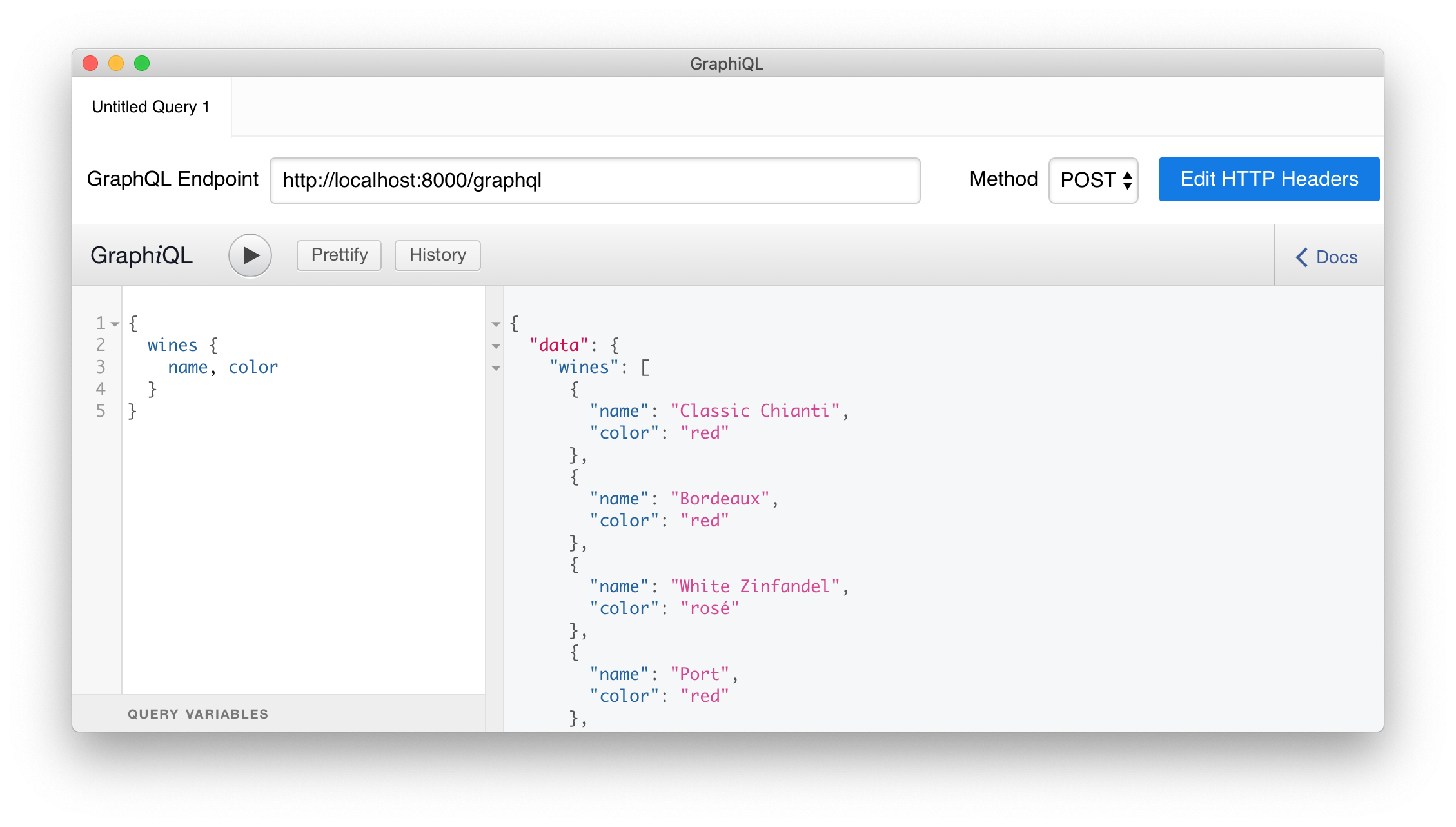
The expression above specifies the name of the query (`wines`) and the fields of the resource you are interested in (`name` and `color`). The response to this request is a JSON object containing an array of wines with the requested fields only. You can try adding another field, like `id` or `description`, and issuing the query again to see what happens.
## Securing Your Laravel and GraphQL API with Auth0
Now that you have a working GraphQL API, you probably want to restrict the access to it so that only authorized clients can consume it. One easy way to secure your API is to integrate it with [Auth0](https://auth0.com). In this article, you will create an [Auth0 API](https://auth0.com/docs/api/info) to represent your GraphQL and Laravel API, then you will configure a GraphiQL tool to issue authenticated requests to it. If you are developing a client application, you will need to learn how to integrate them with Auth0 to be able to consume your API. The way you integrate a client application with Auth0 depends on what type of client you are developing. [Check Auth0's docs to learn more](https://auth0.com/docs/).
### Securing the API
The first step is to sign up for a free Auth0 account, if you don't have one yet. Then, from your [Auth0 dashboard](https://manage.auth0.com), head to [the _APIs_ section](https://manage.auth0.com/#/apis), click on the _Create API_ button, and fill the form as follows:
- Name: "Laravel and GraphQL API"
- Identifier: `https://laravel-graphql-api`
- Signing Algorithm: `RS256`
> **Note:** Don't mind if `https://laravel-graphql-api` does not point to a real URL, Auth0 will never call it.
After clicking on the _Create_ button on this form, Auth0 will redirect you to the _Quick Start_ section of your new API. From there, head to [the _Applications_ section](https://manage.auth0.com/#/applications) of your dashboard and choose the "Laravel and GraphQL API (Test Application)" that Auth0 created for you. After clicking on it, Auth0 will show you a screen where you will see some properties of this application. Leave this page open and head back to your project.
Back in your project, open the `.env` file (you will find it in the project root) and add the following properties to it:
```bash
AUTH0_DOMAIN=https:///
AUTH0_AUDIENCE=
```
You will have to replace `` and `` with the properties from your Auth0 account. More specifically, you will have to replace the first placeholder with the _Domain_ property of your Auth0 Application (e.g., `blog-samples.auth0.com`), and you will have to replace `` with your Auth0 API identifier (i.e., with `https://laravel-graphql-api`).
Now, you will have to create a middleware in your Laravel application to check if the HTTP requests sent to the API are authorized (i.e., if they contain valid [_access tokens_](https://auth0.com/docs/tokens/overview-access-tokens)). You can create a middleware by running the following command (you will need to stop the Laravel server by issuing `Control` + `C` first):
```bash
php artisan make:middleware CheckAccess
```
Issuing this command will create a new file called `CheckAccess.php` inside the `./app/Http/Middleware` directory. Before changing this file, you will have to install the [Auth0 PHP SDK](https://github.com/auth0/auth0-PHP):
```bash
composer require auth0/auth0-php
```
After installing this SDK, replace the contents of the `./app/Http/Middleware/CheckAccess.php` file with this:
```php
// ./app/Http/Middleware/CheckAccess.php
[env('AUTH0_AUDIENCE')],
'authorized_iss' => [env('AUTH0_DOMAIN')],
'supported_algs' => ['RS256']
]);
$token = $request->bearerToken();
$decodedToken = $verifier->verifyAndDecode($token);
if (!$decodedToken) {
abort(403, 'Access denied');
}
}
return $next($request);
}
}
```
The `handle()` method of the `CheckAccess` middleware checks the access token only if you have configured your application by providing an Auth0 audience and domain (otherwise, it simply allows all requests). If that is the case, this method creates an instance of the `JWTVerifier` class based on the Auth0 configuration data you set in the `.env` file. Then this method retrieves the current bearer token from the HTTP request and verifies the `JWTVerifier` instance.
If the token is valid, the request is forwarded to GraphQL. Otherwise, an *Access denied* message is sent back.
> **Warning**: If you are using Apache as web server, be aware that [this server may](https://stackoverflow.com/questions/26475885/authorization-header-missing-in-php-post-request) [remove](http://docs.php.net/manual/en/features.http-auth.php#114877) the `Authorization` header from incoming HTTP requests. To overcome this issue, you need to add the following lines in the `.htaccess` file you find in the `/public` directory:
>
> ```text
> RewriteEngine On
> RewriteCond %{HTTP:Authorization} ^(.*)
> RewriteRule .* - [e=HTTP_AUTHORIZATION:%1]
> ```
Once you have defined this middleware, you need to register it. To do this, open the `./app/Http/Kernel.php` file and add, to the `$routeMiddleware` list, a mapping between a key (`checkAccess`) and the newly created middleware class (`CheckAccess`):
```php
// ./app/Http/Kernel.php
protected $routeMiddleware = [
// ... other mappings ...
'checkAccess' => \App\Http\Middleware\CheckAccess::class,
];
```
As a final step, associate the `CheckAccess` middleware to the GraphQL schema by changing the `./config/graphql.php` file as follows:
```php
// ./config/graphql.php
// ...
'schemas' => [
'default' => [
'query' => [
'wine' => App\GraphQL\Queries\WineQuery::class,
'wines' => App\GraphQL\Queries\WinesQuery::class,
],
'middleware' => ['checkAccess']
],
],
// ...
```
The `middleware` declaration asserts that Laravel will execute the `checkAccess` middleware for each request to the GraphQL schema. With that in place, you have finished securing your Laravel and GraphQL API with Auth0. To confirm that everything is in order, try using the GraphiQL tool to issue the same request as before (you will need to restart the server by issuing `php artisan serve`). If your configuration works, you will get an error.
### Authorizing the GraphiQL Client
To be able to fetch your GraphQL API again, you will need to issue, from the GraphiQL client, requests with access tokens. As mentioned before, the way you get an access token varies depending on what type of client you are developing. However, in this article, for testing purposes, you will use a test token.
To get this token, open the _APIs_ section in your Auth0 dashboard, then click on the API you created ("Laravel and GraphQL API"). Now, click on the _Test_ tab then, if you scroll down a little bit, you will see a button called _Copy Token_. Click on this button to get a copy of the access token in your clipboard.
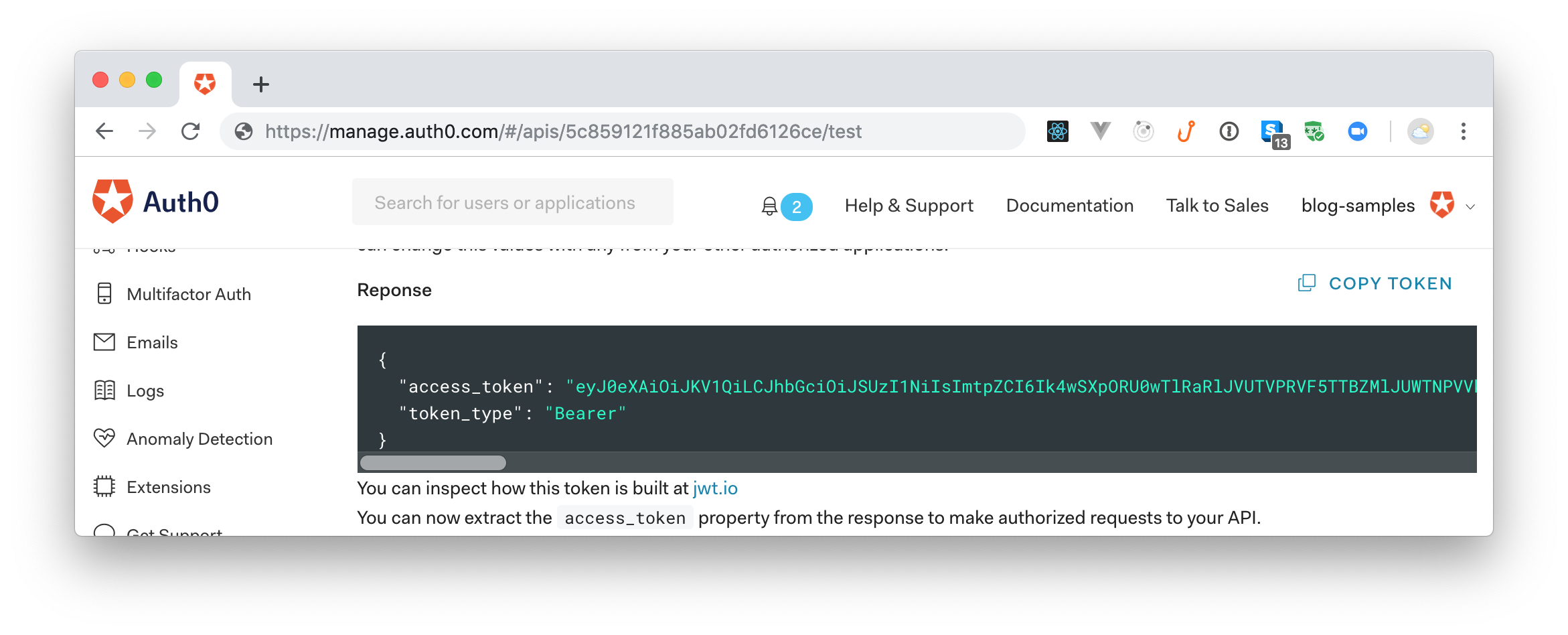
Now, head back to the GraphiQL tool, click on the blue _Edit HTTP Headers_ button, click on the _Add Header_ button, then add the following header:
- Header name: `Authorization`
- Header value: `Bearer eyJ...aEw`
Make sure you use the access token you copied from your Auth0 dashboard (instead of `eyJ...aEw`), then hit save.
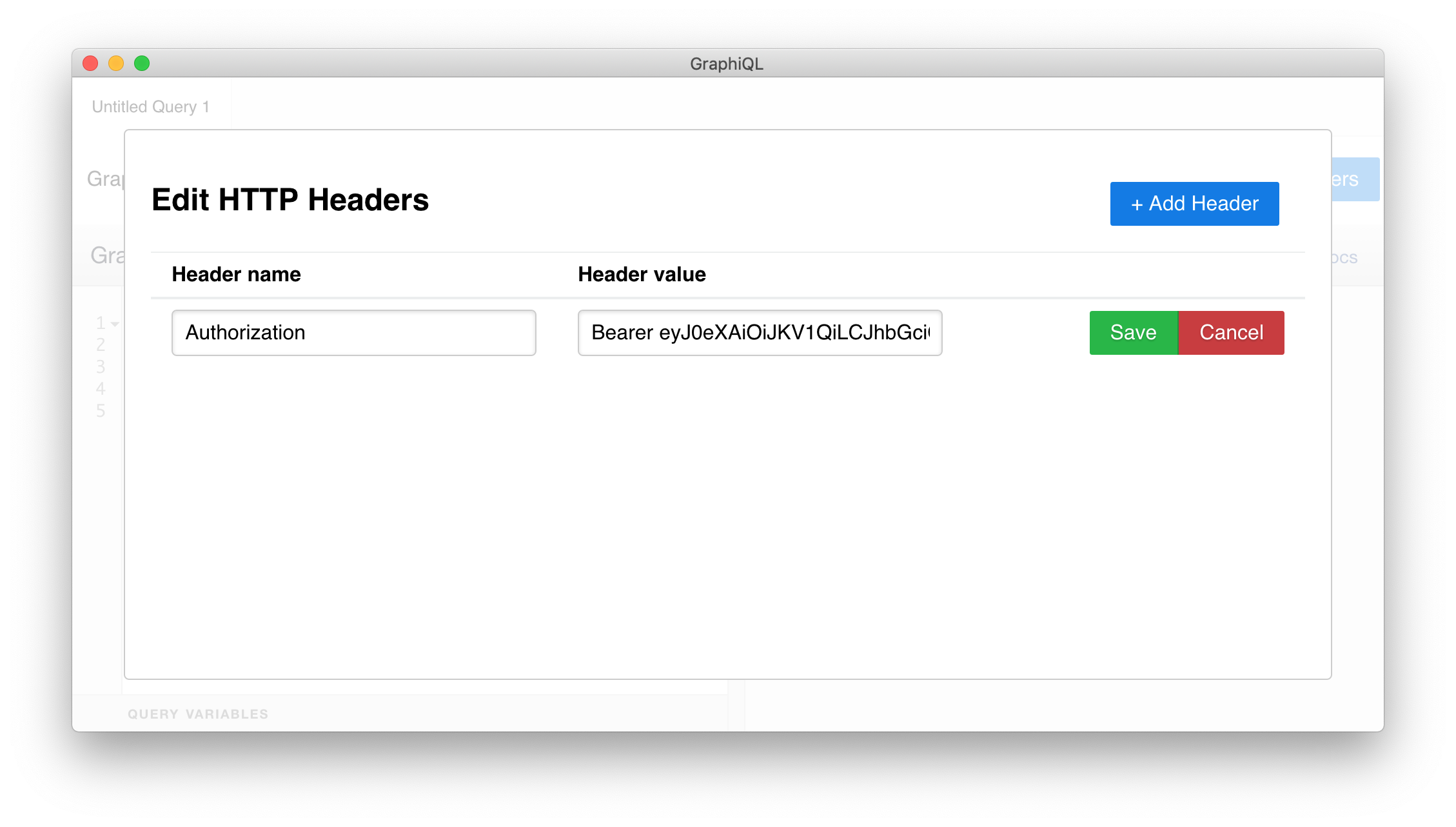
Now, click outside the dialog where you added the header, then hit the _play_ button (or hit `Control` + `Enter`). If everything works as expected, you will see that you can fetch the list of wines again.
## Summary
In this article, you learned how to create GraphQL APIs with Laravel and how to secure them with Auth0.
You started by creating a model with its migration scripts to persist data in a database. Besides that, you created a seeder for the model to populate the database with some initial test data. Then you continued to build your API by defining a GraphQL type and two GraphQL queries. After that, you used the GraphiQL browser-based client to test the GraphQL API interactively.
Finally, you used Auth0 to secure the GraphQL and to authorize the GraphQL client. What do you think about the process as a whole? Let us know on the comments box below.