---
title: "Announcing Auth0 Guardian, Multifactor Made Easy"
description: "Forget about SMSs or manually entering codes, try Guardian!"
authors:
- name: "Sebastian Peyrott"
url: "https://auth0.com/blog/authors/sebastian-peyrott/"
date: "Aug 25, 2016"
category: "Announcements,Features,Guardian"
tags: ["security", "password", "guardian", "auth0", "mfa", "2fa", "multifactor", "multifactor-authentication", "two-factor", "two-factor-authentication"]
url: "https://auth0.com/blog/announcing-Auth0-Guardian-a-new-way-to-login/"
---
# Announcing Auth0 Guardian, Multifactor Made Easy
Today we are officially releasing our [Auth0 Guardian](https://auth0.com/docs/multifactor-authentication/guardian) app, a new and convenient way to perform multifactor authentication for logins. Read on to find out how it works and how you can use it in your projects!
-----
## Typical Multifactor Authentication
There are good intros to [multifactor authentication (MFA)](https://auth0.com/docs/multifactor-authentication) out there, but here's a refresher:
- A single authentication factor (such as username and password) is not safe enough. If credentials are leaked or stolen, that is all that is needed to impersonate a user.
- Adding a second authentication factor increases security by making it harder for both sets of credentials to be compromised at the same time.
- Typical MFA systems rely on SMSs, e-mails, and time-based one-time passwords ([TOTP](https://auth0.com/blog/from-theory-to-practice-adding-two-factor-to-node-dot-js/)). These require the user to perform manual steps: opening an e-mail, copying a code, etc.
Manual steps in the MFA process are usually the main factor against its adoption. What if it was easier, quicker, simpler?
## Enter Auth0 Guardian
Auth0 Guardian is our iOS and Android app for multifactor authentication. The best of it: it can work using push-notifications. That's right, no more SMSs or manual codes. Here, have a look:
If you are a security conscious user, you can get a glance at the login request details:
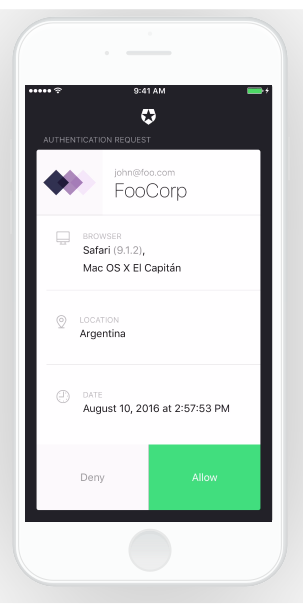
Even better, you are *not* required to rely on Auth0 Guardian to perform a successful MFA login! That's right, Auth0 Guardian integrates with traditional MFA systems, such as SMS, Google Authenticator and Microsoft Authenticator.
Here's the full enrollment and login process:
## How can I use it?
Take a look at the [docs](https://auth0.com/docs/multifactor-authentication/guardian). But here's the deal, to enable it you just need to click a toggle:
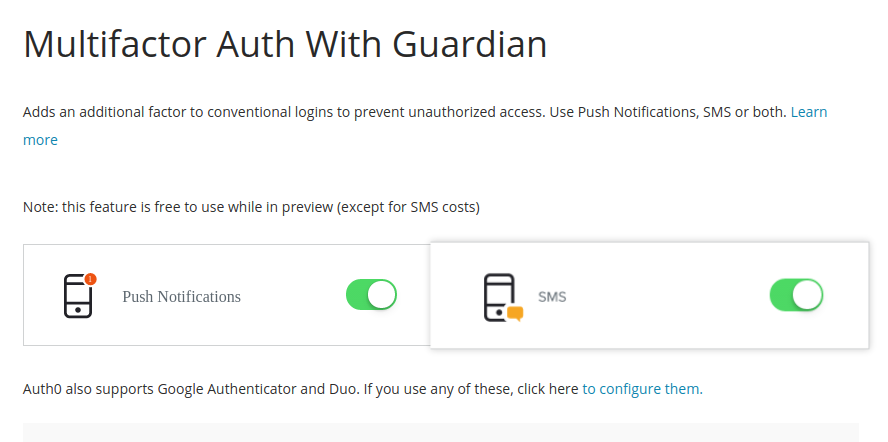
If you want to limit MFA only to certain clients, you can edit the associated rule in that same page. For more information about Auth0 rules, read the [docs](https://auth0.com/docs/multifactor-authentication/guardian/dev-guide). You may also need to setup a SMS provider, in case you want to provide users with that alternative. This all explained in the [administrators's guide](https://auth0.com/docs/multifactor-authentication/guardian/admin-guide).
Sign-up now and start using Auth0 and Guardian for free!