---
title: "A Guide to Angular 8's Differential Loading"
description: "Angular 8 now sends separate bundles to legacy browsers by default."
authors:
- name: "Sam Julien"
url: "https://auth0.com/blog/authors/sam-julien/"
date: "Jun 11, 2019"
category: "Developers,Whats New,Angular"
tags: ["angular", "rxjs"]
url: "https://auth0.com/blog/angular-8-differential-loading/"
---
# A Guide to Angular 8's Differential Loading
**TL;DR:** Angular 8 is here! Learn all about one of its coolest new features: differential loading. Differential loading lets you serve up different bundles to different browsers and make your application even faster!
Angular 8 has only been out for about a week at the time I’m writing this, but there’s already been 17,000 “What’s New” articles published. Rather than throw my own take on the pile, I’ll refer you to the [official Angular release announcement](https://blog.angular.io/version-8-of-angular-smaller-bundles-cli-apis-and-alignment-with-the-ecosystem-af0261112a27) but here are the high points:
- No, Ivy isn’t ready yet (it’s an opt-in preview).
- No, [Bazel](https://bazel.build/) isn’t ready yet (it’s an opt-in preview).
- [Builders](https://blog.angular.io/introducing-cli-builders-d012d4489f1b) allow you to extend and customize the CLI. For example, you’re now able to [deploy to Firebase](https://github.com/angular/angularfire2/pull/2046) and other providers from the CLI.
- There’s [improved support for web workers](https://v8.angular.io/guide/web-worker), such as the ability to generate them from the CLI and use them in your application.
- Rather than using the “magic string” syntax specific to Angular to do lazy loading, you’ll be able to use the [standard `import()` syntax](https://next.angular.io/guide/deprecations#loadchildren-string-syntax). You can even perform this automatically for your app with the [`angular-lazy-routes-fix`](https://github.com/phenomnomnominal/angular-lazy-routes-fix) tool.
- The new [unified location service](https://v8.angular.io/guide/upgrade#using-the-unified-angular-location-service) improves migration from the AngularJS `$location` service.
- The Angular team has created a simplified [Getting Started Guide](https://next.angular.io/getting-started).
- There’s a new [Deprecation Guide](https://v8.angular.io/guide/deprecations) to assist users with updating Angular.
- [Differential loading](https://v8.angular.io/guide/deployment#differential-loading) is turned on in the CLI by default.
In this article, I want to dive into that last one: differential loading. What is that? Why does it matter? What do I need to do about it (if anything)?
## What is Differential Loading?
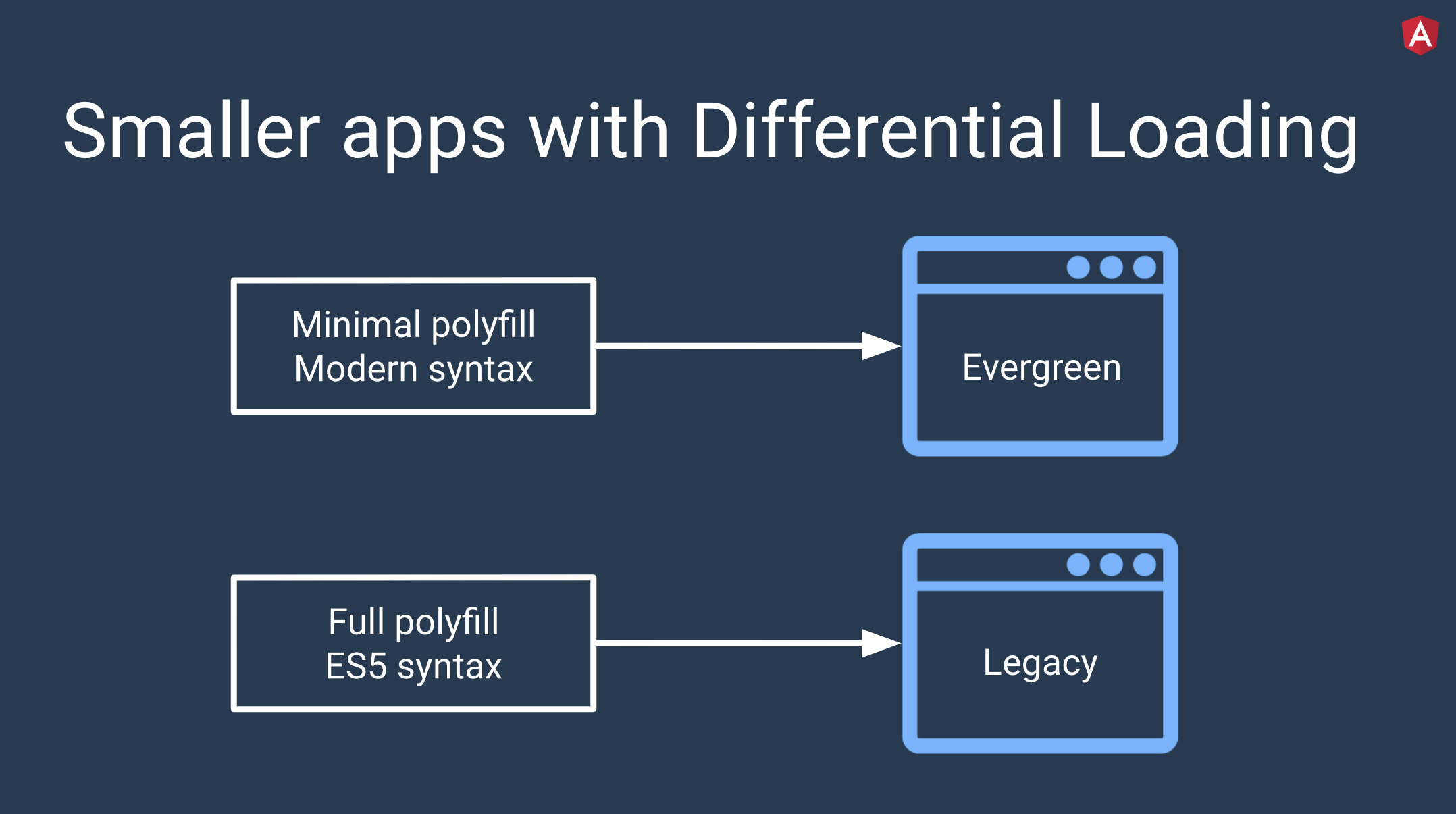
Like most buzzwords in tech, the term “differential loading” is completely opaque about what it actually *means*. In a nutshell, differential loading means to send newer, flashier code to newer browsers and stable legacy code to legacy browsers. This generally translates into two things: modern syntax and polyfills. On a newer browser that supports recent syntax changes in JavaScript (such as arrow functions in ES2015 or async functions in ES2017), it’d be great to ship to code as-is with as few polyfills as possible to keep download time low. On legacy browsers, we’ll need both transpiled code and more polyfills to make things work. This way, newer browsers aren’t punished for legacy browsers by having to load a massive bundle, but legacy browsers aren't left in the dust.
Sounds cool, right? How does this work? Modern browsers have the ability to interpret a `module` type in the `script` HTML tag and to ignore a `nomodule` attribute. It looks like this:
When a modern browser (like a new version of Chrome) runs across this, it will know to only load `fancyModernBundle`. Likewise, when an older browser sees this, it won’t recognize the `module` type and only load `legacyBundle`.
[Source](https://cdn.auth0.com/blog/blog/ng-conf-2019)
## How You Normally Set Up Differential Loading
You’ve probably surmised by now that, in order to take advantage of differential loading, you’ll need to divide up your JavaScript code based on browser support. “Easy,” you think, “I’ll just plug the transpiled code into the `nomodule` tag and the original into the `module` tag.” Well, it’s not quite that simple. Unfortunately, not all browsers support all the same features of JavaScript. Beyond that, your users may not use the same browser you do. In fact, if your users are around the world, they may not even use browsers you’ve heard of — Opera Mini has over [100 million users in Africa](https://blogs.opera.com/news/2016/11/state-of-the-mobile-web-africa-2016/)!
It turns out that splitting up your bundle for differential loading is a combination of art and science. To pull this off, your bundler (like Webpack) and your transpiler or compiler (like Babel or TypeScript) must work together to divide up your code and add the correct polyfills in the right places. Luckily, there’s a configuration tool called [`browserslist`](https://github.com/browserslist/browserslist) that does nearly all of the heavy lifting for you.
Browserslist works with tools like Babel and is essentially a configuration tool that accepts query strings, which it runs against [Can I Use](https://caniuse.com/) data. Tools use Browserslist through either an entry in `package.json`:
```json
// package.json
"browserslist": [
"last 1 version",
"> 1%",
"maintained node versions",
"not dead"
]
```
Or in a separate config file called `.browserslistrc`:
```text
// .browserslistrc
# Browsers that we support
last 1 version
> 1%
maintained node versions
not dead
```
Both of these formats contain the same query:
- `last one version`: the last version for each browser
- `>1%`: browsers versions selected by global usage statistics
- `maintained node versions`: all Node.js versions, which are [still maintained](https://github.com/nodejs/Release) by Node.js Foundation
- `not dead`: excludes "dead" browsers, which are the same as those from a `last 2 versions` query, but with less than 0.5% in global usage statistics and without official support or updates for 24 months
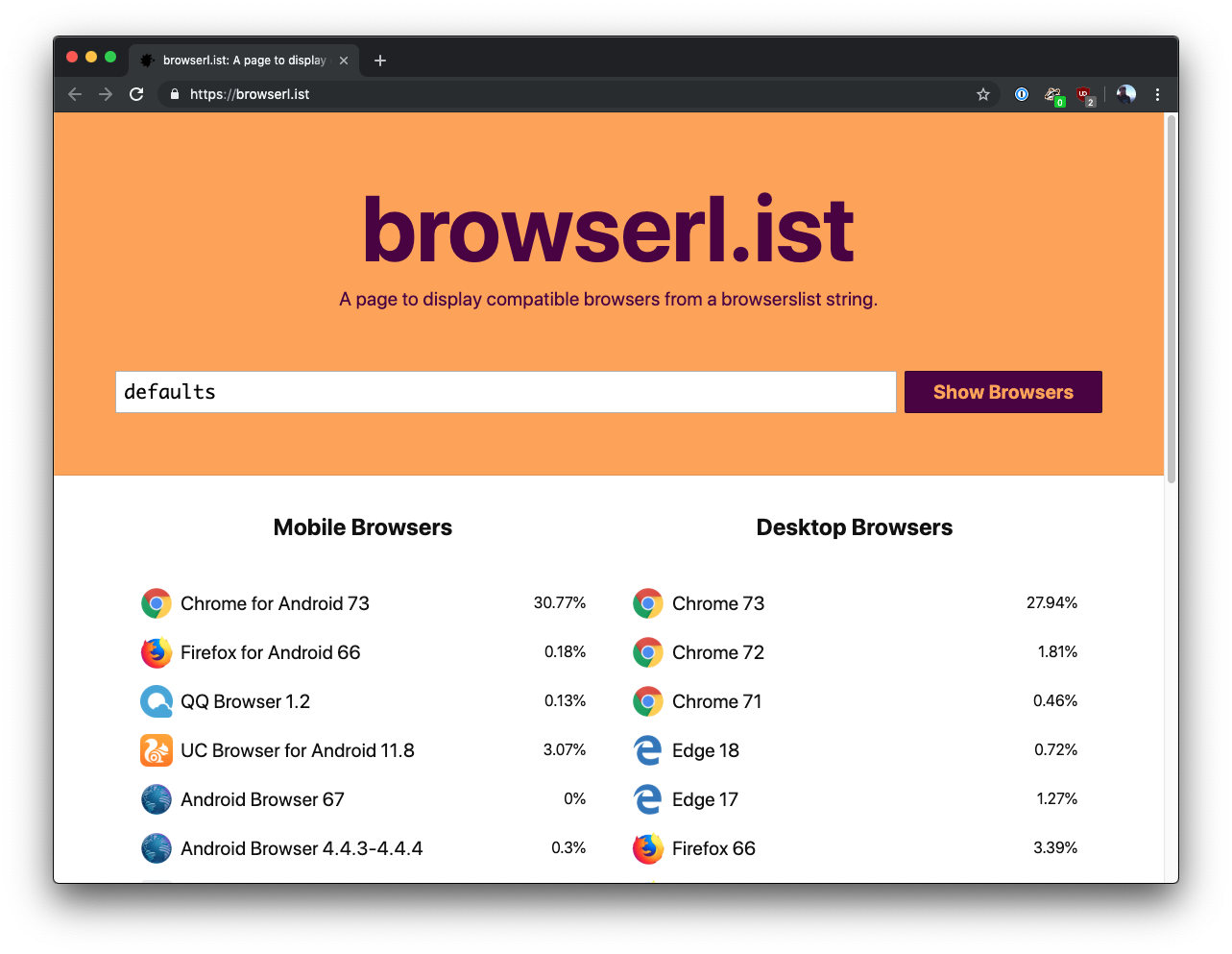
Browserslist also has a `defaults` query that works for many people. They’ve got [great explanations of the queries on their GitHub repo](https://github.com/browserslist/browserslist#full-list) and there’s even a site called [browserl.ist](https://browserl.ist) that lets you plug in a query and see a visual list of supported browsers.
## Differential Loading in Angular 8
Ordinarily, you’d need to configure your bundler and Babel or TypeScript to use `browserslist` to split up your code into the correct bundles. With version 8 of the Angular CLI, you actually get this set up right out of the gate with nothing for you to do! This is awesome because differential loading saves on average 7-20% in bundle size for Angular applications in modern browsers. In fact, [angular.io](https://angular.io/) saved over 40kB of its initial bundle size for modern browsers when the team enabled differential loading.
Want to check this out for yourself? It’s really easy!
### Updating to Angular 8
First, make sure you have the latest version of the Angular CLI installed:
```bash
npm install -g @angular/cli
```
If you’d like to try this on an existing project, you can update it to Angular 8 by running:
```bash
ng update @angular/cli @angular/core
```
> Check out the [Angular Update Guide](https://update.angular.io/) if your app requires more heavy lifting to update, like if it’s currently in version 6 or lower.
Otherwise, you can create a new application:
```bash
ng new diff-loading
```
Follow the prompts about routing and styling and then you’re good to go!
### Configuration and building
If you open the new project in your favorite editor, you’ll notice a new file called `browserslist`. It contains the following by default:
```text
// browserslist
> 0.5%
last 2 versions
Firefox ESR
not dead
not IE 9-11 # For IE 9-11 support, remove 'not'.
```
You can adjust this list to match better with your own user demographics.
> **One very important note about this:** See that `not IE 9-11` part? If you need to support those browsers, you can remove the `not`, but it comes at a price. Those versions of Internet Explorer can’t take advantage of differential loading, so it will be disabled.
If you open `tsconfig.json`, you’ll see a particularly big change in the `target` property: it’s set to `es2015` by default instead of `es5`.
Now that you’ve seen where the configuration lives, build the application with this command:
```bash
ng build --prod
```
After it’s done, open up `dist/index.html` and notice the `script` tags:
See all those `module` and `nomodule` instances? The Angular CLI did all that for you!
### Differential Loading in Angular, in action
Now you just need to see it in action. Install a simple server like `http-server`:
```bash
npm install -g http-server
```
Then, within your project folder, serve up the project inside the `dist` folder:
```bash
http-server dist/diff-loading/
```
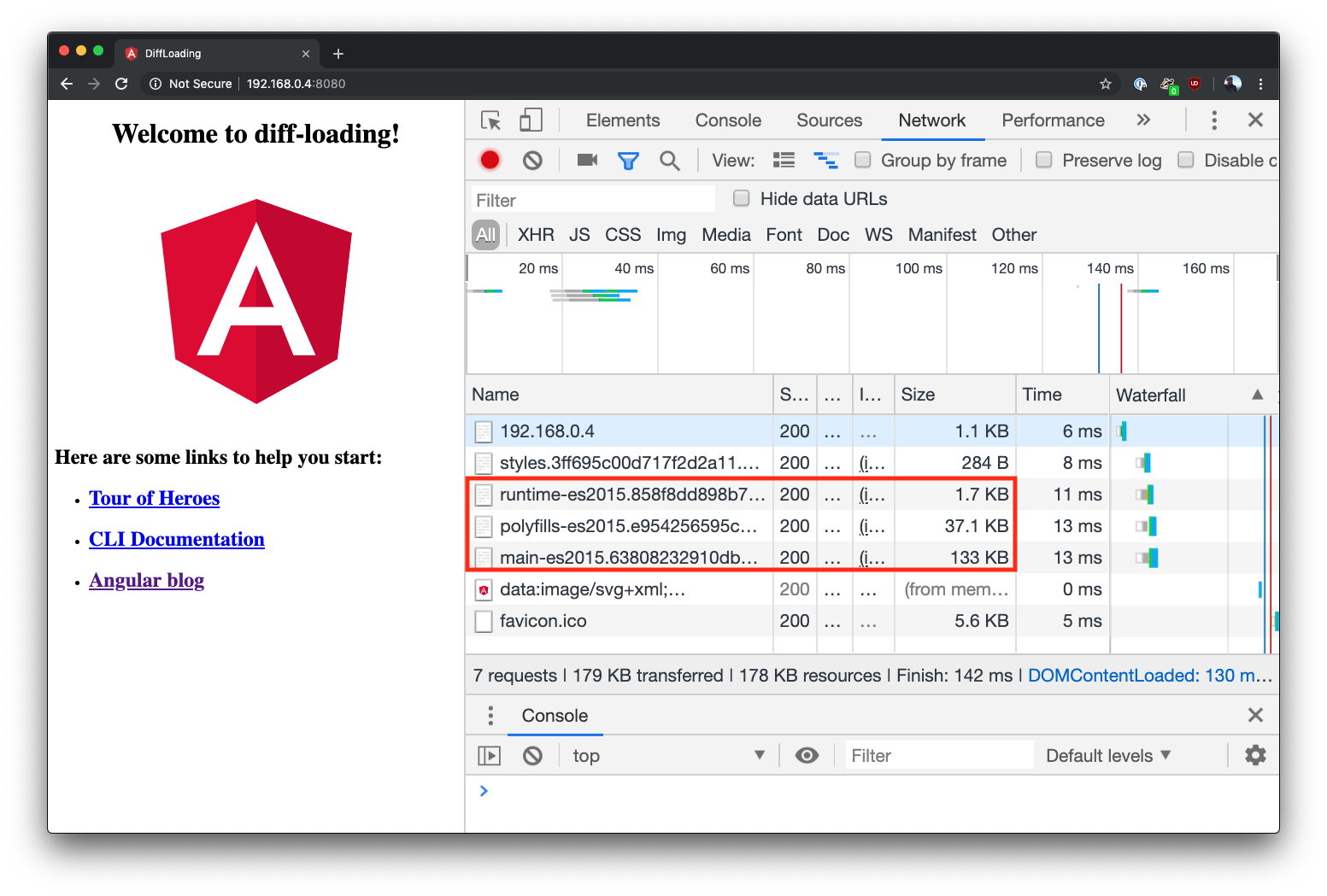
Open Chrome or another modern browser and head to the address of the server (on my machine it’s `http://192.168.0.4:8080` but it may be different for you). Open up the network tab of the developer tools and refresh the page. You should see only the scripts that include `es2015` in the name!
### Other settings
One quick note before I end this tutorial. If you change the different configurations, there are four different scenarios you could end up with:
- A single ES5 build (differential loading disabled, `target` is `es5`)
- Single ES5 build with conditional polyfills (differential loading enabled, `target` is `es5`)
- Single ES2015 build (differential loading disabled, `target` is `es2015`)
- Two builds with conditional polyfills (differential loading enabled, `target` is `es2015`)
To read more, check out the [official documentation](https://angular.io/guide/deployment#differential-loading).
## Conclusion
Angular 8 brings lots of great new stuff to Angular, including differential loading. I hope you’ve enjoyed this look into what differential loading is, how it works, and how to use it in Angular 8. See you next time!