
We keep adding great apps to Auth0's portfolio. You can now setup SSO with Dropbox in just a few simple steps.
As usual, any of our supported Identity Providers would work of course.
How does it work?
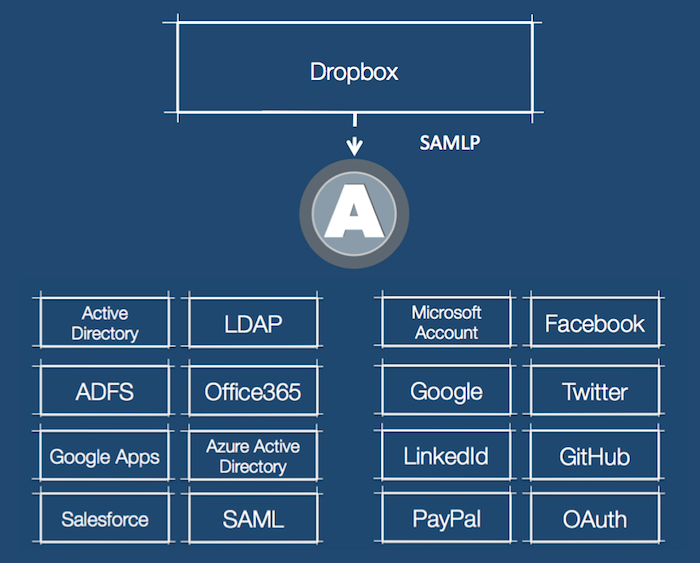
Like other services, Dropbox implements the SAML Protocol for authentication and identity federation. Auth0 bridges SAML-P with whatever your preferred Identity Provider implements: SAML, OAuth 1, OAuth 2, LDAP, a SQL database, anything.
Setup
Configuring Dropbox in Auth0 is reduced to a single checkbox: enable. That's all you need to do.
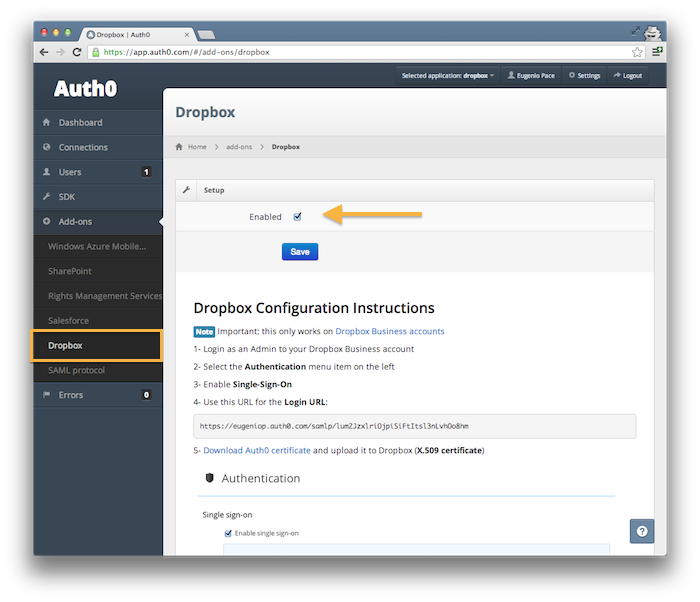
After you enable it, you will need to complete the configuration on Dropbox. Just follow the instructions on the same page where you enabled it. You need two parameters:
- The signing certificate
- The Login URL
You are done!
You can read more about Dropbox SAML SSO here.
Demo
In this very short demo you will see SSO with Dropbox, with users authenticating in Google Apps:
About the author

Eugenio Pace
CEO and Co-Founder